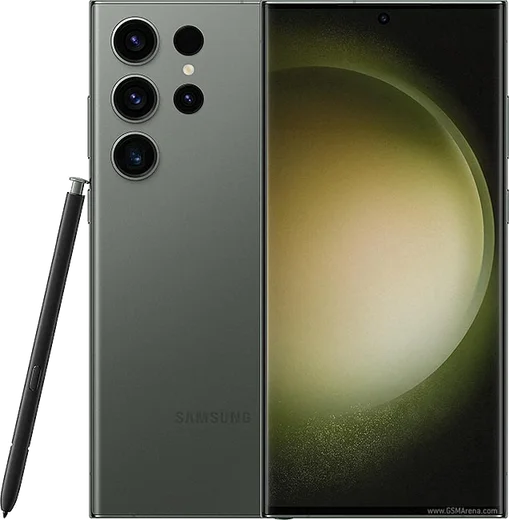
WhatsApp on Samsung Galaxy S23 Ultra
Samsung Android

WhatsApp for Samsung Galaxy S23 Ultra

Snapdragon 8 Gen 2, 6.8-inch QHD+ 120Hz, 200MP

WhatsApp Messenger 4.7 · 64.2M reviews Free · Android · ~40 MB · by WhatsApp LLC
Download WhatsApp

Ask a question / report a problem

You can ask any question about WhatsApp support on the Samsung Galaxy S23 Ultra — leave it below and we'll help.

Ask a question

Can the Samsung Galaxy S23 Ultra run WhatsApp?

Fully supported
  • Operating systemAndroid
  • ProcessorSnapdragon 8 Gen 2
  • WhatsApp versionLatest supported

Latest known WhatsApp problems on Samsung Galaxy S23 Ultra

1

Why are my WhatsApp notifications delayed or not showing on my Galaxy S23 Ultra?

One UI's aggressive battery optimization is the usual culprit. Go to Settings > Apps > WhatsApp > Battery and set it to Unrestricted. Then open Settings > Battery > Background usage limits, make sure WhatsApp is not in the Sleeping or Deep sleeping apps list, and add it to Never sleeping apps. Finally confirm notifications are fully enabled under Settings > Apps > WhatsApp > Notifications and that Do Not Disturb isn't silencing them. See how others solved this on Reddit
2

Why does video quality drop so badly when I send videos through WhatsApp on my S23 Ultra?

WhatsApp compresses any clip sent as a normal video, regardless of how good the original is. In a chat, tap the attach (paperclip) icon, choose Document instead of Gallery, and pick the video file to send it uncompressed at full quality (the recipient gets it as a file rather than an inline video). For everyday sends you can also open WhatsApp > Settings > Storage and data > Media upload quality and set it to HD, though Document remains the only way to avoid compression entirely. See how others solved this on Reddit
3

How do I stop WhatsApp from automatically saving every photo to my S23 Ultra gallery?

Turn off media auto-download and gallery visibility inside WhatsApp. Go to WhatsApp > Settings > Storage and data and uncheck Photos under "When using mobile data" and "When connected on Wi-Fi." To hide already-saved chat media from your Samsung Gallery, open WhatsApp > Settings > Chats and toggle off Media visibility, which writes a .nomedia flag so those photos stop appearing in the gallery. See how others solved this on Reddit
4

Can I use WhatsApp with both SIMs / dual SIM on my Galaxy S23?

A single WhatsApp install registers only one number, but you can run a second account using Samsung's built-in Dual Messenger. Go to Settings > Advanced features > Dual Messenger, toggle on WhatsApp, and a cloned copy appears on your home screen that you register with your second number. Both eSIM and physical SIM work, and each WhatsApp instance uses the number you verify it with. (Newer WhatsApp versions also support adding a second account directly in-app under Settings.) See how others solved this on Reddit
5

Why don't new contacts I add show up in WhatsApp on my Samsung S23?

This is almost always a contacts-permission or refresh issue rather than where the contact is stored. First confirm WhatsApp has access under Settings > Apps > WhatsApp > Permissions > Contacts (toggle it off and back on to force a resync). In WhatsApp, open the new-chat screen and pull down to refresh the contact list. If the number was saved only to the SIM, re-saving it to your phone or Google account often makes it appear more reliably, and make sure it includes the full country code. See how others solved this on Reddit

Ask a question / report a problem

You can ask any question about WhatsApp support on the Samsung Galaxy S23 Ultra — leave it below and we'll help.

Ask a question

Watch: setting up WhatsApp

Prefer to watch? This short walkthrough shows the whole installation and number-verification flow.

How to install WhatsApp on Samsung Galaxy S23 Ultra — video walkthrough

How to install WhatsApp on Samsung Galaxy S23 Ultra

1

Choose how to download

On your Samsung Galaxy S23 Ultra you can get the official app two ways: from the Google Play Store — the easiest option, since it keeps WhatsApp updated automatically — or directly from the official website. You can download an APK file, by clicking a link “Download WhatsApp directly”.

2

Open WhatsApp

Launch WhatsApp from your home screen or app drawer and accept the Terms of Service to start setup.

3

Verify your phone number

Enter your phone number. If your Samsung Galaxy S23 Ultra uses dual SIM, pick the line you want WhatsApp tied to, then enter the 6-digit code it sends by SMS — it usually fills in automatically.

4

Restore chats and finish setup

Restore your chat history from Google Drive (use the same Google account), add your name and photo, and tap Allow for notifications so messages and calls arrive reliably.

Stay safe: only ever install WhatsApp from the official Android source. The Download button above already points there — modified copies (GB/Plus/Aero WhatsApp) can get your number banned.

Comments (15)

No registration needed. No email required.
O
oldschoolApr 24, 2026

update whatsapp finally on my samsung galaxy s23 ultra cheers

L
lil_lucaApr 24, 2026

Guys restarted the phone and then it installed 🙏

M
mia.lApr 13, 2026

im so confused someone help meeee 🙏

AppWhatsOfficialApr 16, 2026

Hey, no need to stress! Tap the green Download button at the top, follow the steps, and you will have WhatsApp in a minute.

L
leo.mApr 5, 2026

Franchement enfin whatsapp installé 🎉

T
tan.nFeb 20, 2026

How to add a profile photo thanks

AppWhatsOfficialFeb 24, 2026

Sure, head to Settings, tap your name, then the camera icon to choose your profile photo. Glad to help.

P
pete.aDec 3, 2025

finally had whatsapp on my galaxy s23ultra in no time

N
noobmasterAug 16, 2025

Quick q can i use the same number on two phones thanks

AppWhatsOfficialAug 17, 2025

Hi! WhatsApp supports linked devices now, so you can use your account on more than one phone. Open Linked Devices in Settings to add another. Enjoy WhatsApp on your your phone!

I
im_solJun 21, 2025

Hi is this the official whatsapp or a modded one pls

AppWhatsOfficialJun 27, 2025

Of course, only the official app here. Modified versions can get your account banned, so we never link to them.

M
marc1990Jun 3, 2025

tbh i had to enable unknown sources but then it was fine

A
ash.gJun 1, 2025

tbh couldnt install whatsapp on my galaxy s23 ultra until i found this

V
val99Mar 12, 2025

Well verified my number on the galaxy s23 ultra with no trouble cheers

N
noah1Jan 23, 2025

my galaxy s23ultra has whatsapp now thanks to this thanks again

H
halppNov 7, 2024

echt sehr einfach, in 2 minuten erledigt

P
pete21Oct 27, 2024

my whatsapp had stopped working but this fixed it cheers

AppWhatsOfficialOct 30, 2024

Awesome, glad it worked!

A
ahmedSep 22, 2024

أخيراً أخيراً ثبّت واتساب شكراً