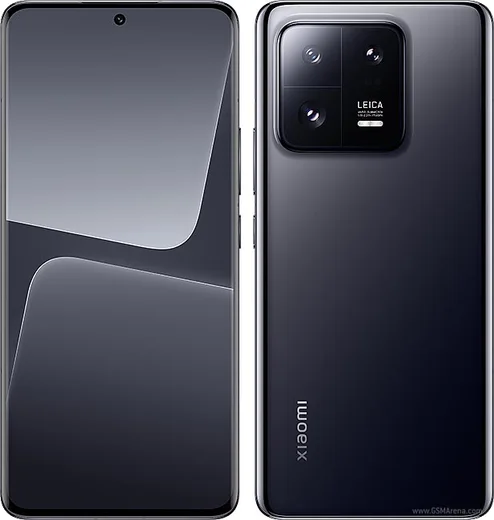
WhatsApp on Xiaomi 13 Pro
Xiaomi Android

WhatsApp for Xiaomi 13 Pro

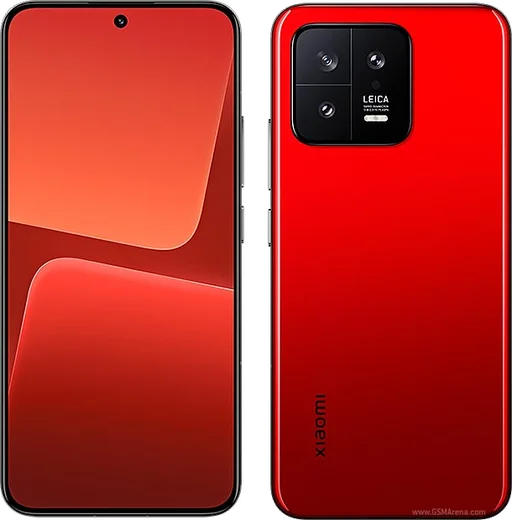
Snapdragon 8 Gen 2, 1-inch Leica sensor, 6.73-inch curved AMOLED

WhatsApp Messenger 4.7 · 64.2M reviews Free · Android · ~40 MB · by WhatsApp LLC
Download WhatsApp

Ask a question / report a problem

You can ask any question about WhatsApp support on the Xiaomi 13 Pro — leave it below and we'll help.

Ask a question

Can the Xiaomi 13 Pro run WhatsApp?

Fully supported
  • Operating systemAndroid
  • ProcessorSnapdragon 8 Gen 2
  • WhatsApp versionLatest supported

Latest known WhatsApp problems on Xiaomi 13 Pro

1

WhatsApp photos and videos not showing in gallery on my Xiaomi 13 Pro after a HyperOS update

A HyperOS/MIUI gallery update can break the media scan so WhatsApp images stop appearing in the Gallery app. In WhatsApp open Settings > Chats and turn on Media visibility, then go to Settings > Apps > Manage apps > Gallery, clear its cache, and reboot the phone to force a fresh media re-scan. If they still don't appear, confirm there's no .nomedia file in the WhatsApp media folder and that WhatsApp has the Files and media (storage) permission granted under Settings > Apps > Manage apps > WhatsApp > Permissions. See how others solved this on Reddit
2

Why are pictures sent through WhatsApp on my Xiaomi 13 Pro coming out blurry?

WhatsApp compresses photos by default, which causes the blur, not the camera. To keep full resolution, in a chat tap the attach (paperclip) icon, choose Document instead of Gallery, and send the image as a file. You can also raise WhatsApp Settings > Storage and data > Media upload quality to Best quality, and tap the HD button on the editing screen before sending. See how others solved this on Reddit
3

WhatsApp keeps crashing or closing on my Xiaomi 13 Pro

Repeated crashes are usually a corrupted cache or an outdated build on HyperOS. Open Settings > Apps > Manage apps > WhatsApp and tap Clear cache (not Clear data, which would wipe local chats), then update WhatsApp from the Play Store or Mi GetApps. If it persists, reinstall WhatsApp and restore your chats from the Google Drive backup during setup. See how others solved this on Reddit
4

WhatsApp call and message notifications are delayed or not showing on my Xiaomi 13 Pro

HyperOS aggressively kills background apps to save battery, which silences WhatsApp notifications. Go to Settings > Apps > Manage apps > WhatsApp > Battery saver and set it to No restrictions, then turn on Autostart for WhatsApp under Settings > Apps > Permissions > Autostart. Also lock WhatsApp in Recents (open the Recents view, swipe down on its card and tap the lock icon) so the system stops closing it in the background. See how others solved this on Reddit
5

WhatsApp calls don't appear on the lock screen of my Xiaomi 13 Pro

On HyperOS the full-screen incoming call screen is blocked until you grant the right permissions. Go to Settings > Apps > Manage apps > WhatsApp > Other permissions and enable Display pop-up windows while running in the background and Show on Lock screen. Then set WhatsApp's Battery saver to No restrictions so the call screen can wake the display, and in WhatsApp Settings > Notifications confirm notifications are on. See how others solved this on Reddit
6

WhatsApp video playback or video calls are glitchy on my Xiaomi 13 Pro

Video stutter and call glitches on HyperOS are usually a cache issue or background throttling. Clear the WhatsApp cache under Settings > Apps > Manage apps > WhatsApp, update to the latest version, and set its Battery saver to No restrictions so the video pipeline isn't throttled. For received videos that won't play, re-download the file and confirm WhatsApp has the Files and media permission so it can read the saved file. See how others solved this on Reddit

Ask a question / report a problem

You can ask any question about WhatsApp support on the Xiaomi 13 Pro — leave it below and we'll help.

Ask a question

Watch: setting up WhatsApp

Prefer to watch? This short walkthrough shows the whole installation and number-verification flow.

How to install WhatsApp on Xiaomi 13 Pro — video walkthrough

How to install WhatsApp on Xiaomi 13 Pro

1

Choose how to download

On your Xiaomi 13 Pro you can get the official app two ways: from the Google Play Store — the easiest option, since it keeps WhatsApp updated automatically — or directly from the official website. You can download an APK file, by clicking a link “Download WhatsApp directly”.

2

Open WhatsApp

Launch WhatsApp from your home screen or app drawer and accept the Terms of Service to start setup.

3

Verify your phone number

Enter your phone number. If your Xiaomi 13 Pro uses dual SIM, pick the line you want WhatsApp tied to, then enter the 6-digit code it sends by SMS — it usually fills in automatically.

4

Restore chats and finish setup

Restore your chat history from Google Drive (use the same Google account), add your name and photo, and tap Allow for notifications so messages and calls arrive reliably.

Stay safe: only ever install WhatsApp from the official Android source. The Download button above already points there — modified copies (GB/Plus/Aero WhatsApp) can get your number banned.

Comments (15)

No registration needed. No email required.
S
sam59May 30, 2026

Tbh whatsapp finally on my 13 pro ❤️

M
ms_benApr 4, 2026

Franchement installé sans souci

L
lucy_xXMar 17, 2026

Yo all good on my Xiaomi 13 Pro now ✌️

B
budgetkingMar 7, 2026

wow ottima guida grazie 😍

N
nourMar 4, 2026

أخيراً سهل جداً بدون مشاكل

M
mia_realDec 23, 2025

update respect, this helped alot

S
saaaaamDec 14, 2025

download takes forever for me

AppWhatsOfficialDec 18, 2025

No worries, it depends on your connection. Try switching to wifi if you can, and the download should finish in under a minute on most networks. Reach out anytime.

G
greg_finAug 18, 2025

set up whatsapp on my dads 13 Pro no problem

R
rosa.iJun 27, 2025

yo smooth and simple, no issues

N
newbieMay 10, 2025

Ok so the download was a bit slow but it worked :)

S
sara_samMar 15, 2025

omg set up whatsapp on my dads Xiaomi 13 Pro no problem

T
tan_tanJan 28, 2025

help meee i pressed everything and nothing

AppWhatsOfficialJan 31, 2025

Relax, it is simpler than it looks. Press Download, install, then verify with the SMS code. You got this!

M
maxx_marDec 16, 2024

so best guide for the 13 Pro by far

X
xX_marcAug 14, 2024

Finally i had to enable unknown sources but then it was fine

J
jay1990Aug 9, 2024

hey does this cost money ?

AppWhatsOfficialAug 13, 2024

No worries, it is completely free. There is no fee for the app, only your usual data or wifi is used. Hope that helps!