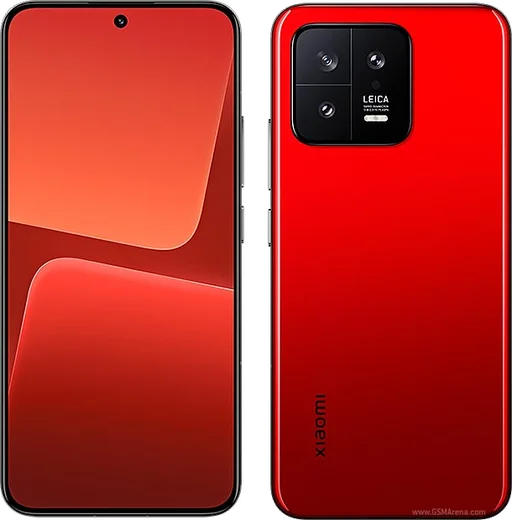
WhatsApp on Xiaomi 13
Xiaomi Android

WhatsApp for Xiaomi 13

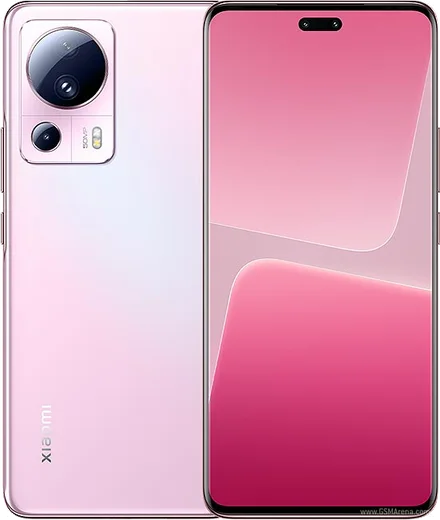
Snapdragon 8 Gen 2, 6.36-inch flat 120Hz AMOLED, Leica triple

WhatsApp Messenger 4.7 · 64.2M reviews Free · Android · ~40 MB · by WhatsApp LLC
Download WhatsApp

Ask a question / report a problem

You can ask any question about WhatsApp support on the Xiaomi 13 — leave it below and we'll help.

Ask a question

Can the Xiaomi 13 run WhatsApp?

Fully supported
  • Operating systemAndroid
  • ProcessorSnapdragon 8 Gen 2
  • WhatsApp versionLatest supported

Latest known WhatsApp problems on Xiaomi 13

1

Why don't WhatsApp notifications show up on my Xiaomi 13 until I open the app?

HyperOS aggressively kills background apps to save battery, so WhatsApp stops receiving pushes while it's closed. Go to Settings > Apps > Manage apps > WhatsApp, set Battery saver to No restrictions, and turn on Autostart. Then open the Recents screen, swipe down on the WhatsApp card (or long-press it) and tap the lock icon so HyperOS won't clear it from memory. Reboot for the changes to take effect. See how others solved this on Reddit
2

Why do WhatsApp messages and notifications only appear on my Xiaomi 13 when the app is already open in the foreground?

This is HyperOS battery management freezing WhatsApp in the background. Open Settings > Apps > Manage apps > WhatsApp, set Battery saver to No restrictions and enable Autostart. Then under Settings > Apps > Manage apps > WhatsApp > Notifications, make sure all the WhatsApp notification categories (including floating/banner) are enabled. A reboot helps the settings stick. See how others solved this on Reddit
3

Why do WhatsApp calls on my Xiaomi 13 not ring, but show up as missed afterward?

The incoming-call notification is suppressed because WhatsApp can't run reliably in the background on HyperOS. In Settings > Apps > Manage apps > WhatsApp > Notifications, enable the Calls category and turn on floating/banner and lock-screen display. Then set Battery saver to No restrictions and enable Autostart so an incoming call can wake the screen. Reboot after making these changes. See how others solved this on Reddit
4

Why are photos and videos I receive on WhatsApp blurry or low quality on my Xiaomi 13?

WhatsApp compresses media by default, and the low-res preview is what loads first. Tap the photo or video in the chat and hit the download (down-arrow) icon to pull the full-quality version. When sending, attach files as a Document instead of through the photo picker to skip compression. There's no HyperOS setting for this since the limit is on WhatsApp's side. See how others solved this on Reddit
5

Why is the WhatsApp Images folder missing from the Gallery on my Xiaomi 13?

WhatsApp's Media visibility setting controls whether downloaded photos show up in the Xiaomi Gallery. In WhatsApp go to Settings > Chats and turn on Media visibility; for an individual chat, open the chat info and set Media visibility to Yes. If the folder still doesn't appear, clear the Gallery app's cache via Settings > Apps > Manage apps > Gallery and reboot to force a re-scan. See how others solved this on Reddit

Ask a question / report a problem

You can ask any question about WhatsApp support on the Xiaomi 13 — leave it below and we'll help.

Ask a question

Watch: setting up WhatsApp

Prefer to watch? This short walkthrough shows the whole installation and number-verification flow.

How to install WhatsApp on Xiaomi 13 — video walkthrough

How to install WhatsApp on Xiaomi 13

1

Choose how to download

On your Xiaomi 13 you can get the official app two ways: from the Google Play Store — the easiest option, since it keeps WhatsApp updated automatically — or directly from the official website. You can download an APK file, by clicking a link “Download WhatsApp directly”.

2

Open WhatsApp

Launch WhatsApp from your home screen or app drawer and accept the Terms of Service to start setup.

3

Verify your phone number

Enter your phone number. If your Xiaomi 13 uses dual SIM, pick the line you want WhatsApp tied to, then enter the 6-digit code it sends by SMS — it usually fills in automatically.

4

Restore chats and finish setup

Restore your chat history from Google Drive (use the same Google account), add your name and photo, and tap Allow for notifications so messages and calls arrive reliably.

Stay safe: only ever install WhatsApp from the official Android source. The Download button above already points there — modified copies (GB/Plus/Aero WhatsApp) can get your number banned.

Comments (11)

No registration needed. No email required.
M
marc_amyMay 8, 2026

tbh the download was a bit slow but it worked

R
ray.jApr 6, 2026

man whatsapp is working on my xiaomi 13 now :)

J
just_noahMar 31, 2026

Omg easy install on my 13

M
ms_ashAug 10, 2025

so smooth install on the Xiaomi 13 😍

N
newphoneJul 21, 2025

omg did it on my 13 in like 2 minutes

M
marc_rayApr 15, 2025

wow no annoying ads which is nice

L
leo.vJan 1, 2025

Por fin el mejor sitio, funcionó a la primera 👍

G
greg.pDec 13, 2024

Hey im so confused someone help meeee

AppWhatsOfficialDec 14, 2024

You are almost there! Tap Download, allow the install, open WhatsApp and confirm your number.

U
ugh_helpDec 9, 2024

omg all good on my xiaomi 13 now lol

Y
yuki66Nov 4, 2024

Wow tout fonctionne, merci beaucoup 👍

R
raj_xXSep 22, 2024

Hey no play store on my phone, will this work pls

AppWhatsOfficialSep 28, 2024

No worries, sure. Turn on unknown sources for your browser and grab the official APK, the guide explains how. Hope that helps!