WhatsApp on Oppo Find X8 Pro
Oppo Android

WhatsApp for Oppo Find X8 Pro

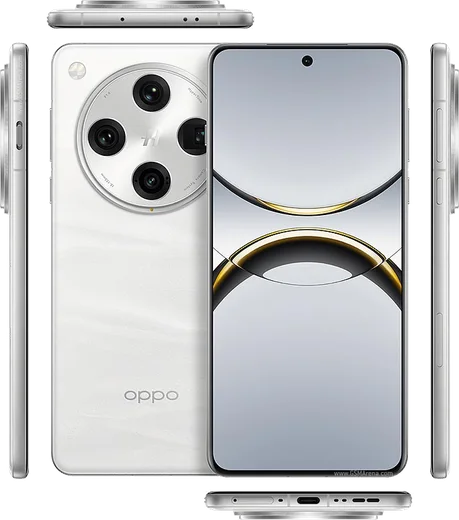
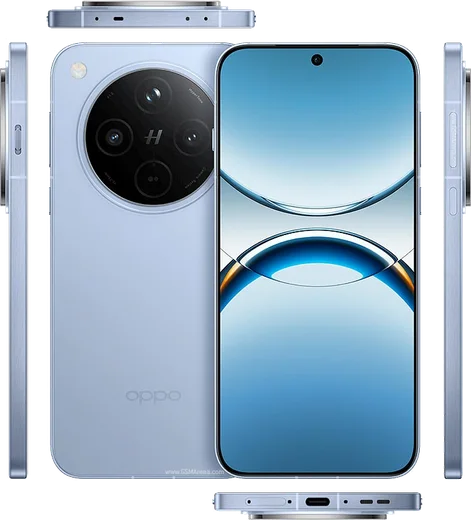
Dimensity 9400, 6.78-inch AMOLED, dual periscope cameras

WhatsApp Messenger 4.7 · 64.2M reviews Free · Android · ~40 MB · by WhatsApp LLC
Download WhatsApp

Ask a question / report a problem

You can ask any question about WhatsApp support on the Oppo Find X8 Pro — leave it below and we'll help.

Ask a question

Can the Oppo Find X8 Pro run WhatsApp?

Fully supported
  • Operating systemAndroid
  • ProcessorDimensity 9400
  • WhatsApp versionLatest supported

Latest known WhatsApp problems on Oppo Find X8 Pro

1

Why does WhatsApp keep crashing or freezing on my Oppo Find X8 Pro?

ColorOS aggressively manages background apps, which can break WhatsApp on the Find X8 Pro. Go to Settings > Battery > (tap the three-dot menu or App battery management) and find WhatsApp, then set it to Allow background activity and turn off Allow app to sleep. Also open Settings > Apps > App management > WhatsApp and confirm it is up to date via the Play Store, since several stability issues were addressed in WhatsApp updates. If it still crashes, clear the cache under Settings > Apps > App management > WhatsApp > Storage usage > Clear cache (this does not delete chats). See how others solved this on Reddit
2

The WhatsApp in-app camera looks blurry or low quality on my Oppo Find X8 Pro, how do I fix it?

WhatsApp's built-in camera uses its own basic capture pipeline and does not tap the Find X8 Pro's full Hasselblad image processing, so photos look softer than the stock Camera app. For better quality, take the photo with the regular Oppo Camera app first, then attach it from your gallery inside the chat (use the document/gallery picker rather than re-shooting in WhatsApp). Also make sure WhatsApp has Camera and Photos/Media permission under Settings > Apps > App management > WhatsApp > Permissions so it can access full-resolution images. See how others solved this on Reddit
3

I'm not getting WhatsApp message notifications on my Oppo Find X8 Pro until I open the app, how do I stop this?

ColorOS power saving silences notifications by putting WhatsApp to sleep in the background. Open Settings > Battery, find WhatsApp in app battery management, set Allow background activity and turn off Allow app to sleep. Then go to Settings > Notification & status bar > Manage notifications > WhatsApp and enable Allow notifications plus Lock screen and Banners. Finally, lock WhatsApp in Recent apps (open recents, hold the WhatsApp card, tap the lock icon) so it isn't cleared from memory. See how others solved this on Reddit
4

WhatsApp notifications are still silent or missing even after I set all the permissions on my Oppo Find X8 Pro, what else can I check?

The hidden culprit is usually ColorOS battery optimisation. Go to Settings > Battery and disable Sleep standby optimization (sometimes under More settings), then in the app battery management for WhatsApp choose Don't optimize / Unrestricted so it can run freely. Also confirm no Do Not Disturb, Bedtime, or Focus schedule is muting it under Settings > Sound & vibration > Do Not Disturb, and that WhatsApp's own in-app notification settings (WhatsApp > Settings > Notifications) are enabled. See how others solved this on Reddit
5

After a ColorOS update WhatsApp is buggy on my Oppo Find X8 Pro, what should I do?

Major ColorOS updates can leave WhatsApp with stale cache that causes glitches. First update WhatsApp itself in the Play Store, then go to Settings > Apps > App management > WhatsApp > Storage usage and tap Clear cache (not Clear data, which deletes chats). If problems persist, back up your chats in WhatsApp > Settings > Chats > Chat backup, then reinstall WhatsApp for a clean install on the new firmware. See how others solved this on Reddit

Ask a question / report a problem

You can ask any question about WhatsApp support on the Oppo Find X8 Pro — leave it below and we'll help.

Ask a question

Watch: setting up WhatsApp

Prefer to watch? This short walkthrough shows the whole installation and number-verification flow.

How to install WhatsApp on Oppo Find X8 Pro — video walkthrough

How to install WhatsApp on Oppo Find X8 Pro

1

Choose how to download

On your Oppo Find X8 Pro you can get the official app two ways: from the Google Play Store — the easiest option, since it keeps WhatsApp updated automatically — or directly from the official website. You can download an APK file, by clicking a link “Download WhatsApp directly”.

2

Open WhatsApp

Launch WhatsApp from your home screen or app drawer and accept the Terms of Service to start setup.

3

Verify your phone number

Enter your phone number. If your Oppo Find X8 Pro uses dual SIM, pick the line you want WhatsApp tied to, then enter the 6-digit code it sends by SMS — it usually fills in automatically.

4

Restore chats and finish setup

Restore your chat history from Google Drive (use the same Google account), add your name and photo, and tap Allow for notifications so messages and calls arrive reliably.

Stay safe: only ever install WhatsApp from the official Android source. The Download button above already points there — modified copies (GB/Plus/Aero WhatsApp) can get your number banned.

Comments (14)

No registration needed. No email required.
R
raj.jMay 16, 2026

ey funcionó perfecto, gracias 🙏

W
whatsappfanMar 26, 2026

Ok so my whatsapp had stopped working but this fixed it :)

X
xX_rayJan 13, 2026

Honestly saved me so much time 👍

N
not_ninaDec 24, 2025

echt ohne probleme installiert danke

L
lil_louOct 8, 2025

wow perfect steps for the Find X8 Pro

S
speedyMay 3, 2025

Worked perfect on my Oppo Find X8 Pro 💯

L
leo.cApr 13, 2025

tbh much better then the other sites

J
just_tinaMar 8, 2025

so best guide for the x8pro by far lol

L
layla67Dec 20, 2024

والله تمام، واتساب يشتغل

S
sooo_confusedDec 12, 2024

honestly installed whatsapp on my Oppo Find X8 Pro with no issues

M
maxx_danNov 9, 2024

guys why cant i see my contacts in the app

AppWhatsOfficialNov 14, 2024

Of course, add the contact in your phone with the full country code, then open WhatsApp and refresh. They should appear. Let us know if you need anything else.

X
xX_deniOct 31, 2024

Honestly two thumbs up

AppWhatsOfficialNov 2, 2024

Awesome, glad it worked!

L
lucy.rOct 21, 2024

Guys whatsapp is working on my Find X8 Pro now

P
pete99Oct 13, 2024

guys my whole family is waiting pls help me install it

AppWhatsOfficialOct 17, 2024

Hey, no need to stress! Tap the green Download button at the top, follow the steps, and you will have WhatsApp in a minute. You will be set up on your phone in no time.