WhatsApp on Motorola Razr 50
Motorola Android

WhatsApp for Motorola Razr 50

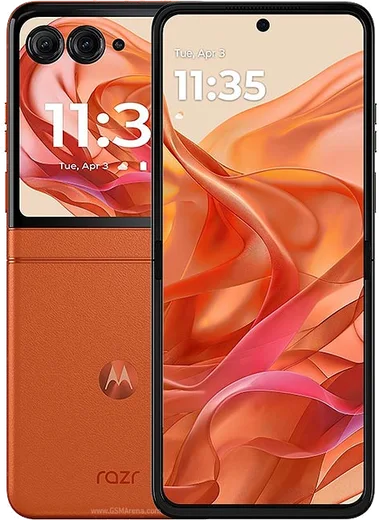
Dimensity 7300X, 3.6-inch cover, 6.9-inch foldable

WhatsApp Messenger 4.7 · 64.2M reviews Free · Android · ~40 MB · by WhatsApp LLC
Download WhatsApp

Ask a question / report a problem

You can ask any question about WhatsApp support on the Motorola Razr 50 — leave it below and we'll help.

Ask a question

Can the Motorola Razr 50 run WhatsApp?

Fully supported
  • Operating systemAndroid
  • ProcessorDimensity 7300X
  • WhatsApp versionLatest supported

Latest known WhatsApp problems on Motorola Razr 50

1

Why do WhatsApp voice messages stop playing when I close my Razr 50's flip cover?

On the Razr 50, audio is tied to the active display, so folding the phone shut interrupts voice-message and call playback by default. Open Settings > Display > External display (or the Moto app > External display panel) and enable WhatsApp so the app continues running on the cover screen, then keep playback going there. As a workaround, route audio to Bluetooth earbuds before folding, which keeps the stream alive regardless of the screen state. See how others solved this on Reddit
2

WhatsApp opens to a black screen when I tap a conversation on my Razr 50 - how do I fix it?

This black-screen glitch is usually a rendering bug between WhatsApp and Motorola's display switching, often appearing after an update. First force-stop the app in Settings > Apps > WhatsApp > Force stop, then clear its cache (Storage > Clear cache, not Clear data) and reopen it. If it persists, update WhatsApp from the Play Store and toggle Settings > System > Developer options > Disable HW overlays, which resolves the blank chat view on many Razr units. See how others solved this on Reddit
3

I'm not getting WhatsApp notifications on my Razr 50 until I open the app - what's wrong?

Delayed notifications on the Razr 50 are almost always caused by aggressive battery optimization killing WhatsApp in the background. Go to Settings > Apps > WhatsApp > Battery and set it to Unrestricted, then check Settings > Battery > Battery optimization and exclude WhatsApp. Also confirm Settings > Apps > WhatsApp > Notifications is fully enabled and that you haven't left Do Not Disturb or the cover-screen notification filter active. See how others solved this on Reddit
4

WhatsApp payments (UPI) won't work on my Razr 50 Ultra in India - how do I set it up?

WhatsApp Pay failures on the Razr 50 usually come from SMS verification not completing, which the bank uses to link your account. Make sure the SIM tied to your bank account is in the phone, that Settings > Apps > WhatsApp > Permissions has SMS and Phone enabled, and that you have a working data connection during setup. If it still fails, remove and re-add the payment method in WhatsApp > Settings > Payments, and verify your number isn't being blocked by a default SMS app or spam filter. See how others solved this on Reddit
5

WhatsApp videos play in cropped fullscreen on my Razr 50 Ultra instead of their real aspect ratio - can I stop that?

The Razr 50's tall screen and Motorola's video scaling can force videos taken on the phone to fill the display, cutting off the edges. In the WhatsApp video player tap the screen and look for the fit/crop toggle (the expand icon) to switch back to the original aspect ratio. If that doesn't stick, check Settings > Display > Aspect ratio for WhatsApp and set it to Fit to screen rather than Full screen so clips aren't stretched. See how others solved this on Reddit
6

Can I run WhatsApp fully on the Razr 50's outer cover screen?

Yes, but apps aren't enabled on the external display by default on the Razr 50. Open the Moto app (or Settings > Display > External display) and toggle WhatsApp on under the running-apps list, after which you can open and reply to chats without unfolding. Note that some full-screen actions like video calls may prompt you to open the phone, but text, voice notes, and quick replies work directly on the cover. See how others solved this on Reddit

Ask a question / report a problem

You can ask any question about WhatsApp support on the Motorola Razr 50 — leave it below and we'll help.

Ask a question

Watch: setting up WhatsApp

Prefer to watch? This short walkthrough shows the whole installation and number-verification flow.

How to install WhatsApp on Motorola Razr 50 — video walkthrough

How to install WhatsApp on Motorola Razr 50

1

Choose how to download

On your Motorola Razr 50 you can get the official app two ways: from the Google Play Store — the easiest option, since it keeps WhatsApp updated automatically — or directly from the official website. You can download an APK file, by clicking a link “Download WhatsApp directly”.

2

Open WhatsApp

Launch WhatsApp from your home screen or app drawer and accept the Terms of Service to start setup.

3

Verify your phone number

Enter your phone number. If your Motorola Razr 50 uses dual SIM, pick the line you want WhatsApp tied to, then enter the 6-digit code it sends by SMS — it usually fills in automatically.

4

Restore chats and finish setup

Restore your chat history from Google Drive (use the same Google account), add your name and photo, and tap Allow for notifications so messages and calls arrive reliably.

Stay safe: only ever install WhatsApp from the official Android source. The Download button above already points there — modified copies (GB/Plus/Aero WhatsApp) can get your number banned.

Comments (11)

No registration needed. No email required.
O
oldschoolMay 17, 2026

tbh this fixed whatsapp on my Motorola Razr 50 👍

T
the_real_solMar 28, 2026

guys how do i set my profile picture ?

AppWhatsOfficialMar 31, 2026

No worries, in Settings tap your profile at the top, then the camera icon lets you pick or take a new picture. Feel free to ask if you get stuck.

K
kev_ivaJan 14, 2026

Hey danke, mein Razr 50 hat jetzt whatsapp 😍

R
ray21Oct 6, 2025

wow finally a guide that makes sense

L
lina29Sep 9, 2025

guys can i recover my chats thanks

AppWhatsOfficialSep 13, 2025

Thanks for asking, your chats can come back from a backup. Sign in with the same number and tap Restore when prompted. Glad to help.

L
lil_ellaSep 7, 2025

omg had whatsapp on my motorola razr 50 in no time

N
newphoneSep 3, 2025

omg anyone pls i cant download it heeeelp me :(

AppWhatsOfficialSep 6, 2025

Hey, no need to stress! Tap the green Download button at the top, follow the steps, and you will have WhatsApp in a minute.

P
pablo21Jun 18, 2025

all set up and chatting now

T
tina.uMay 23, 2025

wow got my Motorola Razr 50 sorted thanks to you 👍

M
mmmaaaxxxApr 5, 2025

Hey beste seite, hat sofort geklappt auf meinem Motorola Razr 50

E
ella_lucJul 10, 2024

honestly you guys are life savers

AppWhatsOfficialJul 12, 2024

That is great to hear!