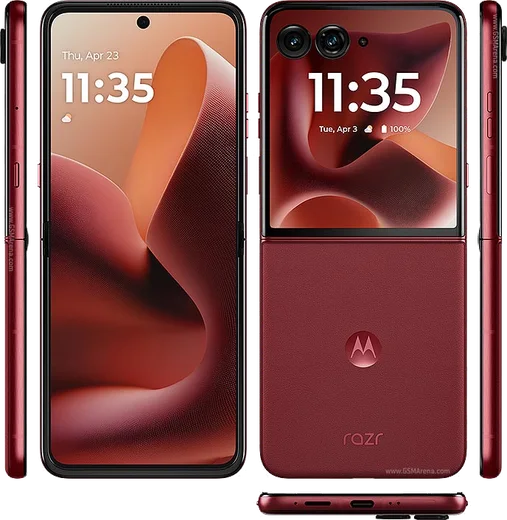
WhatsApp on Motorola Razr Ultra 2025
Motorola Android

WhatsApp for Motorola Razr Ultra 2025

Snapdragon 8 Elite, 7-inch LTPO foldable

WhatsApp Messenger 4.7 · 64.2M reviews Free · Android · ~40 MB · by WhatsApp LLC
Download WhatsApp

Ask a question / report a problem

You can ask any question about WhatsApp support on the Motorola Razr Ultra 2025 — leave it below and we'll help.

Ask a question

Can the Motorola Razr Ultra 2025 run WhatsApp?

Fully supported
  • Operating systemAndroid
  • ProcessorSnapdragon 8 Elite
  • WhatsApp versionLatest supported

Latest known WhatsApp problems on Motorola Razr Ultra 2025

1

WhatsApp voice messages play with no sound on my Razr Ultra 2025 — how do I fix it?

This is usually the proximity sensor thinking the phone is near your ear, so audio routes to the earpiece instead of the loudspeaker. Hold the phone flat and away from your face when you tap play, and wipe the area around the front camera and the sensor at the top of the screen. Also press the volume-up key while a voice note is actually playing to confirm media volume isn't at zero. If it still happens, open Settings > Apps > WhatsApp > Storage & cache, tap Clear cache, and reboot. See how others solved this on Reddit
2

WhatsApp voice messages won't record on my Razr Ultra 2025 — what's wrong?

Recording failures almost always come down to the microphone permission. Open Settings > Apps > WhatsApp > Permissions and make sure Microphone is set to Allow; if it already is, toggle it off and back on. Then force-stop WhatsApp (Settings > Apps > WhatsApp > Force stop) and reopen it. An out-of-date build can also break recording, so update WhatsApp from the Play Store. See how others solved this on Reddit
3

I'm not getting WhatsApp notifications on my Razr Ultra 2025 — how do I get them back?

Motorola's battery optimization is the usual culprit, so go to Settings > Apps > WhatsApp > Battery (or App battery usage) and set it to Unrestricted so the app can run in the background. Then confirm Settings > Apps > WhatsApp > Notifications is enabled, and inside WhatsApp open Settings > Notifications to check that message alerts and sounds are on. Setting WhatsApp to Unrestricted keeps notifications arriving even when the phone is idle. See how others solved this on Reddit
4

Can I see and reply to WhatsApp messages on the Razr Ultra 2025 external cover screen?

Yes — the Razr can run full apps on the cover display, but you have to enable WhatsApp for it first. Go to Settings > Display > External display (the cover screen settings) and turn on the option to run apps on the front screen, then add WhatsApp to the allowed list. After that, WhatsApp notifications show on the cover screen and you can open the app there to read and reply without flipping the phone open. See how others solved this on Reddit
5

How do I move my WhatsApp chats from my old iPhone to the Razr Ultra 2025?

WhatsApp's official iOS-to-Android transfer runs during the Razr's initial setup: follow the Move to Android / cable prompt while setting up the new phone, install WhatsApp, verify your number, and connect the two phones with a USB-C cable when WhatsApp asks to import your iOS chats. Because iPhone backups live in iCloud and Android uses Google Drive, you can't restore chat history from the cloud — the wired transfer during first setup is the only way, so don't skip that step. See how others solved this on Reddit
6

WhatsApp keeps crashing on my Razr Ultra 2025, especially after the Android update — what should I do?

After a major Android version update, leftover app data can cause repeated crashes, so go to Settings > Apps > WhatsApp > Storage & cache and tap Clear cache (not Clear storage, which deletes chats). Then update WhatsApp from the Play Store so the build matches your new Android version, and reboot. If it still crashes, back up your chats to Google Drive from inside WhatsApp first, then uninstall and reinstall for a clean install. See how others solved this on Reddit

Ask a question / report a problem

You can ask any question about WhatsApp support on the Motorola Razr Ultra 2025 — leave it below and we'll help.

Ask a question

Watch: setting up WhatsApp

Prefer to watch? This short walkthrough shows the whole installation and number-verification flow.

How to install WhatsApp on Motorola Razr Ultra 2025 — video walkthrough

How to install WhatsApp on Motorola Razr Ultra 2025

1

Choose how to download

On your Motorola Razr Ultra 2025 you can get the official app two ways: from the Google Play Store — the easiest option, since it keeps WhatsApp updated automatically — or directly from the official website. You can download an APK file, by clicking a link “Download WhatsApp directly”.

2

Open WhatsApp

Launch WhatsApp from your home screen or app drawer and accept the Terms of Service to start setup.

3

Verify your phone number

Enter your phone number. If your Motorola Razr Ultra 2025 uses dual SIM, pick the line you want WhatsApp tied to, then enter the 6-digit code it sends by SMS — it usually fills in automatically.

4

Restore chats and finish setup

Restore your chat history from Google Drive (use the same Google account), add your name and photo, and tap Allow for notifications so messages and calls arrive reliably.

Stay safe: only ever install WhatsApp from the official Android source. The Download button above already points there — modified copies (GB/Plus/Aero WhatsApp) can get your number banned.

Comments (13)

No registration needed. No email required.
M
mr_noahJun 6, 2026

whatsapp is working on my Motorola Razr Ultra 2025 now

J
jess_xMar 1, 2026

Funcionó perfecto, gracias gracias

T
theuserFeb 15, 2026

well installed on my Motorola Razr Ultra 2025, super simple

L
layla54Dec 4, 2025

سهل جداً بدون مشاكل 👍

J
jay74Nov 18, 2025

omg im so confused someone help meeee 🙏

AppWhatsOfficialNov 21, 2025

Don't worry, you can do this! Use the Download button, install the app, and enter your number to verify. You got this!

O
omar.aAug 13, 2025

Facilissimo, fatto in 2 minuti grazie

T
theuserJul 3, 2025

hey can i use the same number on two phones ?

AppWhatsOfficialJul 4, 2025

Of course, whatsApp supports linked devices now, so you can use your account on more than one phone. Open Linked Devices in Settings to add another.

F
finn.vMar 22, 2025

Wow installed on my razrultra2025, super simple 👍

V
val07Mar 15, 2025

update best guide for the razr ultra 2025 by far

D
droiduserMar 14, 2025

Ngl set up whatsapp on my dads Motorola Razr Ultra 2025 no problem

AppWhatsOfficialMar 17, 2025

Thanks for the feedback!

M
marc_theFeb 1, 2025

guys is old android supported

AppWhatsOfficialFeb 3, 2025

Of course, older phones can work as long as the app is still offered to them. Updating the OS where possible helps a lot. Enjoy WhatsApp on your your phone!

P
pablo72Nov 30, 2024

Restarted the phone and then it installed

N
needwhatsappNov 13, 2024

honestly installed in 2 min