Motorola Android

WhatsApp for Motorola Razr 2025

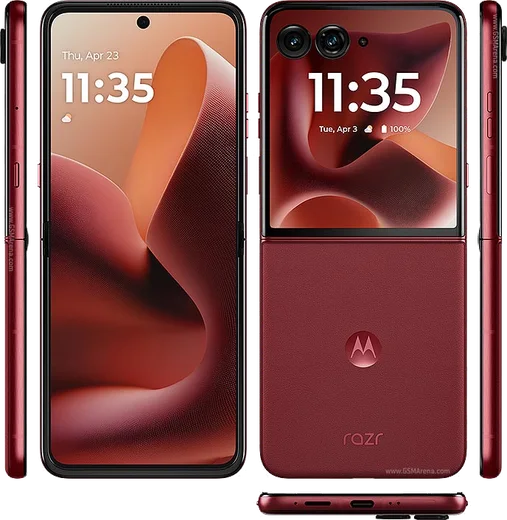
Dimensity 7400X, 6.9-inch foldable, 3.6-inch cover

WhatsApp Messenger 4.7 · 64.2M reviews Free · Android · ~40 MB · by WhatsApp LLC
Download WhatsApp

Ask a question / report a problem

You can ask any question about WhatsApp support on the Motorola Razr 2025 — leave it below and we'll help.

Ask a question

Can the Motorola Razr 2025 run WhatsApp?

Fully supported
  • Operating systemAndroid
  • ProcessorDimensity 7400X
  • WhatsApp versionLatest supported

Latest known WhatsApp problems on Motorola Razr 2025

1

WhatsApp voice notes play with no sound on my Motorola Razr 2025 — how do I fix it?

This usually happens because the proximity sensor thinks the phone is near your ear, switching audio to the earpiece, or because WhatsApp lost access to the speaker. Open WhatsApp, play the voice note while holding the phone away from your face, and toggle the speaker; if it persists, go to Settings > Apps > WhatsApp > Permissions and confirm Microphone is allowed, then clear the WhatsApp cache under Settings > Apps > WhatsApp > Storage and restart the phone. Make sure WhatsApp is updated from the Play Store, since several voice-playback bugs on Razr 2024/2025 were resolved in newer app builds. See how others solved this on Reddit
2

Can I reply to WhatsApp messages on the external (cover) screen of the Motorola Razr 2025?

Yes, but you have to enable the app on the outer display first because Motorola hides most third-party apps from it by default. Go to Settings > Display > External display (or the Moto app > Personalize > External display) and turn on WhatsApp in the app list, then you can open it folded and use the small keyboard or voice dictation to reply. Notifications also appear on the cover screen, and you can swipe down on them to read and respond without opening the phone. See how others solved this on Reddit
3

I'm not getting WhatsApp notifications on the external screen of my Razr 2025 — what's wrong?

The cover screen only shows notifications for apps you've explicitly allowed, and aggressive battery optimization can suppress them. Enable WhatsApp under Settings > Display > External display, then go to Settings > Apps > WhatsApp > Battery and set it to Unrestricted so it can wake the device. Also check Settings > Notifications to confirm WhatsApp notifications are on and not in a Do Not Disturb or silent profile. See how others solved this on Reddit
4

How do I move my WhatsApp chats from my old iPhone to the Motorola Razr 2025?

Use WhatsApp's official iOS-to-Android transfer, which works best during the Razr's initial setup. Start the Motorola setup, choose to copy data with a USB-C cable connected to your iPhone, open WhatsApp on the Razr, and when prompted scan the QR code to pull your chat history straight from the iPhone. If you've already finished setup, you can still trigger it by reinstalling WhatsApp from the Play Store and selecting the move-from-iPhone option with the cable attached and both phones on the same charge level. See how others solved this on Reddit
5

WhatsApp payments (UPI) stopped working on my Motorola Razr after an update — how do I fix it in India?

WhatsApp Pay verifies your device and SIM, so a recent app or Android version mismatch can break UPI registration. Make sure WhatsApp is updated from the Play Store, confirm SMS permission is granted under Settings > Apps > WhatsApp > Permissions (it needs to read the bank verification SMS), and that your bank-linked SIM is in the phone. If payment setup still fails, remove and re-add the payment method in WhatsApp Settings > Payments, and ensure the phone's date/time is set to automatic under Settings > System > Date & time. See how others solved this on Reddit
6

Should I update my Motorola Razr 2025 to Android 16, and will it affect WhatsApp?

The Android 16 rollout for the Razr has been stable for most users, but a few reported notification and background-app quirks afterward that can affect messaging apps. After updating via Settings > System > System update, recheck that WhatsApp is set to Unrestricted under Settings > Apps > WhatsApp > Battery and that its notifications are still enabled, since major OS updates sometimes reset these. If WhatsApp behaves oddly post-update, clearing its cache under Settings > Apps > WhatsApp > Storage usually resolves it without losing chats. See how others solved this on Reddit

Ask a question / report a problem

You can ask any question about WhatsApp support on the Motorola Razr 2025 — leave it below and we'll help.

Ask a question

Watch: setting up WhatsApp

Prefer to watch? This short walkthrough shows the whole installation and number-verification flow.

How to install WhatsApp on Motorola Razr 2025 — video walkthrough

How to install WhatsApp on Motorola Razr 2025

1

Choose how to download

On your Motorola Razr 2025 you can get the official app two ways: from the Google Play Store — the easiest option, since it keeps WhatsApp updated automatically — or directly from the official website. You can download an APK file, by clicking a link “Download WhatsApp directly”.

2

Open WhatsApp

Launch WhatsApp from your home screen or app drawer and accept the Terms of Service to start setup.

3

Verify your phone number

Enter your phone number. If your Motorola Razr 2025 uses dual SIM, pick the line you want WhatsApp tied to, then enter the 6-digit code it sends by SMS — it usually fills in automatically.

4

Restore chats and finish setup

Restore your chat history from Google Drive (use the same Google account), add your name and photo, and tap Allow for notifications so messages and calls arrive reliably.

Stay safe: only ever install WhatsApp from the official Android source. The Download button above already points there — modified copies (GB/Plus/Aero WhatsApp) can get your number banned.

Comments (13)

No registration needed. No email required.
B
ben.yMar 10, 2026

honestly worked even on my old phone thanks again

S
sam16Jan 22, 2026

wow respect, this helped alot 👌

E
eeeeeemmmmmaaaaaJan 15, 2026

Why does it crash on opening ?

AppWhatsOfficialJan 17, 2026

Happy to help, try clearing the cache and updating your phone software, then install the latest version again. That usually stops the crashing. Feel free to ask if you get stuck.

L
lina21Sep 24, 2025

Guys im so confused someone help meeee 😭

AppWhatsOfficialSep 28, 2025

Take a breath, we got you. Press Download above, then Install, then verify your number. That is all it takes.

U
ugh_helpSep 10, 2025

Got it working on my motorola razr 2025 first try thanks again

J
just_valJul 27, 2025

sorry but i lost my old chats can i get them back pls

AppWhatsOfficialJul 29, 2025

Of course, yes, as long as you had a backup. Use the same number and choose Restore during setup to bring your messages back. Let us know if you need anything else.

K
kev.rJul 18, 2025

por fin el mejor sitio, funcionó a la primera 💯

A
andy.hJan 24, 2025

hi does whatsapp support the Motorola Razr 2025

AppWhatsOfficialJan 28, 2025

Hey there, absolutely, the your phone is supported. Follow the steps above and you will be chatting in minutes. Enjoy WhatsApp on your your phone!

A
ahmedJan 19, 2025

تم التثبيت بدون مشاكل

M
ms_maxxJan 6, 2025

tbh my motorola razr 2025 was being difficult but this sorted it

R
rosa95Dec 17, 2024

Installato senza problemi

A
amy_realNov 12, 2024

Tbh smooth install on the Motorola Razr 2025

S
sara21Sep 8, 2024

my new razr 2025 is all set up now

AppWhatsOfficialSep 9, 2024

Glad we could help!