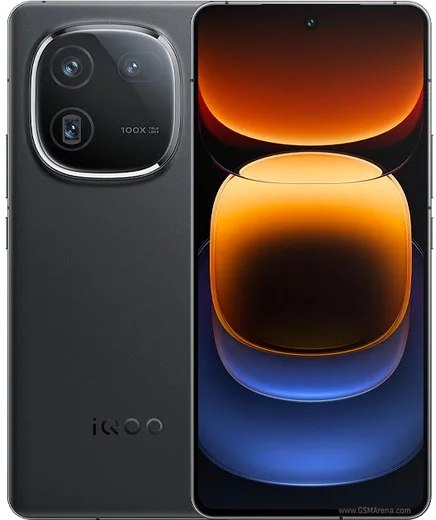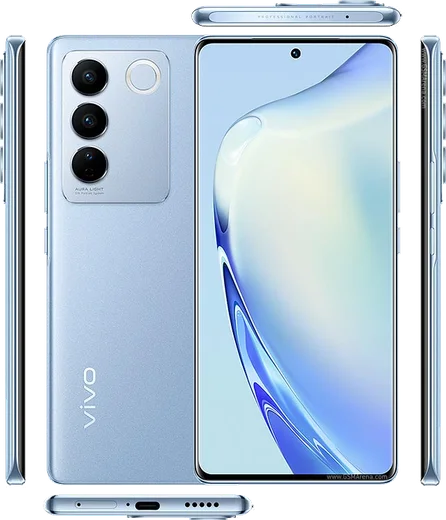
WhatsApp on Vivo iQOO 12
Vivo Android

WhatsApp for Vivo iQOO 12

Snapdragon 8 Gen 3, 6.78-inch LTPO AMOLED, 5000mAh, 120W

WhatsApp Messenger 4.7 · 64.2M reviews Free · Android · ~40 MB · by WhatsApp LLC
Download WhatsApp

Ask a question / report a problem

You can ask any question about WhatsApp support on the Vivo iQOO 12 — leave it below and we'll help.

Ask a question

Can the Vivo iQOO 12 run WhatsApp?

Fully supported
  • Operating systemAndroid
  • ProcessorSnapdragon 8 Gen 3
  • WhatsApp versionLatest supported

Latest known WhatsApp problems on Vivo iQOO 12

1

Why am I not getting WhatsApp notifications on my iQOO 12 until I open the app?

OriginOS aggressively kills background apps to save battery, which delays or blocks WhatsApp alerts. Open Settings > Battery > High background power consumption and allow WhatsApp, then go to Settings > Apps > Manage apps > WhatsApp > Battery and set it to 'Allow background activity' / 'No restrictions'. Also enable WhatsApp under Settings > Apps > Auto-start, and long-press WhatsApp in the Recents screen and tap the lock icon so it isn't cleared from memory. See how others solved this on Reddit
2

How do I show WhatsApp message content in notifications on my iQOO 12?

OriginOS hides notification text on the lock screen by default for privacy. Go to Settings > Notification & status bar > Lock screen notifications and switch from 'Hide notification content' to 'Show all notification content'. Then open Settings > Notification & status bar > Manage notifications > WhatsApp and make sure notifications and the lock-screen preview are turned on. Inside WhatsApp, also check Settings > Notifications to confirm message previews are enabled. See how others solved this on Reddit
3

WhatsApp notifications are delayed on my iQOO 12, sometimes by hours. How do I fix this?

This happens when OriginOS memory management freezes WhatsApp in the background. Go to Settings > Apps > Manage apps > WhatsApp > Battery and choose 'No restrictions', enable WhatsApp under Settings > Apps > Auto-start, and add it to the allow list under Settings > Battery > High background power consumption. Locking WhatsApp in the Recents tray (long-press the card, tap the lock) usually restores near-instant delivery. See how others solved this on Reddit
4

How do I stop the annoying WhatsApp floating chat bubble on my iQOO 12?

The floating bubble is Android's Conversation Bubbles feature, not a WhatsApp-specific bug. Open WhatsApp > Settings > Notifications and turn off 'Use bubbles', or go to phone Settings > Notification & status bar > Manage notifications > WhatsApp > tap a conversation category > Bubbles and set it to 'Don't allow'. After disabling it, tapping a message just opens WhatsApp normally instead of showing a floating icon. See how others solved this on Reddit
5

Why does WhatsApp misbehave with Origin Island / drag-and-go on my iQOO 12?

Origin Island's live-activity area can conflict with how WhatsApp posts notifications, so chats may not respond to the drag-and-go gesture. Make sure WhatsApp is updated from the Play Store, then grant it full background and auto-start permissions under Settings > Apps > Manage apps > WhatsApp (Battery > No restrictions, plus Auto-start). If problems persist, turn Origin Island off in the dropdown/Settings to confirm it's the cause and fall back to standard notifications. See how others solved this on Reddit
6

Will WhatsApp work on the China version of the iQOO 12 with OriginOS?

The China iQOO 12 ships with Chinese OriginOS, which has no Google Mobile Services, so WhatsApp won't install or verify out of the box. You'd have to manually sideload the Play Store and a GMS framework, which is fiddly and can break OTA updates. For dependable WhatsApp use, the global/Indian iQOO 12 (with Google services preinstalled) is the safer choice; if you already own the China unit, sideloading the WhatsApp APK plus a working GMS package is the only path. See how others solved this on Reddit

Ask a question / report a problem

You can ask any question about WhatsApp support on the Vivo iQOO 12 — leave it below and we'll help.

Ask a question

Watch: setting up WhatsApp

Prefer to watch? This short walkthrough shows the whole installation and number-verification flow.

How to install WhatsApp on Vivo iQOO 12 — video walkthrough

How to install WhatsApp on Vivo iQOO 12

1

Choose how to download

On your Vivo iQOO 12 you can get the official app two ways: from the Google Play Store — the easiest option, since it keeps WhatsApp updated automatically — or directly from the official website. You can download an APK file, by clicking a link “Download WhatsApp directly”.

2

Open WhatsApp

Launch WhatsApp from your home screen or app drawer and accept the Terms of Service to start setup.

3

Verify your phone number

Enter your phone number. If your Vivo iQOO 12 uses dual SIM, pick the line you want WhatsApp tied to, then enter the 6-digit code it sends by SMS — it usually fills in automatically.

4

Restore chats and finish setup

Restore your chat history from Google Drive (use the same Google account), add your name and photo, and tap Allow for notifications so messages and calls arrive reliably.

Stay safe: only ever install WhatsApp from the official Android source. The Download button above already points there — modified copies (GB/Plus/Aero WhatsApp) can get your number banned.

Comments (10)

No registration needed. No email required.
N
noobmasterMar 26, 2026

Franchement super guide, ça a marché sur mon iqoo 12 merci

N
needwhatsappJan 30, 2026

Finally a guide that makes sense ✌️

P
phoneaddictDec 14, 2025

sorry but does this cost money anyone

AppWhatsOfficialDec 15, 2025

Of course, whatsApp is 100% free to download and use. You only use your normal mobile data or wifi for messages and calls. Glad to help.

I
ivan_ivaDec 13, 2025

ok so whatsapp works fine on my iqoo 12 thx

B
big_robAug 9, 2025

Ngl all set up and chatting now 😍

P
phoneaddictJan 27, 2025

I tried everything pls help meee install whatsapp on iQOO 12 🙏

AppWhatsOfficialJan 30, 2025

Breathe! Follow the steps above one by one, tap Download first, and you will be chatting in no time. It is easier than it looks, promise.

P
phonefanDec 3, 2024

quick q is this safe? i dont want a virus

AppWhatsOfficialDec 4, 2024

Hi! Yes, this is safe. Stick to the official download we link to and avoid modified copies and you will be fine.

S
stuckkkOct 12, 2024

Wow ohne probleme auf meinem iqoo 12 installiert danke

S
sol.zSep 15, 2024

yo did this on my vivo iqoo 12 and it just worked

B
big_zoeJul 20, 2024

Guys how do i hide my last seen

AppWhatsOfficialJul 26, 2024

Of course, open Settings, then Privacy, and adjust Last Seen and Online there to keep your activity hidden.