Huawei HarmonyOS

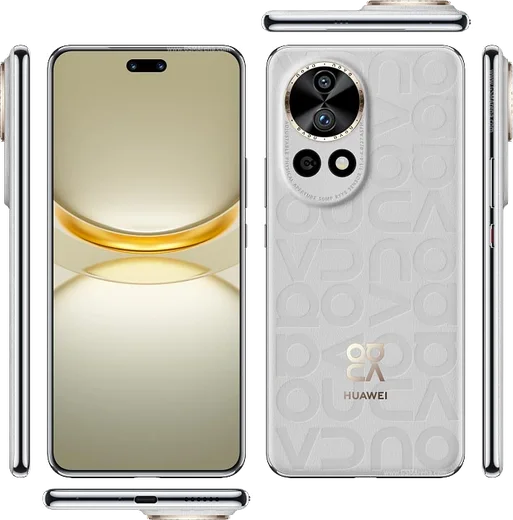
WhatsApp for Huawei Pura 70 Pro

Kirin 9010, 6.8-inch 120Hz OLED, retractable macro lens

WhatsApp Messenger 4.7 · 64.2M reviews Free · HarmonyOS · ~40 MB · by WhatsApp LLC
Download WhatsApp

Ask a question / report a problem

You can ask any question about WhatsApp support on the Huawei Pura 70 Pro — leave it below and we'll help.

Ask a question

Can the Huawei Pura 70 Pro run WhatsApp?

Fully supported
  • Operating systemHarmonyOS
  • ProcessorKirin 9010
  • WhatsApp versionLatest supported

Latest known WhatsApp problems on Huawei Pura 70 Pro

1

Can I even install WhatsApp on the Huawei Pura 70 Pro without Google services?

Yes. The Pura 70 Pro runs HarmonyOS without Google Mobile Services, and WhatsApp still works. AppGallery does not host the official WhatsApp itself; instead its built-in search (Petal Search) redirects you to download the APK from an external source. The safest route is to get the genuine APK directly from whatsapp.com/android, then allow installs from your browser or file manager when HarmonyOS prompts you. Avoid third-party APK mirrors and modded builds like GBWhatsApp. See how others solved this on Reddit
2

Will WhatsApp actually work properly on the Pura 70 Pro on EMUI 14.2 before I buy it?

Yes, WhatsApp runs fine on the Pura 70 Pro for messaging, voice and video calls once installed. There is no native AppGallery version, so download the official APK from whatsapp.com/android (AppGallery's search just redirects you there). The one common rough edge is delayed background notifications, which you fix by exempting WhatsApp from battery optimization (see the notifications steps below). Do not use GBWhatsApp or other mods, as they get accounts banned. See how others solved this on Reddit
3

WhatsApp won't install or keeps failing to install on my Pura 70 Pro, what do I do?

Download the APK only from whatsapp.com/android rather than a random mirror. When the install fails or is blocked, go to Settings > Security > More settings > Install apps from external sources (or tap the prompt that appears) and grant your browser or file manager permission, then run the APK again. If the download stalls, clear the cache of the app you downloaded with under Settings > Apps & services > Apps, and make sure you have enough free storage before retrying. See how others solved this on Reddit
4

I'm not receiving WhatsApp messages on my Huawei Pura 70 until I open the app, how can I fix it?

This is HarmonyOS aggressively closing the app in the background. Go to Settings > Battery > App launch, find WhatsApp, turn off Manage automatically, then enable Auto-launch, Secondary launch and Run in background. Next open WhatsApp > Settings > Notifications and confirm they are on, and lock WhatsApp in the recent-apps switcher (swipe down on its card or tap the lock icon) so it is not cleared from memory. See how others solved this on Reddit
5

How well does WhatsApp run day-to-day on a Huawei Pura 70 Pro, and where do backups go?

Day-to-day it works like on any phone for chats, media and calls. Because there are no Google services, chat backups cannot go to Google Drive; WhatsApp instead keeps a local backup on the device under Internal storage > WhatsApp > Databases. To keep your history safe, open WhatsApp > Settings > Chats > Chat backup to force a local backup, then copy that WhatsApp folder to a computer or your own cloud. When you switch phones, restore by placing that folder back before reinstalling. See how others solved this on Reddit

Ask a question / report a problem

You can ask any question about WhatsApp support on the Huawei Pura 70 Pro — leave it below and we'll help.

Ask a question

Watch: setting up WhatsApp

Prefer to watch? This short walkthrough shows the whole installation and number-verification flow.

How to install WhatsApp on Huawei Pura 70 Pro — video walkthrough

How to install WhatsApp on Huawei Pura 70 Pro

1

Open Huawei AppGallery

On your Huawei Pura 70 Pro, tap the AppGallery icon — Huawei's own app store. Newer Huawei phones ship without Google Play, so AppGallery is where you get WhatsApp.

2

Search for WhatsApp

Search WhatsApp Messenger in AppGallery and confirm it's published by WhatsApp LLC. If it isn't offered in your region, use Petal Search to download the official app.

3

Install the app

Tap Install. AppGallery downloads and installs WhatsApp; if prompted, allow installing the app so it can finish.

4

Verify your phone number

Open WhatsApp, accept the terms, and enter your phone number. On a dual-SIM Huawei Pura 70 Pro, pick the line you want WhatsApp tied to, then enter the 6-digit code it sends by SMS.

5

Allow notifications and background activity

Add your name and photo, tap Allow for notifications, then open Settings > Battery and let WhatsApp auto-launch and run in the background so messages arrive on time on HarmonyOS.

Stay safe: only ever install WhatsApp from the official HarmonyOS source. The Download button above already points there — modified copies (GB/Plus/Aero WhatsApp) can get your number banned.

Comments (13)

No registration needed. No email required.
O
oldschoolApr 21, 2026

Pls help the download is very slow is that normal ?

AppWhatsOfficialApr 22, 2026

It depends on your connection. Try switching to wifi if you can, and the download should finish in under a minute on most networks. Feel free to ask if you get stuck.

H
halppJan 8, 2026

well clear steps for the pura70pro, cheers

M
mr_rajJan 3, 2026

Wow tout fonctionne, merci beaucoup

W
whatsappfanDec 27, 2025

man even my grandma could do this cheers

T
tan54Oct 1, 2025

ngl everything working now

R
rosa.jMay 15, 2025

Man perfect steps for the Huawei Pura 70 Pro 🔥

J
just_nickMar 21, 2025

Guys is this the official whatsapp or a modded one

AppWhatsOfficialMar 26, 2025

Happy to help, this is the genuine WhatsApp. Avoid GB or Plus mods, they break the rules and risk a ban. Reach out anytime.

B
ben_andFeb 1, 2025

Wow sehr einfach, in 2 minuten auf meinem Pura 70 Pro erledigt 💯

U
ugh_helpJan 27, 2025

والله أفضل شرح

T
tina_robNov 30, 2024

yo no problems installing on my Huawei Pura 70 Pro

L
luca.cOct 31, 2024

works like a charm on the Pura 70 Pro

N
nick70Oct 26, 2024

someone im so confused someone help meeee 😩

AppWhatsOfficialOct 28, 2024

No panic needed. The Download button takes you to the official app, then just install and verify your number. You will be set up on your phone in no time.

J
joe_realJul 27, 2024

Ok so restarted the phone and then it installed