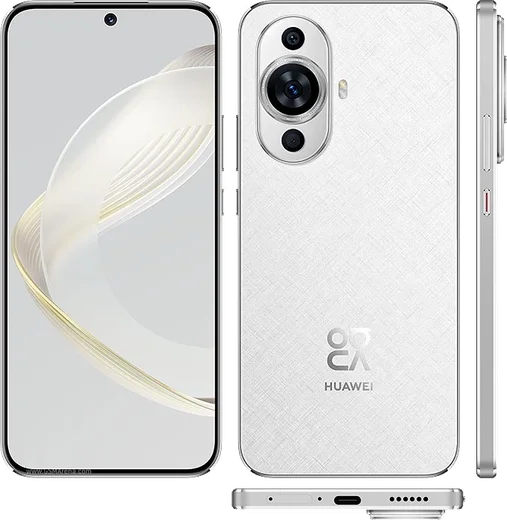
WhatsApp on Huawei Nova 11
Huawei HarmonyOS

WhatsApp for Huawei Nova 11

Snapdragon 778G 4G, 6.7-inch 120Hz OLED, 60MP front camera

WhatsApp Messenger 4.7 · 64.2M reviews Free · HarmonyOS · ~40 MB · by WhatsApp LLC
Download WhatsApp

Ask a question / report a problem

You can ask any question about WhatsApp support on the Huawei Nova 11 — leave it below and we'll help.

Ask a question

Can the Huawei Nova 11 run WhatsApp?

Fully supported
  • Operating systemHarmonyOS
  • ProcessorSnapdragon 778G 4G
  • WhatsApp versionLatest supported

Latest known WhatsApp problems on Huawei Nova 11

1

How do I install WhatsApp on the Huawei Nova 11 without Google Play?

The Nova 11 has no Google Play Services, so open the pre-installed AppGallery and search for WhatsApp, which is listed there officially and will handle updates for you. If AppGallery doesn't show it in your region, download the APK only from the official whatsapp.com/android page, then open the file in the Files app and tap Install, allowing installs from that source when prompted. See how others solved this on Reddit
2

WhatsApp stopped working on my Huawei Nova 11 and says it can't connect or verify the app, how do I fix it?

This usually happens because WhatsApp was installed as an APK that's now outdated and failing its checks, so uninstall it completely and reinstall the current version from AppGallery. Also update HarmonyOS under Settings > System & updates > Software update, since older system builds can break WhatsApp's current requirements. See how others solved this on Reddit
3

WhatsApp tells me I don't have the official app on my Nova 11, what does that mean?

That warning appears when WhatsApp was sideloaded from an unofficial mirror or a modified (mod) APK, which the app now blocks. Delete it and reinstall strictly from AppGallery or the official whatsapp.com download, then log back in with your number to clear the message. See how others solved this on Reddit
4

How do I transfer my WhatsApp chats from an old Huawei phone to my Nova 11?

Since the Nova 11 has no Google Drive backup, make a local backup on the old phone via WhatsApp > Settings > Chats > Chat backup, then move the whole WhatsApp folder to the Nova 11 using Huawei Phone Clone or a cable (the chat databases live in Internal storage > Android > media > com.whatsapp > WhatsApp). After installing WhatsApp on the Nova 11 and verifying the same number, it will detect the local backup and offer to restore. See how others solved this on Reddit
5

WhatsApp messages don't arrive on my Nova 11 unless the app is open, how do I get notifications?

HarmonyOS aggressively closes background apps, so go to Settings > Battery > App launch, find WhatsApp, turn off automatic management for it, and enable Auto-launch, Secondary launch, and Run in background. Then confirm notifications are turned on under Settings > Notifications > WhatsApp so messages push through in real time. See how others solved this on Reddit
6

Is WhatsApp still reliable on the Huawei Nova 11, or should I expect it to stop working?

WhatsApp runs fine on the Nova 11 as long as you keep it updated through AppGallery and avoid old sideloaded versions that lose support over time. The main thing to manage is HarmonyOS battery control, so granting WhatsApp permanent background activity and notification permissions is what keeps it dependable day to day. See how others solved this on Reddit

Ask a question / report a problem

You can ask any question about WhatsApp support on the Huawei Nova 11 — leave it below and we'll help.

Ask a question

Watch: setting up WhatsApp

Prefer to watch? This short walkthrough shows the whole installation and number-verification flow.

How to install WhatsApp on Huawei Nova 11 — video walkthrough

How to install WhatsApp on Huawei Nova 11

1

Open Huawei AppGallery

On your Huawei Nova 11, tap the AppGallery icon — Huawei's own app store. Newer Huawei phones ship without Google Play, so AppGallery is where you get WhatsApp.

2

Search for WhatsApp

Search WhatsApp Messenger in AppGallery and confirm it's published by WhatsApp LLC. If it isn't offered in your region, use Petal Search to download the official app.

3

Install the app

Tap Install. AppGallery downloads and installs WhatsApp; if prompted, allow installing the app so it can finish.

4

Verify your phone number

Open WhatsApp, accept the terms, and enter your phone number. On a dual-SIM Huawei Nova 11, pick the line you want WhatsApp tied to, then enter the 6-digit code it sends by SMS.

5

Allow notifications and background activity

Add your name and photo, tap Allow for notifications, then open Settings > Battery and let WhatsApp auto-launch and run in the background so messages arrive on time on HarmonyOS.

Stay safe: only ever install WhatsApp from the official HarmonyOS source. The Download button above already points there — modified copies (GB/Plus/Aero WhatsApp) can get your number banned.

Comments (11)

No registration needed. No email required.
D
deni87Apr 11, 2026

everything working now

A
amy_proMar 8, 2026

quick q safe to install or no ?

AppWhatsOfficialMar 14, 2026

Thanks for asking, yes, this is safe. Stick to the official download we link to and avoid modified copies and you will be fine.

B
big_andyDec 26, 2025

Pls help i lost my old chats can i get them back anyone

AppWhatsOfficialDec 28, 2025

If you made a backup before, sign in with the same number and tap Restore when asked. WhatsApp pulls your chats from the cloud backup. Feel free to ask if you get stuck.

U
ugh_helpSep 7, 2025

whatsapp is working on my Nova 11 now cheers

K
kev_kaiJul 28, 2025

Update whatsapp finally on my Huawei Nova 11 thx

D
droiduserJun 5, 2025

Someone help meee i pressed everything and nothing 😭

AppWhatsOfficialJun 6, 2025

No panic needed. The Download button takes you to the official app, then just install and verify your number.

M
mr_andyApr 11, 2025

Omg worked like a charm 💯

N
newphoneDec 6, 2024

Finalmente ha funzionato benissimo sul mio 11

V
val.yOct 10, 2024

honestly restarted the phone and then it installed 👌

L
lucy.iOct 5, 2024

a marché parfaitement sur mon huawei nova 11

P
priya.cJul 18, 2024

guys finally got whatsapp running on my nova 11