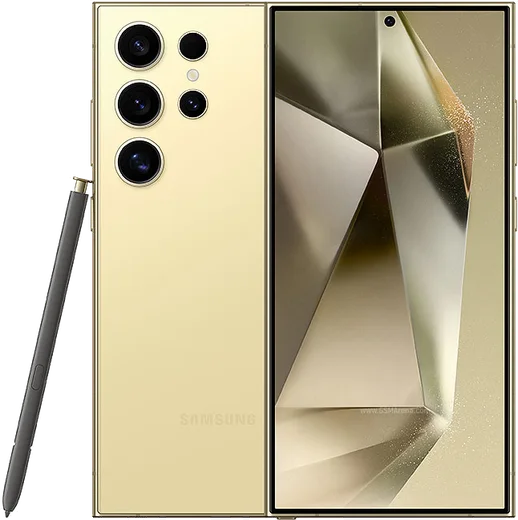
WhatsApp on Samsung Galaxy S24 Ultra
Samsung Android

WhatsApp for Samsung Galaxy S24 Ultra

Snapdragon 8 Gen 3, 6.8-inch QHD+ titanium, 200MP

WhatsApp Messenger 4.7 · 64.2M reviews Free · Android · ~40 MB · by WhatsApp LLC
Download WhatsApp

Ask a question / report a problem

You can ask any question about WhatsApp support on the Samsung Galaxy S24 Ultra — leave it below and we'll help.

Ask a question

Can the Samsung Galaxy S24 Ultra run WhatsApp?

Fully supported
  • Operating systemAndroid
  • OS versionAndroid 14 → 16 (One UI 7)
  • ProcessorSnapdragon 8 Gen 3
  • RAM12 GB

Latest known WhatsApp problems on Samsung Galaxy S24 Ultra

1

WhatsApp keeps crashing or not working properly on my Galaxy S24 Ultra, how do I fix it?

First update WhatsApp through the Google Play Store, then clear its cache via Settings > Apps > WhatsApp > Storage > Clear cache (avoid Clear data, which can wipe chats that aren't backed up). If it still misbehaves, exempt WhatsApp from One UI's power management: go to Settings > Apps > WhatsApp > Battery and set it to Unrestricted, and make sure WhatsApp isn't listed under Settings > Battery > Background usage limits > Sleeping apps so syncing and notifications aren't throttled. See how others solved this on Reddit
2

Why do WhatsApp notifications arrive late or not at all on my S24 Ultra?

One UI puts idle apps to sleep, which delays push notifications. Go to Settings > Battery > Background usage limits and remove WhatsApp from both Sleeping apps and Deep sleeping apps, then open Settings > Apps > WhatsApp > Battery and set it to Unrestricted. Also confirm notifications are enabled under Settings > Apps > WhatsApp > Notifications and inside WhatsApp > Settings > Notifications, and turn off Power saving mode if it's suppressing background activity. See how others solved this on Reddit
3

How do I run two WhatsApp accounts using Dual Messenger on the S24 Ultra?

Go to Settings > Advanced features > Dual Messenger, toggle WhatsApp on, and a second cloned WhatsApp icon will appear that you can register with a different number. The cloned app is a separate install with its own data, so it keeps its own chat backup and won't share media or Google Drive backups with your primary WhatsApp; back each one up separately. Note that WhatsApp's own built-in multi-account feature is another option if you prefer not to clone the app. See how others solved this on Reddit
4

Why do photos and the in-app camera look poor in WhatsApp on my S24 Ultra?

WhatsApp heavily compresses media and its in-app camera is low quality, so images often look soft even though the S24 Ultra's hardware is excellent. For better results, take the photo with the normal Samsung Camera app and attach it from your gallery rather than shooting inside WhatsApp, and when sending choose the HD option (the HD toggle at the top of the image preview) so WhatsApp uploads a higher-resolution version. Sending as a document also avoids compression entirely, though contacts must download it manually. See how others solved this on Reddit
5

How do I make WhatsApp calls show up in my Samsung phone's native call log?

On Android this isn't supported the way it is on iPhone: WhatsApp keeps its call history inside the app and does not write entries into Samsung's native Phone dialer log. Make sure WhatsApp has the Phone and Contacts permissions under Settings > Apps > WhatsApp > Permissions so calls connect reliably, but the complete record of your WhatsApp calls will remain in the Calls tab inside WhatsApp itself rather than the Samsung dialer. See how others solved this on Reddit
6

Why can't I sync WhatsApp from my S24 Ultra to my Galaxy Watch?

WhatsApp on a Wear OS Galaxy Watch mirrors notifications and lets you send quick replies, but it does not sync your full chat history. Make sure the Galaxy Wearable app is connected and notification access is granted, then enable WhatsApp under Galaxy Wearable > Watch settings > Notifications. Keep WhatsApp on both devices and Wear OS up to date, and re-pair the watch if notifications still don't come through. See how others solved this on Reddit

Ask a question / report a problem

You can ask any question about WhatsApp support on the Samsung Galaxy S24 Ultra — leave it below and we'll help.

Ask a question

Watch: setting up WhatsApp

Prefer to watch? This short walkthrough shows the whole installation and number-verification flow.

How to install WhatsApp on Samsung Galaxy S24 Ultra — video walkthrough

How to install WhatsApp on Samsung Galaxy S24 Ultra

1

Choose how to download

On your Samsung Galaxy S24 Ultra you can get the official app two ways: from the Google Play Store — the easiest option, since it keeps WhatsApp updated automatically — or directly from the official website. You can download an APK file, by clicking a link “Download WhatsApp directly”.

2

Open WhatsApp

Launch WhatsApp from your home screen or app drawer and accept the Terms of Service to start setup.

3

Verify your phone number

Enter your phone number. If your Samsung Galaxy S24 Ultra uses dual SIM, pick the line you want WhatsApp tied to, then enter the 6-digit code it sends by SMS — it usually fills in automatically.

4

Restore chats and finish setup

Restore your chat history from Google Drive (use the same Google account), add your name and photo, and tap Allow for notifications so messages and calls arrive reliably.

Stay safe: only ever install WhatsApp from the official Android source. The Download button above already points there — modified copies (GB/Plus/Aero WhatsApp) can get your number banned.

Comments (15)

No registration needed. No email required.
M
mia_petApr 29, 2026

hey i NEED this app pleaseeee how do i do it 😭

AppWhatsOfficialMay 1, 2026

Breathe! Follow the steps above one by one, tap Download first, and you will be chatting in no time. It is easier than it looks, promise.

K
kai_yukApr 3, 2026

Ok so even my grandma could do this 👌

R
rob.rMar 18, 2026

Wow im not techy and i still managed

B
ben_ytMar 17, 2026

Tbh installed in 2 min thanks again

X
xX_pabloDec 28, 2025

guys worked even on my old phone

L
lina.mNov 25, 2025

Yo i tried 3 other guides before this one :)

L
leo2000Aug 30, 2025

installed whatsapp on my s24 ultra with no issues

Q
quickfixAug 5, 2025

clear steps for the galaxy s24 ultra, cheers 🎉

S
sara_kMar 29, 2025

اشتغل تمام شكراً

M
marc34Mar 1, 2025

Davvero ha funzionato subito sul mio Galaxy S24 Ultra

J
just_nickJan 16, 2025

Wow enfin whatsapp installé sur mon galaxy s24ultra

A
andy_officialDec 15, 2024

Sorry but my contacts are not showing up in whatsapp anyone

AppWhatsOfficialDec 17, 2024

Contacts come from your phone address book. Save them with the country code and refresh the app to see them. Happy chatting!

M
marc91Nov 10, 2024

ok so got it working on my s24 ultra first try :)

B
ben87Oct 28, 2024

Anyone? download takes forever for me anyone

AppWhatsOfficialNov 1, 2024

Sure, speed comes down to your data or wifi. On a good connection it only takes a few seconds. Glad to help.

I
im_nickSep 2, 2024

sorry but how to add a profile photo ?

AppWhatsOfficialSep 5, 2024

Hey there, in Settings tap your profile at the top, then the camera icon lets you pick or take a new picture. Enjoy WhatsApp on your your phone!