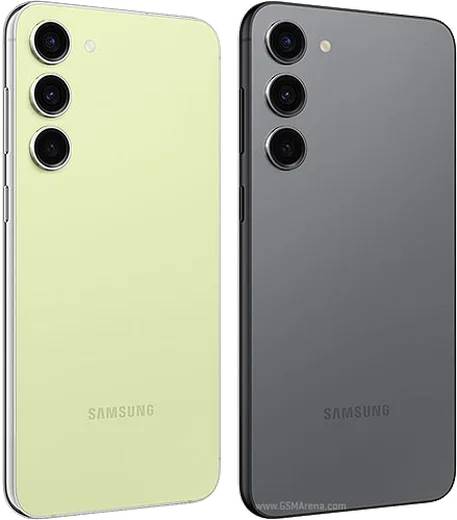
WhatsApp on Samsung Galaxy S23 Plus
Samsung Android

WhatsApp for Samsung Galaxy S23 Plus

Snapdragon 8 Gen 2, 6.6-inch FHD+ 120Hz AMOLED

WhatsApp Messenger 4.7 · 64.2M reviews Free · Android · ~40 MB · by WhatsApp LLC
Download WhatsApp

Ask a question / report a problem

You can ask any question about WhatsApp support on the Samsung Galaxy S23 Plus — leave it below and we'll help.

Ask a question

Can the Samsung Galaxy S23 Plus run WhatsApp?

Fully supported
  • Operating systemAndroid
  • ProcessorSnapdragon 8 Gen 2
  • WhatsApp versionLatest supported

Latest known WhatsApp problems on Samsung Galaxy S23 Plus

1

Why are my WhatsApp notifications delayed or not showing on my Galaxy S23 Plus?

One UI's aggressive battery optimization is the usual culprit, so go to Settings > Apps > WhatsApp > Battery and set it to Unrestricted. Then open Settings > Battery > Background usage limits and make sure WhatsApp is removed from both the Sleeping and Deep sleeping app lists, and confirm notifications are fully enabled in WhatsApp's own Settings > Notifications. See how others solved this on Reddit
2

How do I use WhatsApp with both SIMs (dual SIM) on the Galaxy S23 Plus?

If you want to run your second number as a separate WhatsApp, the app now supports two accounts natively: tap the three-dot menu > Settings, tap the arrow next to your name, and choose Add account to register the second number. If you only have one WhatsApp account and just want calls to connect reliably, note that WhatsApp calls run over mobile data (VoIP), not the cellular voice line, so set your default data SIM under Settings > Connections > SIM manager > Mobile data. See how others solved this on Reddit
3

Why is there no sound or one-sided audio during WhatsApp video calls on my S23 Plus?

First confirm the mic permission: Settings > Apps > WhatsApp > Permissions > Microphone > Allow, and disconnect any Bluetooth headset that may be grabbing the call audio. If it persists, clear WhatsApp's cache via Settings > Apps > WhatsApp > Storage > Clear cache, update WhatsApp from the Play Store, and restart the phone, since a stale app version is a common cause of one-sided call audio. See how others solved this on Reddit
4

Why do my WhatsApp voice messages record poorly or cut out on the Galaxy S23?

This is typically a microphone permission or a background recording conflict, so check Settings > Apps > WhatsApp > Permissions > Microphone is set to Allow, and close any other app (voice recorder, Bixby, an active call) that may be holding the mic. Clearing WhatsApp's cache under Settings > Apps > WhatsApp > Storage > Clear cache and recording in a fresh session, after updating WhatsApp from the Play Store, usually restores clean voice notes. See how others solved this on Reddit
5

Why can't I download images on WhatsApp after the Android 14 update on my S23?

Android 14 tightened storage permissions, so go to Settings > Apps > WhatsApp > Permissions > Photos and videos and select Allow all. Then check the device has free storage space, and confirm media auto-download isn't disabled in WhatsApp's own Settings > Storage and data > Media auto-download, as a blocked permission or a full device will stop images from saving. See how others solved this on Reddit
6

WhatsApp keeps crashing or freezing on my Galaxy S23, how do I fix it?

Start by force-stopping the app and clearing its cache under Settings > Apps > WhatsApp > Storage > Clear cache (not Clear data, which deletes local chats), then update to the latest version from the Play Store. If it's still broken, set the app to Unrestricted under Settings > Apps > WhatsApp > Battery and, as a last resort, back up your chats in WhatsApp Settings > Chats > Chat backup before reinstalling. See how others solved this on Reddit

Ask a question / report a problem

You can ask any question about WhatsApp support on the Samsung Galaxy S23 Plus — leave it below and we'll help.

Ask a question

Watch: setting up WhatsApp

Prefer to watch? This short walkthrough shows the whole installation and number-verification flow.

How to install WhatsApp on Samsung Galaxy S23 Plus — video walkthrough

How to install WhatsApp on Samsung Galaxy S23 Plus

1

Choose how to download

On your Samsung Galaxy S23 Plus you can get the official app two ways: from the Google Play Store — the easiest option, since it keeps WhatsApp updated automatically — or directly from the official website. You can download an APK file, by clicking a link “Download WhatsApp directly”.

2

Open WhatsApp

Launch WhatsApp from your home screen or app drawer and accept the Terms of Service to start setup.

3

Verify your phone number

Enter your phone number. If your Samsung Galaxy S23 Plus uses dual SIM, pick the line you want WhatsApp tied to, then enter the 6-digit code it sends by SMS — it usually fills in automatically.

4

Restore chats and finish setup

Restore your chat history from Google Drive (use the same Google account), add your name and photo, and tap Allow for notifications so messages and calls arrive reliably.

Stay safe: only ever install WhatsApp from the official Android source. The Download button above already points there — modified copies (GB/Plus/Aero WhatsApp) can get your number banned.

Comments (19)

No registration needed. No email required.
I
ivan_tinMay 16, 2026

help meee i pressed everything and nothing 😭 😭😭

AppWhatsOfficialMay 18, 2026

Hey, no need to stress! Tap the green Download button at the top, follow the steps, and you will have WhatsApp in a minute. You got this!

G
greg99Jan 2, 2026

installed in 2 min 😍

M
ms_leoDec 22, 2025

hey my phone has no google services, is it possible ?

AppWhatsOfficialDec 25, 2025

Thanks for asking, sure. Turn on unknown sources for your browser and grab the official APK, the guide explains how. Glad to help.

P
pete_tomNov 26, 2025

i tried 3 other guides before this one

A
aliAug 27, 2025

أخيراً أخيراً ثبّت واتساب 🙏

G
greg1990May 1, 2025

Il miglior sito, al primo colpo

P
pete_samMar 1, 2025

hi do i need to pay for the app

AppWhatsOfficialMar 7, 2025

Happy to help, it is completely free. There is no fee for the app, only your usual data or wifi is used. Hope that helps!

L
leo_robFeb 21, 2025

Hi do i need to uninstall my old whatsapp first pls

AppWhatsOfficialFeb 24, 2025

No worries, you can keep the old one. Installing the newest build simply updates it and your chats stay put. Reach out anytime.

V
val07Feb 19, 2025

Ok so restarted the phone and then it installed

A
amy_kevDec 20, 2024

You guys are life savers

M
mr_noahDec 10, 2024

enfin installé sans souci

L
leo99Oct 26, 2024

wow des étapes super claires pour le galaxy s23 Plus

N
nooooOct 22, 2024

Finally whatsapp running great on my galaxy s23plus

K
kai_jesOct 2, 2024

Omg no registration needed, love that

E
ella16Sep 19, 2024

ok so got it working on my galaxy s23 plus first try thanks again

E
ella.rSep 6, 2024

Why cant i see my contacts in the app

AppWhatsOfficialSep 11, 2024

Happy to help, add the contact in your phone with the full country code, then open WhatsApp and refresh. They should appear.

C
confuuusedSep 5, 2024

man had whatsapp on my s23plus in no time

J
joe_miaJul 31, 2024

well installed whatsapp on my s23 plus with no issues

AppWhatsOfficialAug 2, 2024

Nice one, enjoy WhatsApp!

N
nick07Jul 16, 2024

hey no contacts appear in the app

AppWhatsOfficialJul 19, 2024

Sure, contacts come from your phone address book. Save them with the country code and refresh the app to see them. Let us know if you need anything else.