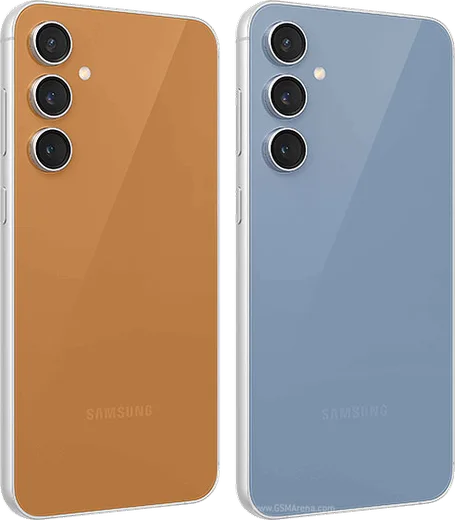
WhatsApp on Samsung Galaxy S23 FE
Samsung Android

WhatsApp for Samsung Galaxy S23 FE

Exynos 2200/SD8 Gen 1, 6.4-inch FHD+ 120Hz

WhatsApp Messenger 4.7 · 64.2M reviews Free · Android · ~40 MB · by WhatsApp LLC
Download WhatsApp

Ask a question / report a problem

You can ask any question about WhatsApp support on the Samsung Galaxy S23 FE — leave it below and we'll help.

Ask a question

Can the Samsung Galaxy S23 FE run WhatsApp?

Fully supported
  • Operating systemAndroid
  • ProcessorExynos 2200/SD8 Gen 1
  • WhatsApp versionLatest supported

Latest known WhatsApp problems on Samsung Galaxy S23 FE

1

Why am I not getting WhatsApp notifications on my Galaxy S23 FE?

One UI's aggressive battery management is usually the cause, since it puts WhatsApp to sleep in the background. Go to Settings > Apps > WhatsApp > Battery and set it to Unrestricted, then open Settings > Battery > Background usage limits and make sure WhatsApp is not in the Sleeping or Deep sleeping apps lists. Also confirm notifications are enabled in Settings > Apps > WhatsApp > Notifications, and inside WhatsApp under Settings > Notifications check that the Messages and Groups categories are turned on. See how others solved this on Reddit
2

WhatsApp video calls have no sound or distorted audio on my Galaxy S23 FE, how do I fix it?

This is often caused by Samsung's audio processing or a stale Bluetooth/audio session, so first go to Settings > Sounds and vibration > Sound quality and effects and turn Dolby Atmos off, then restart the phone. Make sure WhatsApp has microphone permission under Settings > Apps > WhatsApp > Permissions, and clear the WhatsApp cache via Settings > Apps > WhatsApp > Storage > Clear cache. If it persists, update WhatsApp from the Play Store, since several audio bugs on the S23 FE were patched in later builds. See how others solved this on Reddit
3

Can I use WhatsApp with two numbers (dual SIM) on the Galaxy S23 FE?

A single WhatsApp account ties to one phone number, but you can run two numbers using Samsung's Dual Messenger: go to Settings > Advanced features > Dual Messenger and toggle WhatsApp on to create a second cloned instance. Each WhatsApp instance is registered separately by entering and verifying a phone number during setup, so you can register your first SIM's number in one and your second SIM's number in the other. WhatsApp calls run over data/internet rather than a cellular line, so the SIM only matters for the number you register, not for routing the call. See how others solved this on Reddit
4

WhatsApp keeps crashing or freezing on my Galaxy S23 FE, what should I do?

Start by clearing the cache under Settings > Apps > WhatsApp > Storage > Clear cache (avoid Clear data, which logs you out). If it still misbehaves, update both WhatsApp from the Play Store and One UI via Settings > Software update > Download and install, since many breakage reports trace back to an outdated app or system version. As a last resort, uninstall and reinstall WhatsApp after confirming you have a recent Google Drive backup so your chat history restores cleanly. See how others solved this on Reddit
5

New contacts I add don't show up in WhatsApp on my Galaxy S23 FE, how do I sync them?

WhatsApp reads from your phone's contacts, so a contact saved only to the SIM may not sync reliably; save new contacts to a synced account such as your Google account instead. Make sure Settings > Apps > WhatsApp > Permissions > Contacts is allowed, then open WhatsApp and pull down to refresh the chats or contacts list to force a re-sync. If the contact still won't appear, verify the number is saved with the full country code (for example +1), since WhatsApp ignores improperly formatted numbers. See how others solved this on Reddit
6

My WhatsApp voice messages on the Galaxy S23 FE record garbled or cut off, how can I fix the audio?

This usually comes from another app holding the microphone or from Samsung's audio processing interfering, so close background apps and try turning off Settings > Sounds and vibration > Sound quality and effects (Dolby Atmos and the equalizer) before recording. Confirm WhatsApp has microphone access under Settings > Apps > WhatsApp > Permissions > Microphone, and clear the app cache via Settings > Apps > WhatsApp > Storage > Clear cache. If recordings are still distorted, test the mic in another app to rule out hardware, then update WhatsApp from the Play Store. See how others solved this on Reddit

Ask a question / report a problem

You can ask any question about WhatsApp support on the Samsung Galaxy S23 FE — leave it below and we'll help.

Ask a question

Watch: setting up WhatsApp

Prefer to watch? This short walkthrough shows the whole installation and number-verification flow.

How to install WhatsApp on Samsung Galaxy S23 FE — video walkthrough

How to install WhatsApp on Samsung Galaxy S23 FE

1

Choose how to download

On your Samsung Galaxy S23 FE you can get the official app two ways: from the Google Play Store — the easiest option, since it keeps WhatsApp updated automatically — or directly from the official website. You can download an APK file, by clicking a link “Download WhatsApp directly”.

2

Open WhatsApp

Launch WhatsApp from your home screen or app drawer and accept the Terms of Service to start setup.

3

Verify your phone number

Enter your phone number. If your Samsung Galaxy S23 FE uses dual SIM, pick the line you want WhatsApp tied to, then enter the 6-digit code it sends by SMS — it usually fills in automatically.

4

Restore chats and finish setup

Restore your chat history from Google Drive (use the same Google account), add your name and photo, and tap Allow for notifications so messages and calls arrive reliably.

Stay safe: only ever install WhatsApp from the official Android source. The Download button above already points there — modified copies (GB/Plus/Aero WhatsApp) can get your number banned.

Comments (13)

No registration needed. No email required.
R
rob_ytMay 8, 2026

Honestly perfect steps for the samsung galaxy s23 fe lol

S
sol_zoeMay 1, 2026

hey SOS i cant figure out how to install whatsapp heeelp :(

AppWhatsOfficialMay 3, 2026

Hey, no need to stress! Tap the green Download button at the top, follow the steps, and you will have WhatsApp in a minute.

K
kai.aApr 25, 2026

sorry but stuck on a black screen after install ?

AppWhatsOfficialMay 1, 2026

Of course, a black screen usually clears after a restart. If not, reinstall the newest version and it should open fine. Enjoy WhatsApp on your your phone!

B
big_deniMar 16, 2026

is this the official whatsapp or a modded one

AppWhatsOfficialMar 20, 2026

Hey there, it is the official WhatsApp from the real app store. We do not recommend modded versions like GB or Plus, they can get your number banned. Enjoy WhatsApp on your your phone!

A
ash.mFeb 20, 2026

hi the download is very slow is that normal

AppWhatsOfficialFeb 23, 2026

Good question, it depends on your connection. Try switching to wifi if you can, and the download should finish in under a minute on most networks.

A
alex_nicJan 22, 2026

my new Samsung Galaxy S23 FE is all set up now

M
ms_rosaJul 17, 2025

yo everything working now

L
laylaJul 2, 2025

أفضل موقع، اشتغل من أول مرة 👍

L
lil_tanApr 26, 2025

Merci, mon s23fe a whatsapp maintenant 👍

N
nick_greMar 3, 2025

Ok so did it on my Samsung Galaxy S23 FE in like 2 minutes thanks again

AppWhatsOfficialMar 7, 2025

Thanks, enjoy the app!

N
not_marcDec 9, 2024

ey por fin pude instalar whatsapp 🎉

R
rosa_marNov 20, 2024

honestly easy install on my Galaxy S23 FE

X
xX_raySep 21, 2024

very clear steps