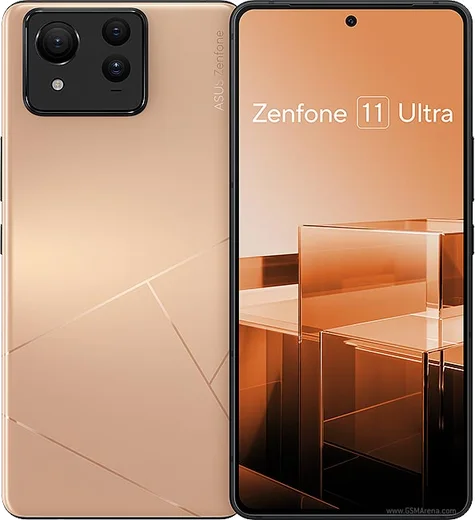
WhatsApp on Asus Zenfone 11 Ultra
Asus Android

WhatsApp for Asus Zenfone 11 Ultra

Snapdragon 8 Gen 3, 6.78-inch 144Hz AMOLED, 5500mAh

WhatsApp Messenger 4.7 · 64.2M reviews Free · Android · ~40 MB · by WhatsApp LLC
Download WhatsApp

Ask a question / report a problem

You can ask any question about WhatsApp support on the Asus Zenfone 11 Ultra — leave it below and we'll help.

Ask a question

Can the Asus Zenfone 11 Ultra run WhatsApp?

Fully supported
  • Operating systemAndroid
  • ProcessorSnapdragon 8 Gen 3
  • WhatsApp versionLatest supported

Latest known WhatsApp problems on Asus Zenfone 11 Ultra

1

Why does WhatsApp look different or use the old interface on my Zenfone 11 Ultra?

WhatsApp rolls out its redesigned interface server-side, so the same app version can look different from one phone to another even on the same Android build - it is tied to your account, not your Zenfone. Make sure WhatsApp is fully updated in the Play Store (tap your profile photo > Manage apps & device > Update all), then force-stop it via Settings > Apps > WhatsApp > Force stop and reopen. If it still shows the older look, the new layout simply hasn't reached your account yet and will arrive automatically later. See how others solved this on Reddit
2

How do I record WhatsApp calls on the Asus Zenfone 11 Ultra?

WhatsApp does not let third-party apps capture its encrypted in-app call audio, and Asus's ZenUI has no native call recorder for VoIP calls, so there is no built-in toggle for this. The only reliable workaround is to put the call on speaker and use a separate voice-recorder app, or record with a second device. Be aware that recording calls without the other party's consent may be illegal in your region. See how others solved this on Reddit
3

Why are WhatsApp notifications delayed on my Zenfone 11 Ultra until I open the app?

Asus's aggressive battery optimization is the usual culprit, since ZenUI suspends background apps to save power. Go to Settings > Apps > WhatsApp > Battery (or App battery usage) and set it to Unrestricted, then open the Mobile Manager app and make sure WhatsApp is allowed in the Auto-start manager. Also turn off any scheduled or adaptive battery-saver profile so WhatsApp can keep a live background connection. See how others solved this on Reddit
4

Can I run WhatsApp on my Zenfone 11 Ultra without Google services after de-Googling?

WhatsApp itself runs without Google Mobile Services, but its push notifications normally rely on Google's Firebase, so on a de-Googled setup you'll want microG installed to receive timely alerts. Install WhatsApp from Aurora Store or a trusted APK, then verify microG's Cloud Messaging is registered; otherwise new messages only appear when you open the app manually. Without microG, WhatsApp still sends and reads messages, but background notifications are unreliable. See how others solved this on Reddit
5

Why do WhatsApp photos and videos look over-compressed on my Zenfone 11 Ultra?

WhatsApp heavily compresses media by default, which is separate from your phone's camera quality. When sending, attach the file as a Document (paperclip > Document) instead of through the gallery to preserve full resolution, or in Settings > Storage and data > Media upload quality choose HD. For received media that already looks soft, the sender's copy was compressed before it reached you, so ask them to resend it as a document. See how others solved this on Reddit

Ask a question / report a problem

You can ask any question about WhatsApp support on the Asus Zenfone 11 Ultra — leave it below and we'll help.

Ask a question

Watch: setting up WhatsApp

Prefer to watch? This short walkthrough shows the whole installation and number-verification flow.

How to install WhatsApp on Asus Zenfone 11 Ultra — video walkthrough

How to install WhatsApp on Asus Zenfone 11 Ultra

1

Choose how to download

On your Asus Zenfone 11 Ultra you can get the official app two ways: from the Google Play Store — the easiest option, since it keeps WhatsApp updated automatically — or directly from the official website. You can download an APK file, by clicking a link “Download WhatsApp directly”.

2

Open WhatsApp

Launch WhatsApp from your home screen or app drawer and accept the Terms of Service to start setup.

3

Verify your phone number

Enter your phone number. If your Asus Zenfone 11 Ultra uses dual SIM, pick the line you want WhatsApp tied to, then enter the 6-digit code it sends by SMS — it usually fills in automatically.

4

Restore chats and finish setup

Restore your chat history from Google Drive (use the same Google account), add your name and photo, and tap Allow for notifications so messages and calls arrive reliably.

Stay safe: only ever install WhatsApp from the official Android source. The Download button above already points there — modified copies (GB/Plus/Aero WhatsApp) can get your number banned.

Comments (15)

No registration needed. No email required.
B
bea_beaApr 25, 2026

Tbh did it on my zenfone 11 ultra in like 2 minutes ❤️

L
luca.cMar 17, 2026

had whatsapp on my 11 ultra in no time thanks again

N
nightowlJan 15, 2026

official app or a mod ?

AppWhatsOfficialJan 16, 2026

Of course, it is the official WhatsApp from the real app store. We do not recommend modded versions like GB or Plus, they can get your number banned. Enjoy WhatsApp on your your phone!

N
nourJan 4, 2026

أفضل موقع، اشتغل من أول مرة

B
bea84Nov 10, 2025

man smooth and simple, no issues 👍

S
sam_miaAug 12, 2025

Facilissimo, fatto in 2 minuti

G
greg.nJun 27, 2025

ok so great stuff, much appreciated 👍

R
rob.zFeb 22, 2025

finalmente whatsapp installato sul mio 11 ultra

T
tina90Feb 16, 2025

guys perfect, exactly what i needed

M
mobilegeekFeb 1, 2025

Quick q it crashes right after the splash screen pls

AppWhatsOfficialFeb 2, 2025

No worries, sorry to hear that. Please clear the app cache in Settings, make sure your system software is updated, then reinstall the latest version. Hope that helps!

S
sara_ytJan 2, 2025

Guys cant do this alone HELP how do i download :(

AppWhatsOfficialJan 4, 2025

Breathe! Follow the steps above one by one, tap Download first, and you will be chatting in no time. You will be set up on your phone in no time.

N
noobmasterDec 17, 2024

so simple and fast

P
priya1990Nov 15, 2024

worked perfect on my zenfone 11ultra

W
whyyyyyOct 19, 2024

well did it on my Asus Zenfone 11 Ultra in like 2 minutes

P
plz help meeOct 16, 2024

Guys can i use the same number on two phones

AppWhatsOfficialOct 20, 2024

Hi! You can link extra devices from Settings, that lets the same number work on another phone. Let us know if you need anything else.