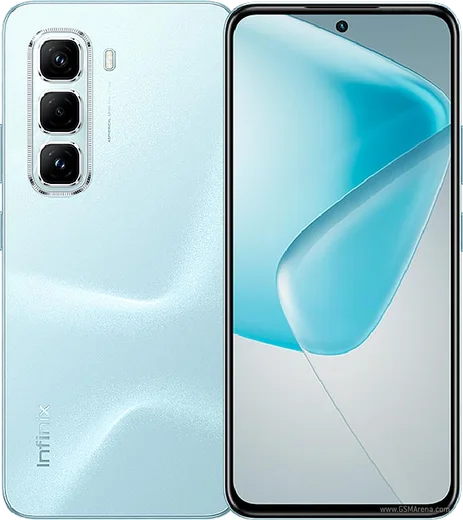
Infinix Android

WhatsApp for Infinix Smart 9

Helio G81, 6.7-inch 120Hz IPS LCD, 5000mAh battery

WhatsApp Messenger 4.7 · 64.2M reviews Free · Android · ~40 MB · by WhatsApp LLC
Download WhatsApp

Ask a question / report a problem

You can ask any question about WhatsApp support on the Infinix Smart 9 — leave it below and we'll help.

Ask a question

Can the Infinix Smart 9 run WhatsApp?

Fully supported
  • Operating systemAndroid
  • ProcessorHelio G81
  • WhatsApp versionLatest supported

Latest known WhatsApp problems on Infinix Smart 9

1

How do I stop ads and pop-ups on my Infinix Smart 9?

Most ads on the Smart 9 come from XOS system apps, not from WhatsApp or the apps you installed. Open Settings > Apps > App management, find Palm Store, Phone Master/Security and Folax, open each one and turn off any 'Receive recommendations'/'Personalized content' toggle inside it. Then go to Settings > Google > Ads and tap 'Delete advertising ID'. Finally, revoke notification permission for those system apps under Settings > Notifications (or Settings > Apps > Notifications). Disabling Palm Store this way removes the bulk of the intrusive pop-ups. See how others solved this on Reddit
2

WhatsApp video and voice call notifications don't show up on my Infinix Smart 9

This is XOS aggressive battery management killing WhatsApp in the background. Go to Settings > Apps > App management > WhatsApp > Battery (or 'Battery usage') and set it to 'No restrictions'/'Allow background activity'. If your XOS build has a power-saving/auto-launch protected list (often under Settings > Battery or Phone Master), add WhatsApp to it. Then confirm notifications are fully enabled under Settings > Notifications > WhatsApp, including the 'Calls' channel and pop-up/floating notifications. See how others solved this on Reddit
3

Why can't I see WhatsApp floating over other apps on my Infinix Smart 9?

Floating call windows and chat heads need the overlay permission, which XOS often leaves off by default. Go to Settings > Apps > Special app access > Display over other apps (or Settings > Apps > App management > WhatsApp > Permissions) and turn on 'Display over other apps' for WhatsApp. After granting it, restart WhatsApp so the floating window can appear when you switch apps during a call. See how others solved this on Reddit
4

Can I replace the Infinix Smart 9 home screen with a cleaner launcher?

Yes, the stock XOS launcher can be swapped for something lighter like Smart Launcher or Nova. Install it from the Play Store, then go to Settings > Apps > Default apps > Home app and pick the new launcher; press the home button once to set it active. To hide the leftover XOS feed and shortcuts, the new launcher's own home settings let you remove them, and you can clear the old launcher's defaults under Settings > Apps > App management. See how others solved this on Reddit
5

My Infinix Smart 9 is stuck on the boot/recovery screen and won't start

First force a restart by holding the Power button for about 15-20 seconds until it reboots. If it keeps looping, power off and boot into recovery by holding Power + Volume Up, choose 'Wipe cache partition' and reboot, which fixes most soft bricks without erasing data. If it still won't boot, a 'Wipe data/factory reset' from recovery usually revives it (this erases your data). A true hard brick stuck in download/flash mode needs the official XOS firmware reflashed via Infinix's service tool, so back up to your Google account beforehand. See how others solved this on Reddit
6

Is the Infinix Smart 9 actually good, or will it slow down and lag over time?

As a budget XOS phone the Smart 9 handles WhatsApp, browsing and light apps fine; slowdowns usually come from preinstalled bloatware and limited RAM rather than failing hardware. Keep it smooth by disabling promo apps (Settings > Apps > App management), reducing animations in Developer options, and enabling 'Memory extension'/RAM expansion in Settings. Clearing a heavy app's cache via Settings > Apps > App management > [app] > Storage also helps if it starts feeling sluggish. See how others solved this on Reddit

Ask a question / report a problem

You can ask any question about WhatsApp support on the Infinix Smart 9 — leave it below and we'll help.

Ask a question

Watch: setting up WhatsApp

Prefer to watch? This short walkthrough shows the whole installation and number-verification flow.

How to install WhatsApp on Infinix Smart 9 — video walkthrough

How to install WhatsApp on Infinix Smart 9

1

Choose how to download

On your Infinix Smart 9 you can get the official app two ways: from the Google Play Store — the easiest option, since it keeps WhatsApp updated automatically — or directly from the official website. You can download an APK file, by clicking a link “Download WhatsApp directly”.

2

Open WhatsApp

Launch WhatsApp from your home screen or app drawer and accept the Terms of Service to start setup.

3

Verify your phone number

Enter your phone number. If your Infinix Smart 9 uses dual SIM, pick the line you want WhatsApp tied to, then enter the 6-digit code it sends by SMS — it usually fills in automatically.

4

Restore chats and finish setup

Restore your chat history from Google Drive (use the same Google account), add your name and photo, and tap Allow for notifications so messages and calls arrive reliably.

Stay safe: only ever install WhatsApp from the official Android source. The Download button above already points there — modified copies (GB/Plus/Aero WhatsApp) can get your number banned.

Comments (10)

No registration needed. No email required.
R
rob.pMay 3, 2026

ok so whatsapp running great on my infinix smart 9 🔥

N
noah99Jan 10, 2026

omg help meee i pressed everything and nothing 😭 :(

AppWhatsOfficialJan 14, 2026

Relax, it is simpler than it looks. Press Download, install, then verify with the SMS code. You got this! Reply here if you get stuck.

J
justmeNov 8, 2025

wow très simple, fait en 2 minutes sur mon Infinix Smart 9 👍

L
lina00Oct 16, 2025

finally no annoying ads which is nice

T
the_real_robAug 17, 2025

omg did it without any help, very simple

X
xX_miaAug 14, 2025

my infinix smart 9 was being difficult but this sorted it

S
stuckkkAug 9, 2025

ngl got my infinix smart 9 sorted thanks to you

H
helpmeApr 12, 2025

Wow le meilleur site, marché du premier coup

Z
zoe_realJan 10, 2025

omg smooth install on the Infinix Smart 9

L
lou_jesJan 6, 2025

yo you guys are life savers cheers