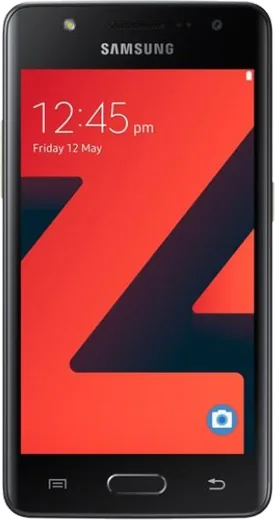
WhatsApp on Samsung Z4
Samsung Android

WhatsApp for Samsung Z4

Install the official WhatsApp on your Samsung Z4 in a few simple steps.

WhatsApp Messenger 4.7 · 64.2M reviews Free · Android · ~40 MB · by WhatsApp LLC
Download WhatsApp

Ask a question / report a problem

You can ask any question about WhatsApp support on the Samsung Z4 — leave it below and we'll help.

Ask a question

Can the Samsung Z4 run WhatsApp?

Not supported
  • Operating systemAndroid
  • WhatsApp versionNot supported

Latest known WhatsApp problems on Samsung Z4

1

Why can't I install WhatsApp from the Play Store on my Samsung Z4?

The Samsung Z4 runs Tizen OS, not Android, so it has no Google Play Store and cannot run Android APK files. WhatsApp was distributed for Tizen through the Samsung Galaxy Store (Galaxy Apps), so open that store on the phone and search for WhatsApp there rather than trying to sideload an Android version, which will not install on Tizen. See how others solved this on Reddit
2

WhatsApp shows as unsupported or won't open after an update on my Z4 — what can I do?

WhatsApp officially ended support for the Tizen platform, so the Galaxy Store build for the Z4 stopped receiving updates and now shows an unsupported-version screen. While a build is still listed you can try updating it from the Galaxy Store, but once support is fully retired there is no fix on the device itself — the only reliable option is moving WhatsApp to a separate supported phone, since no Android WhatsApp APK will run on Tizen. See how others solved this on Reddit
3

Can I extract and reinstall the original apps that came with the Samsung Z4?

Yes — the stock Tizen apps and games shipped on the Z1/Z2/Z3/Z4 can be pulled as .tpk Tizen package files and reinstalled, which helps when an app was removed or the Galaxy Store no longer lists it. You install them with Tizen's sdb tool (sdb install) or a Tizen package installer, not any Android installer, and they only run on Tizen devices like the Z4. See how others solved this on Reddit
4

Is my Samsung Z4 an Android phone, and why won't normal Android apps work on it?

No — the Z4 is a Tizen smartphone. Tizen is Samsung's own operating system and is not compatible with Android apps, the Play Store, or APK files. You're limited to apps published specifically for Tizen in the Galaxy Store, which is why many mainstream apps either never appeared on the Z4 or were later dropped from the platform. See how others solved this on Reddit
5

WhatsApp is gone from the Galaxy Store on my Z4 — how do I keep my number and messages?

If the Tizen WhatsApp listing has disappeared, install WhatsApp on a supported phone and register it with the same SIM/phone number, then verify by SMS so your account moves to the new device. Be aware that Tizen WhatsApp chat history does not transfer to Android — there is no cross-platform backup restore — so older Z4 conversations generally cannot be carried over even though your number and contacts will continue working. See how others solved this on Reddit

Ask a question / report a problem

You can ask any question about WhatsApp support on the Samsung Z4 — leave it below and we'll help.

Ask a question

Watch: setting up WhatsApp

Prefer to watch? This short walkthrough shows the whole installation and number-verification flow.

How to install WhatsApp on Samsung Z4 — video walkthrough

How to install WhatsApp on Samsung Z4

1

Choose how to download

On your Samsung Z4 you can get the official app two ways: from the Google Play Store — the easiest option, since it keeps WhatsApp updated automatically — or directly from the official website. You can download an APK file, by clicking a link “Download WhatsApp directly”.

2

Open WhatsApp

Launch WhatsApp from your home screen or app drawer and accept the Terms of Service to start setup.

3

Verify your phone number

Enter your phone number. If your Samsung Z4 uses dual SIM, pick the line you want WhatsApp tied to, then enter the 6-digit code it sends by SMS — it usually fills in automatically.

4

Restore chats and finish setup

Restore your chat history from Google Drive (use the same Google account), add your name and photo, and tap Allow for notifications so messages and calls arrive reliably.

Stay safe: only ever install WhatsApp from the official Android source. The Download button above already points there — modified copies (GB/Plus/Aero WhatsApp) can get your number banned.

Comments (6)

No registration needed. No email required.
S
sooo_confusedApr 10, 2026

yo did it without any help, very simple 😍

T
tina_proMar 23, 2026

Easy install on my Z4

N
nightowlDec 30, 2025

Wow mon samsung z4 a enfin whatsapp, top

S
sara.dJun 16, 2025

update good job whoever made this 😍

N
nina86Jun 16, 2025

whyyy is this so hard pls help me get whatsapp pls

AppWhatsOfficialJun 20, 2025

Relax, it is simpler than it looks. Press Download, install, then verify with the SMS code. You got this! Reply here if you get stuck.

L
lina_xXApr 13, 2025

this is the only one that worked for me thx