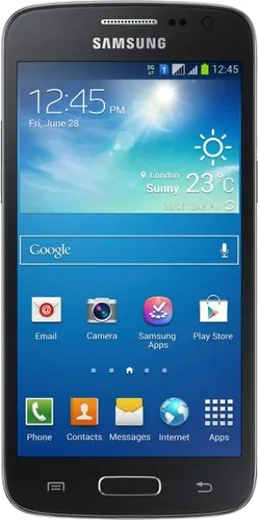
WhatsApp on Samsung Ativ S I8750
Samsung Android

WhatsApp for Samsung Ativ S I8750

Install the official WhatsApp on your Samsung Ativ S I8750 in a few simple steps.

WhatsApp Messenger 4.7 · 64.2M reviews Free · Android · ~40 MB · by WhatsApp LLC
Download WhatsApp

Ask a question / report a problem

You can ask any question about WhatsApp support on the Samsung Ativ S I8750 — leave it below and we'll help.

Ask a question

Can the Samsung Ativ S I8750 run WhatsApp?

Not supported
  • Operating systemAndroid
  • WhatsApp versionNot supported

Latest known WhatsApp problems on Samsung Ativ S I8750

1

Is the Samsung Ativ S I8750 still usable in 2024 as a renewed or second-hand phone?

The Ativ S runs Windows Phone 8/8.1, which Microsoft no longer supports, so the app store and many online services no longer work, but it still functions for calls, texts, the camera, music, and offline use. Treat a renewed unit as a retro or backup device. Before relying on it, do a full reset under Settings > about > reset your phone, and don't expect modern banking or social apps to install. See how others solved this on Reddit
2

How do I recover photos and files from a dead or non-booting Ativ S I8750?

Windows Phone exposes storage only over MTP, not as a normal USB drive, so if the phone won't boot at all you generally can't pull files by plugging it into a PC. If it still powers on, connect it via USB and browse it as a media device in Windows Explorer, or check whether your photos were auto-uploaded to OneDrive (Settings > photos+camera, auto upload). A board that won't power on usually means the data is unrecoverable without specialist hardware tools. See how others solved this on Reddit
3

The Windows Phone Store won't load apps on my Ativ S I8750 anymore. What can I do?

Microsoft shut down the legacy Windows Phone 8.x store, so the built-in Store can no longer download or update apps and most listings appear blank. There is no official fix. You can only sideload compatible XAP files manually on a developer-unlocked phone, but for most owners new app installs are simply no longer possible on this device. See how others solved this on Reddit
4

My renewed Ativ S I8750 keeps asking for a Microsoft account I don't have. How do I get past it?

Windows Phone 8 lets you skip account sign-in during setup, so when the Microsoft account screen appears choose sign in later or skip to reach the Start screen; you can add an account later under Settings > email+accounts. If the previous owner left it locked, factory reset it from Settings > about > reset your phone, or if you can't reach the menus, power off and use the hardware reset by holding Volume Down while powering on and following the on-screen prompts. See how others solved this on Reddit
5

Can I connect the Ativ S I8750 to a computer to access its files like a USB drive?

The phone uses MTP rather than mass storage, so it appears under This PC in Windows Explorer as a media device, not a removable drive letter; open it there to browse Pictures, Music, and Documents. Protected system and app data won't be visible, so plan on copying only your personal media. If the device isn't detected, install the Windows Phone desktop app or update the MTP driver in Windows. See how others solved this on Reddit

Ask a question / report a problem

You can ask any question about WhatsApp support on the Samsung Ativ S I8750 — leave it below and we'll help.

Ask a question

Watch: setting up WhatsApp

Prefer to watch? This short walkthrough shows the whole installation and number-verification flow.

How to install WhatsApp on Samsung Ativ S I8750 — video walkthrough

How to install WhatsApp on Samsung Ativ S I8750

1

Choose how to download

On your Samsung Ativ S I8750 you can get the official app two ways: from the Google Play Store — the easiest option, since it keeps WhatsApp updated automatically — or directly from the official website. You can download an APK file, by clicking a link “Download WhatsApp directly”.

2

Open WhatsApp

Launch WhatsApp from your home screen or app drawer and accept the Terms of Service to start setup.

3

Verify your phone number

Enter your phone number. If your Samsung Ativ S I8750 uses dual SIM, pick the line you want WhatsApp tied to, then enter the 6-digit code it sends by SMS — it usually fills in automatically.

4

Restore chats and finish setup

Restore your chat history from Google Drive (use the same Google account), add your name and photo, and tap Allow for notifications so messages and calls arrive reliably.

Stay safe: only ever install WhatsApp from the official Android source. The Download button above already points there — modified copies (GB/Plus/Aero WhatsApp) can get your number banned.

Comments (6)

No registration needed. No email required.
R
raj_mikApr 1, 2026

wow très simple, fait en 2 minutes sur mon samsung ativ s i8750 😍

Y
yuki_realDec 28, 2025

plz heeeelp me how to download on my ativsi8750 :(

AppWhatsOfficialDec 29, 2025

Don't worry, you can do this! Use the Download button, install the app, and enter your number to verify. You got this!

L
lina.sOct 13, 2025

yo this fixed whatsapp on my ativsi8750 👍

G
greg00Aug 3, 2025

update simple and fast 👍

M
mobilegeekJun 13, 2025

Should i remove the old version before this thanks

AppWhatsOfficialJun 14, 2025

Sure, you can keep the old one. Installing the newest build simply updates it and your chats stay put.

N
noah_realApr 21, 2025

Update perfect steps for the ativ s i8750

AppWhatsOfficialApr 25, 2025

That is great to hear!