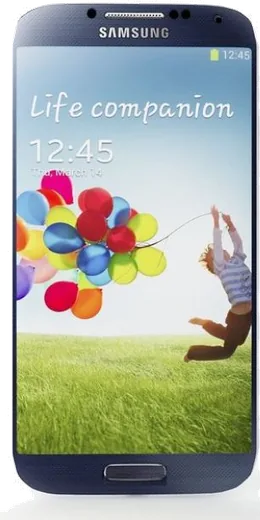
WhatsApp on Samsung I9506 Galaxy S4
Samsung Android

WhatsApp for Samsung I9506 Galaxy S4

Install the official WhatsApp on your Samsung I9506 Galaxy S4 in a few simple steps.

WhatsApp Messenger 4.7 · 64.2M reviews Free · Android · ~40 MB · by WhatsApp LLC
Download WhatsApp

Ask a question / report a problem

You can ask any question about WhatsApp support on the Samsung I9506 Galaxy S4 — leave it below and we'll help.

Ask a question

Can the Samsung I9506 Galaxy S4 run WhatsApp?

Not supported
  • Operating systemAndroid
  • WhatsApp versionNot supported

Latest known WhatsApp problems on Samsung I9506 Galaxy S4

1

Can I update my Samsung I9506 Galaxy S4 to Android 5.0 Lollipop, and will it help with WhatsApp?

The I9506 shipped with Android 4.2/4.3 and Samsung's last official update for it was Android 5.0.1 Lollipop, so check Settings > About device > Software update to pull the final official build. Newer WhatsApp versions dropped support for very old Android, so being on Lollipop helps; install or update WhatsApp from the Play Store. If your model is stuck on KitKat and the Play Store refuses the update, your only path to keep WhatsApp current is a custom Lollipop-or-newer ROM. See how others solved this on Reddit
2

The stock weather widget and clock on my Galaxy S4 LTE-A stopped showing the forecast on my home screen

Samsung's old AccuWeather feed for the I9506 was retired years ago, which is why the stock weather widget went blank. Try updating the weather provider via the Play Store, but the reliable fix is to replace the stock widget with a current third-party weather app: long-press an empty area of the home screen > Widgets, drag the new widget on, then grant it location access under Settings > Apps > (the weather app) > Permissions. See how others solved this on Reddit
3

Should I root my Samsung I9506 Galaxy S4 to free up storage so WhatsApp media stops filling the phone?

Rooting the I9506 lets you remove Samsung bloatware, but it permanently trips the Knox flag and can break secure features, so only consider it if the phone is no longer critical. A simpler fix for WhatsApp media needs no root: open WhatsApp > Settings > Storage and data > Manage storage to delete large files, and to move data off internal storage go to Settings > Storage (or Settings > More > Storage on older TouchWiz) and set the SD card as the default save location. See how others solved this on Reddit
4

I just rooted my Galaxy S4 I9506 - what should I do to make WhatsApp run smoother and last longer?

After rooting, flash a custom recovery like TWRP and a maintained newer ROM (such as LineageOS) for the I9506, since a more modern Android base keeps current WhatsApp running far better than stock Lollipop. Then use Greenify to hibernate background apps and free up RAM for WhatsApp, and always back up your chats first via WhatsApp > Settings > Chats > Chat backup before flashing anything. See how others solved this on Reddit
5

My old Samsung I9506 Galaxy S4 is laggy and WhatsApp feels slow - is it worth keeping or upgrading?

The I9506 has only 2GB of RAM and aging storage, so heavy WhatsApp use plus background apps will lag. Clear the cache under Settings > Apps > WhatsApp > Storage > Clear cache and disable unused system apps to reclaim memory. If it stays sluggish, back up your WhatsApp chats to Google Drive and do a factory reset via Settings > Backup and reset > Factory data reset before deciding whether to replace the phone. See how others solved this on Reddit

Ask a question / report a problem

You can ask any question about WhatsApp support on the Samsung I9506 Galaxy S4 — leave it below and we'll help.

Ask a question

Watch: setting up WhatsApp

Prefer to watch? This short walkthrough shows the whole installation and number-verification flow.

How to install WhatsApp on Samsung I9506 Galaxy S4 — video walkthrough

How to install WhatsApp on Samsung I9506 Galaxy S4

1

Choose how to download

On your Samsung I9506 Galaxy S4 you can get the official app two ways: from the Google Play Store — the easiest option, since it keeps WhatsApp updated automatically — or directly from the official website. You can download an APK file, by clicking a link “Download WhatsApp directly”.

2

Open WhatsApp

Launch WhatsApp from your home screen or app drawer and accept the Terms of Service to start setup.

3

Verify your phone number

Enter your phone number. If your Samsung I9506 Galaxy S4 uses dual SIM, pick the line you want WhatsApp tied to, then enter the 6-digit code it sends by SMS — it usually fills in automatically.

4

Restore chats and finish setup

Restore your chat history from Google Drive (use the same Google account), add your name and photo, and tap Allow for notifications so messages and calls arrive reliably.

Stay safe: only ever install WhatsApp from the official Android source. The Download button above already points there — modified copies (GB/Plus/Aero WhatsApp) can get your number banned.

Comments (10)

No registration needed. No email required.
L
luca.kJun 23, 2026

súper sencillo, ya está listo 🎉

T
tom21Apr 22, 2026

Omg installed whatsapp on my samsung i9506 galaxy s4 with no issues

J
joe31Mar 24, 2026

wow installé sans souci

R
rosa_rayJan 29, 2026

well set up whatsapp on my dads Samsung I9506 Galaxy S4 no problem cheers

S
stuckkkNov 29, 2025

it worked first try 😍

N
noobmasterAug 30, 2025

Guys my Samsung I9506 Galaxy S4 was being difficult but this sorted it cheers

P
priya31Jul 31, 2025

Hi download takes forever for me

AppWhatsOfficialAug 4, 2025

Hi! It depends on your connection. Try switching to wifi if you can, and the download should finish in under a minute on most networks. Enjoy WhatsApp on your your phone!

J
jess87Mar 4, 2025

Installed on my I9506 Galaxy S4, super simple 😍

M
mmmaaaxxxDec 31, 2024

guys my whole family is waiting pls help me install it

AppWhatsOfficialJan 2, 2025

Relax, it is simpler than it looks. Press Download, install, then verify with the SMS code. You got this!

M
mr_miaOct 19, 2024

man downloaded and installed on my i9506galaxys4