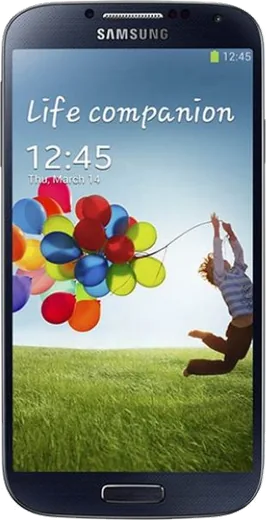
WhatsApp on Samsung I9505 Galaxy S4
Samsung Android

WhatsApp for Samsung I9505 Galaxy S4

Install the official WhatsApp on your Samsung I9505 Galaxy S4 in a few simple steps.

WhatsApp Messenger 4.7 · 64.2M reviews Free · Android · ~40 MB · by WhatsApp LLC
Download WhatsApp

Ask a question / report a problem

You can ask any question about WhatsApp support on the Samsung I9505 Galaxy S4 — leave it below and we'll help.

Ask a question

Can the Samsung I9505 Galaxy S4 run WhatsApp?

Not supported
  • Operating systemAndroid
  • WhatsApp versionNot supported

Latest known WhatsApp problems on Samsung I9505 Galaxy S4

1

Why does my Galaxy S4 I9505 get so hot and drain the battery fast?

On this aging S4, overheating and fast drain are usually a rogue app or runaway background sync rather than a hardware fault. Open Settings > More > Battery to see which app tops the usage list, force-stop it (Settings > Application manager > the app > Force stop), and turn off sync for accounts you don't need under Settings > Accounts; also switch off GPS and mobile data when idle. If it still runs warm sitting untouched on the lock screen, the original 2013 battery has likely degraded or swelled, and since the back cover pops off and the battery is user-replaceable, a fresh I9505 cell will usually fix both the heat and the drain. See how others solved this on Reddit
2

My Galaxy S4 runs incredibly hot for no obvious reason, what's wrong?

First rule out a stuck wakelock: reboot and watch whether it heats up while sitting unused. If it does, an app or radio is stuck awake, so check Settings > More > Battery for an app holding the device awake and force-stop or uninstall it. Pull the back cover and feel the battery, since a worn or swollen cell after this many years generates heat on its own and should be swapped. If you're on a custom ROM, a mismatched modem or GPS driver can peg the CPU, so reflash a clean build and a matching modem to stop the constant heat. See how others solved this on Reddit
3

Should I update my Galaxy S4 to Android 5.0 Lollipop?

Lollipop (5.0.1) is the last stock firmware Samsung ever shipped for the I9505, and it brings some security and visual improvements, but it also made some S4 units feel sluggish and hit battery life harder. If your phone is stable on KitKat (4.4.x) and you mainly want speed, it's fine to stay put. If you want the newest stock features, flash the official 5.0.1 firmware with Odin and do a factory reset afterward to avoid lag. For anything newer than 5.0 you'd need a custom ROM like LineageOS, not a Samsung update. See how others solved this on Reddit
4

After flashing LineageOS on my S4 I get "Setup Wizard keeps stopping" and can't install GApps, how do I fix it?

This error almost always means the Google Apps package didn't match your ROM's Android version or CPU architecture, so the setup wizard crashes on first boot. Boot into TWRP recovery, wipe Data/Cache/Dalvik, reflash the LineageOS build for the I9505, then immediately flash an ARM GApps package whose Android version exactly matches that build (for example an ARM 7.1 package for a LineageOS 14.1 / Android 7.1 ROM) before the first reboot. Pick a smaller variant like pico or nano so it fits the S4's modest system partition, and don't reboot between the ROM and GApps flash. See how others solved this on Reddit
5

Is my Galaxy S4 running a prototype or unusual Jellybean build?

On a retail I9505, open Settings > More > About device: the Model number should read GT-I9505 and the build number will show one of the standard JDQ39/JSS15 Jellybean strings Samsung shipped. A genuine prototype would show an engineering build, a non-retail model code, or extra test menus. If you see odd debug options or a CSC that matches no carrier, you may have a pre-release or engineering unit. Either way it runs all normal apps fine, and you can flash a clean official I9505 firmware with Odin if you want a known-good retail build. See how others solved this on Reddit
6

Can I still get a newer Android version than 5.0 on my Galaxy S4 in 2026?

Samsung never released anything past Android 5.0.1 for the S4, so the only way higher is a community custom ROM. The I9505 (jfltexx) had official LineageOS support through LineageOS 14.1 (Android 7.1), with unofficial community builds reaching newer versions of varying stability, all flashed through TWRP recovery. That gets you more recent security patches and a lighter system than stock Lollipop. Back up your data first, install a matching ARM GApps package alongside the ROM, and expect to rely on community builds since there's no further official update path. See how others solved this on Reddit

Ask a question / report a problem

You can ask any question about WhatsApp support on the Samsung I9505 Galaxy S4 — leave it below and we'll help.

Ask a question

Watch: setting up WhatsApp

Prefer to watch? This short walkthrough shows the whole installation and number-verification flow.

How to install WhatsApp on Samsung I9505 Galaxy S4 — video walkthrough

How to install WhatsApp on Samsung I9505 Galaxy S4

1

Choose how to download

On your Samsung I9505 Galaxy S4 you can get the official app two ways: from the Google Play Store — the easiest option, since it keeps WhatsApp updated automatically — or directly from the official website. You can download an APK file, by clicking a link “Download WhatsApp directly”.

2

Open WhatsApp

Launch WhatsApp from your home screen or app drawer and accept the Terms of Service to start setup.

3

Verify your phone number

Enter your phone number. If your Samsung I9505 Galaxy S4 uses dual SIM, pick the line you want WhatsApp tied to, then enter the 6-digit code it sends by SMS — it usually fills in automatically.

4

Restore chats and finish setup

Restore your chat history from Google Drive (use the same Google account), add your name and photo, and tap Allow for notifications so messages and calls arrive reliably.

Stay safe: only ever install WhatsApp from the official Android source. The Download button above already points there — modified copies (GB/Plus/Aero WhatsApp) can get your number banned.

Comments (10)

No registration needed. No email required.
E
eeeeeemmmmmaaaaaJul 2, 2026

Quick q wont this give me a virus thanks

AppWhatsOfficialJul 4, 2026

Yes, it is completely safe. The Download button takes you to the official app on the store, we never host modified versions. Feel free to ask if you get stuck.

Y
yuki18Jun 17, 2026

Honestly bookmarking this site for sure

V
val2000Mar 15, 2026

beste seite, hat sofort geklappt auf meinem i9505galaxys4

P
pleaseeeDec 8, 2025

Installed on my samsung i9505 galaxy s4, super simple cheers

AppWhatsOfficialDec 11, 2025

Good to hear!

P
pete93Aug 23, 2025

Yo smooth install on the i9505 galaxy S4 ❤️

L
lina.kJul 24, 2025

guys works like a charm on the I9505 Galaxy S4 👍

K
kai44Jul 6, 2025

guys very clear steps 🎉

S
sara92Jan 18, 2025

ugh anyone pls i cant download it heeeelp me :(

AppWhatsOfficialJan 22, 2025

You are almost there! Tap Download, allow the install, open WhatsApp and confirm your number. It is easier than it looks, promise.

L
lucy26Nov 4, 2024

well whatsapp finally on my Samsung I9505 Galaxy S4

L
lina38Aug 27, 2024

hey hat super funktioniert, danke