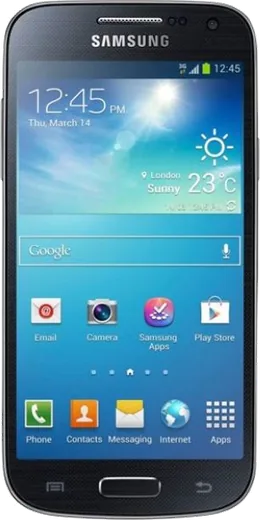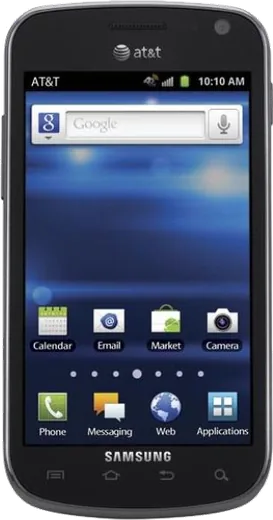
WhatsApp on Samsung I9190 Galaxy S4 mini
Samsung Android

WhatsApp for Samsung I9190 Galaxy S4 mini

Install the official WhatsApp on your Samsung I9190 Galaxy S4 mini in a few simple steps.

WhatsApp Messenger 4.7 · 64.2M reviews Free · Android · ~40 MB · by WhatsApp LLC
Download WhatsApp

Ask a question / report a problem

You can ask any question about WhatsApp support on the Samsung I9190 Galaxy S4 mini — leave it below and we'll help.

Ask a question

Can the Samsung I9190 Galaxy S4 mini run WhatsApp?

Not supported
  • Operating systemAndroid
  • WhatsApp versionNot supported

Latest known WhatsApp problems on Samsung I9190 Galaxy S4 mini

1

How can I turn my old Samsung Galaxy S4 mini into a basic dumb phone for calls and texts only?

Long-press the home screen and remove every app shortcut except Phone, Contacts and Messages. To go further, disable the apps you can't uninstall via Settings > Application manager > swipe to the All tab > tap each app (Internet, Play Store, Email) > Disable. For an even cleaner setup, install a minimalist launcher like KISS or Olauncher from the Play Store first, set it as the default home (Settings > Application manager > pick your launcher as default), then disable the rest. See how others solved this on Reddit
2

My Galaxy S4 mini is stuck on Android 4.4 KitKat and most apps say it's no longer supported. What can I do?

The I9190 officially tops out at Android 4.4.2, so many newer Play Store apps will refuse to install. If you want a more usable device you can flash an unofficial LineageOS build for the S4 mini family via TWRP recovery (this wipes the phone and voids warranty, so back up first). Otherwise, embrace it as a calls-and-texts-only phone where the outdated OS no longer matters because you've stripped it down. See how others solved this on Reddit
3

How do I stop my S4 mini from constantly draining battery and getting hot when idle?

Open Settings > More networks > Mobile networks and turn off Mobile data, and turn off Wi-Fi (Settings > Wi-Fi) when you don't need it, since background sync on Android 4.4 is a major drain. Then go to Settings > Application manager > All and disable Gmail and social apps you don't use. On a dumb-phone setup you can leave only the cellular radio active, which sharply cuts heat and standby drain. See how others solved this on Reddit
4

Can I block the internet and the browser on my Galaxy S4 mini so it stays distraction-free?

Open Settings > Application manager, swipe to the All tab, tap the stock Internet browser (and Chrome if it's installed) and choose Disable so they can't be launched. To fully cut the web, go to Settings > More networks > Mobile networks and turn off Mobile data, leaving only calls and SMS working. See how others solved this on Reddit
5

How do I factory reset my Samsung I9190 Galaxy S4 mini before repurposing or selling it?

Back up contacts to your Google account first via Settings > Accounts > Google, then go to Settings > Backup and reset > Factory data reset > Reset device. If the phone won't boot normally, power off and hold Volume Up + Home + Power to enter recovery mode, use the volume keys to highlight 'wipe data/factory reset', and confirm with the power button. See how others solved this on Reddit
6

My S4 mini storage is always full even though I have almost no apps. How do I free up space?

The I9190 has only 8GB of internal storage, so move photos and music to a microSD card via My Files > Device storage, long-press the files and choose Move > SD card. Then clear cached data through Settings > Storage > Cached data, and disable or uninstall bloatware under Settings > Application manager to reclaim the space those Samsung and Google apps take up. See how others solved this on Reddit

Ask a question / report a problem

You can ask any question about WhatsApp support on the Samsung I9190 Galaxy S4 mini — leave it below and we'll help.

Ask a question

Watch: setting up WhatsApp

Prefer to watch? This short walkthrough shows the whole installation and number-verification flow.

How to install WhatsApp on Samsung I9190 Galaxy S4 mini — video walkthrough

How to install WhatsApp on Samsung I9190 Galaxy S4 mini

1

Choose how to download

On your Samsung I9190 Galaxy S4 mini you can get the official app two ways: from the Google Play Store — the easiest option, since it keeps WhatsApp updated automatically — or directly from the official website. You can download an APK file, by clicking a link “Download WhatsApp directly”.

2

Open WhatsApp

Launch WhatsApp from your home screen or app drawer and accept the Terms of Service to start setup.

3

Verify your phone number

Enter your phone number. If your Samsung I9190 Galaxy S4 mini uses dual SIM, pick the line you want WhatsApp tied to, then enter the 6-digit code it sends by SMS — it usually fills in automatically.

4

Restore chats and finish setup

Restore your chat history from Google Drive (use the same Google account), add your name and photo, and tap Allow for notifications so messages and calls arrive reliably.

Stay safe: only ever install WhatsApp from the official Android source. The Download button above already points there — modified copies (GB/Plus/Aero WhatsApp) can get your number banned.

Comments (7)

No registration needed. No email required.
D
deni99Mar 29, 2026

quick and painless thanks again

E
ella_yukMar 26, 2026

Worked like a charm

L
lucy75Sep 4, 2025

ok so couldnt be easier lol

D
deni.fJun 14, 2025

well my i9190galaxys4mini has whatsapp now thanks to this :)

AppWhatsOfficialJun 18, 2025

That is great to hear!

R
ray.iMay 22, 2025

wow installed in 2 min ✌️

X
xX_alexJan 6, 2025

por fin muy fácil, lo hice en 2 minutos en mi Samsung I9190 Galaxy S4 mini gracias

N
needwhatsappJul 14, 2024

cant do this alone HELP how do i download 🙏

AppWhatsOfficialJul 17, 2024

Take a breath, we got you. Press Download above, then Install, then verify your number. That is all it takes. Reply here if you get stuck.