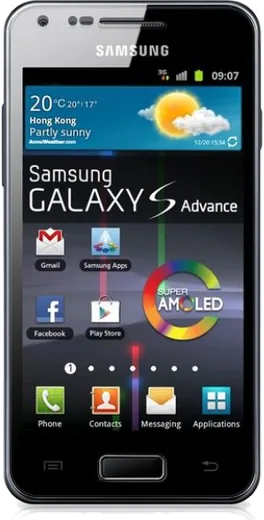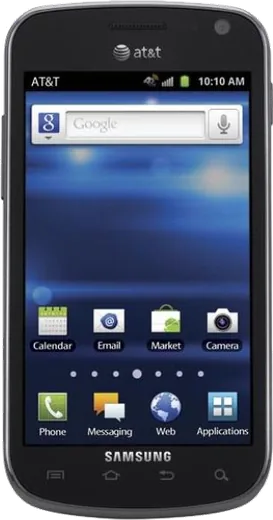
WhatsApp on Samsung I9070 Galaxy S Advance
Samsung Android

WhatsApp for Samsung I9070 Galaxy S Advance

Install the official WhatsApp on your Samsung I9070 Galaxy S Advance in a few simple steps.

WhatsApp Messenger 4.7 · 64.2M reviews Free · Android · ~40 MB · by WhatsApp LLC
Download WhatsApp

Ask a question / report a problem

You can ask any question about WhatsApp support on the Samsung I9070 Galaxy S Advance — leave it below and we'll help.

Ask a question

Can the Samsung I9070 Galaxy S Advance run WhatsApp?

Not supported
  • Operating systemAndroid
  • WhatsApp versionNot supported

Latest known WhatsApp problems on Samsung I9070 Galaxy S Advance

1

Can't sign in to my Google account on the Galaxy S Advance - login keeps failing

The S Advance runs Android 2.3.6 to 4.1.2, and Google's modern login servers often reject these old clients because their root certificates and TLS support are outdated. First check that the date and time are correct under Settings > Date & time (a wrong clock breaks the secure handshake), then try Settings > Accounts and sync > Add account > Google > Existing. If it still loops, update Google Play services if any update is offered, or sign in to the account once in a desktop browser and approve the new device. On the oldest builds the account may simply refuse to authenticate, in which case the phone has to be used offline with apps sideloaded as APKs. See how others solved this on Reddit
2

How do I add a Google account on the old Android version the Galaxy S Advance runs?

On Android 4.x devices like the S Advance, go to Settings > Accounts and sync > Add account > Google, choose Existing, and enter your credentials. Make sure the date and time are correct under Settings > Date & time first, since a wrong clock breaks the secure connection, and apply any pending Google Play services update. Because Google has retired support for these old login clients, sign-in can still fail outright, and if it does the account cannot be added on this OS. See how others solved this on Reddit
3

Links keep opening in the wrong browser instead of the correct app on my Galaxy S Advance

This happens when a browser is set as the default handler for web links. Go to Settings > Applications (Application manager), tap the browser that keeps grabbing links, and tap Clear defaults. Open the link again and, when the chooser appears, pick the app you want and tap Always. For an app that should claim its own links, open that app and look for a default or supported-links option in its settings. See how others solved this on Reddit
4

How do I make links open in Chrome instead of the stock browser on the Galaxy S Advance?

Note that Chrome's last versions for Android 4.1 are very old, but if you have it installed: there is no Default apps menu on Android 4.x, so the way to switch is to clear the current browser's defaults under Settings > Applications (Application manager) > the browser > Clear defaults. Then tap any web link, and when the chooser pops up select Chrome and tap Always so it becomes the default going forward. See how others solved this on Reddit
5

Is the Android version on the Galaxy S Advance too old to be useful now?

Largely yes. The S Advance shipped with Android 2.3.6 and topped out at 4.1.2 Jelly Bean, which is over a decade old and gets no security or Google service updates. Most current apps and even Google sign-in no longer work, so it is best used as an offline or single-purpose device for music, photos, alarms, or a media player. A lightweight custom ROM for the i9070 can stretch its life a little, but mainstream apps will stay unsupported. See how others solved this on Reddit
6

How do I enable USB debugging (ADB) on the Galaxy S Advance for sideloading or recovery?

On the S Advance's Android 4.1.2, Developer options are visible directly, so go to Settings > Developer options and toggle on USB debugging. (On Android 4.2 and newer, where the menu is hidden, you would tap Build number seven times under Settings > About phone to unlock it, but the S Advance does not need this.) Then connect over USB and accept the debugging prompt on the phone so ADB can talk to it. See how others solved this on Reddit

Ask a question / report a problem

You can ask any question about WhatsApp support on the Samsung I9070 Galaxy S Advance — leave it below and we'll help.

Ask a question

Watch: setting up WhatsApp

Prefer to watch? This short walkthrough shows the whole installation and number-verification flow.

How to install WhatsApp on Samsung I9070 Galaxy S Advance — video walkthrough

How to install WhatsApp on Samsung I9070 Galaxy S Advance

1

Choose how to download

On your Samsung I9070 Galaxy S Advance you can get the official app two ways: from the Google Play Store — the easiest option, since it keeps WhatsApp updated automatically — or directly from the official website. You can download an APK file, by clicking a link “Download WhatsApp directly”.

2

Open WhatsApp

Launch WhatsApp from your home screen or app drawer and accept the Terms of Service to start setup.

3

Verify your phone number

Enter your phone number. If your Samsung I9070 Galaxy S Advance uses dual SIM, pick the line you want WhatsApp tied to, then enter the 6-digit code it sends by SMS — it usually fills in automatically.

4

Restore chats and finish setup

Restore your chat history from Google Drive (use the same Google account), add your name and photo, and tap Allow for notifications so messages and calls arrive reliably.

Stay safe: only ever install WhatsApp from the official Android source. The Download button above already points there — modified copies (GB/Plus/Aero WhatsApp) can get your number banned.

Comments (6)

No registration needed. No email required.
N
noobmasterApr 28, 2026

yo my Samsung I9070 Galaxy S Advance was being difficult but this sorted it ❤️

V
val_robNov 9, 2025

ugh i NEED this app pleaseeee how do i do it

AppWhatsOfficialNov 10, 2025

Relax, it is simpler than it looks. Press Download, install, then verify with the SMS code. You got this!

M
ms_beaApr 30, 2025

Anyone? why does it crash on opening

AppWhatsOfficialMay 2, 2025

Sure, crashes are often an old version. Remove it, update your OS, and reinstall the newest build from the official source.

M
maxx_pabJan 10, 2025

wow no problems installing on my samsung i9070 galaxy s advance

R
ray_linAug 9, 2024

Ey gracias, mi samsung i9070 galaxy s advance ya tiene whatsapp

N
nightowlAug 6, 2024

ngl the I9070 Galaxy S Advance guide was spot on

AppWhatsOfficialAug 10, 2024

Nice one, enjoy WhatsApp!