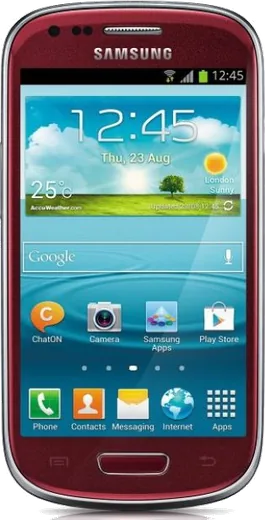
WhatsApp on Samsung I8190 Galaxy S III mini
Samsung Android

WhatsApp for Samsung I8190 Galaxy S III mini

Install the official WhatsApp on your Samsung I8190 Galaxy S III mini in a few simple steps.

WhatsApp Messenger 4.7 · 64.2M reviews Free · Android · ~40 MB · by WhatsApp LLC
Download WhatsApp

Ask a question / report a problem

You can ask any question about WhatsApp support on the Samsung I8190 Galaxy S III mini — leave it below and we'll help.

Ask a question

Can the Samsung I8190 Galaxy S III mini run WhatsApp?

Not supported
  • Operating systemAndroid
  • WhatsApp versionNot supported

Latest known WhatsApp problems on Samsung I8190 Galaxy S III mini

1

Can I still use WhatsApp on a Samsung Galaxy S3 Mini in 2024?

The S3 Mini ships with Android 4.1 Jelly Bean, which WhatsApp dropped support for years ago, so the current Play Store version won't install or stay logged in. Your only realistic option is to root the phone and flash a custom ROM based on Android 5.0+ (Lollipop), such as an unofficial LineageOS port for the i8190, which lets a more recent WhatsApp build run. Without that, plain WhatsApp is no longer usable on this hardware. See how others solved this on Reddit
2

Is the Galaxy S3 Mini still usable as a daily phone today?

It still works fine for calls, texts, alarms and a few lightweight offline apps, but the 1 GB of RAM and old Android 4.1 mean modern apps and browsers will crawl or refuse to install. To get the most life out of it, factory reset it (Settings > Backup and reset > Factory data reset), disable or uninstall unused bloatware under Settings > Application manager, and lean on it as a minimalist or backup device rather than a main smartphone. See how others solved this on Reddit
3

My Galaxy S3 Mini is slow and laggy, how do I speed it up?

On 1 GB of RAM, background apps are usually the cause, so go to Settings > Application manager, swipe to the Running tab, and stop or uninstall apps you don't use. Clear cached data via Settings > Storage > Cached data, and turn off live wallpapers and widgets on the home screen. A factory reset (Settings > Backup and reset > Factory data reset) gives the biggest improvement if it's still sluggish afterward. See how others solved this on Reddit
4

What can I actually do with a fully working S3 Mini that I don't use as my main phone?

It makes a great single-purpose device: a dedicated music or podcast player, an alarm clock or bedside dock, a Wi-Fi only game phone for kids, or a simple navigation device using offline maps like OsmAnd. Connect it to Wi-Fi, sign into a Google account under Settings > Accounts > Add account, and load only the lightweight offline apps you need so the limited storage and RAM aren't overwhelmed. See how others solved this on Reddit
5

How do I stop modern apps from refusing to install on my Galaxy S3 Mini?

Most new apps now require Android 5.0 or higher, so the Play Store simply hides or blocks them on the i8190's Android 4.1. Look for older compatible versions: some apps still serve a legacy build to old Android, or you can sideload an older APK from a trusted archive after enabling Settings > Security > Unknown sources. The cleaner long-term fix is flashing a Lollipop-based custom ROM, which unlocks far more current apps. See how others solved this on Reddit
6

Can I make the S3 Mini work as a distraction-free dumbphone?

Yes, it's a popular minimalist phone because you can strip it right down: factory reset it (Settings > Backup and reset > Factory data reset), install a simple launcher from the Play Store, and disable social and browser apps under Settings > Application manager. Keep only calls, messaging, clock and maybe an offline map, and the small screen plus weak specs naturally discourage doom-scrolling. See how others solved this on Reddit

Ask a question / report a problem

You can ask any question about WhatsApp support on the Samsung I8190 Galaxy S III mini — leave it below and we'll help.

Ask a question

Watch: setting up WhatsApp

Prefer to watch? This short walkthrough shows the whole installation and number-verification flow.

How to install WhatsApp on Samsung I8190 Galaxy S III mini — video walkthrough

How to install WhatsApp on Samsung I8190 Galaxy S III mini

1

Choose how to download

On your Samsung I8190 Galaxy S III mini you can get the official app two ways: from the Google Play Store — the easiest option, since it keeps WhatsApp updated automatically — or directly from the official website. You can download an APK file, by clicking a link “Download WhatsApp directly”.

2

Open WhatsApp

Launch WhatsApp from your home screen or app drawer and accept the Terms of Service to start setup.

3

Verify your phone number

Enter your phone number. If your Samsung I8190 Galaxy S III mini uses dual SIM, pick the line you want WhatsApp tied to, then enter the 6-digit code it sends by SMS — it usually fills in automatically.

4

Restore chats and finish setup

Restore your chat history from Google Drive (use the same Google account), add your name and photo, and tap Allow for notifications so messages and calls arrive reliably.

Stay safe: only ever install WhatsApp from the official Android source. The Download button above already points there — modified copies (GB/Plus/Aero WhatsApp) can get your number banned.

Comments (6)

No registration needed. No email required.
B
ben83May 2, 2026

Good job whoever made this 😍

A
andy_theMar 30, 2026

ok so two thumbs up thanks again

P
pablo46Dec 5, 2025

Easy install on my I8190 Galaxy S III mini lol

Y
yuki_beaJul 28, 2025

Omg plz heeeelp me how to download on my i8190galaxysiiimini 🙏

AppWhatsOfficialJul 29, 2025

Relax, it is simpler than it looks. Press Download, install, then verify with the SMS code. You got this!

N
needwhatsappDec 16, 2024

much better then the other sites ✌️

P
phoneaddictSep 27, 2024

endlich mein samsung i8190 galaxy s iii mini hat endlich whatsapp, klasse