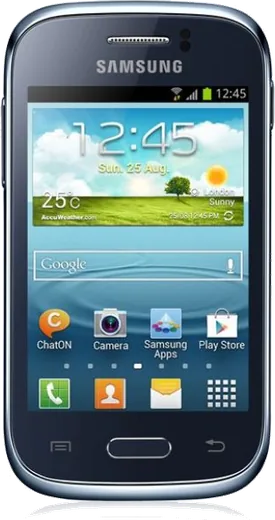
WhatsApp on Samsung Galaxy Young S6310
Samsung Android

WhatsApp for Samsung Galaxy Young S6310

Install the official WhatsApp on your Samsung Galaxy Young S6310 in a few simple steps.

WhatsApp Messenger 4.7 · 64.2M reviews Free · Android · ~40 MB · by WhatsApp LLC
Download WhatsApp

Ask a question / report a problem

You can ask any question about WhatsApp support on the Samsung Galaxy Young S6310 — leave it below and we'll help.

Ask a question

Can the Samsung Galaxy Young S6310 run WhatsApp?

Not supported
  • Operating systemAndroid
  • WhatsApp versionNot supported

Latest known WhatsApp problems on Samsung Galaxy Young S6310

1

Can I upgrade my Samsung Galaxy Young S6310 to Android 5 or higher?

No official upgrade exists. The S6310 shipped with Android 4.1 Jelly Bean and Samsung never released anything newer, so the highest stock version you can run is 4.1.2. You can confirm your version under Settings > About device > Android version, but there is no over-the-air update that will move you past 4.1. See how others solved this on Reddit
2

Is there a LineageOS or custom ROM for the Galaxy Young S6310?

There is no official LineageOS build for this model because its single-core CPU and 768MB of RAM fall below what modern Android needs. A few unofficial CyanogenMod 11 (Android 4.4) ports were attempted on forums like XDA, but they are unstable and long abandoned. Realistically the device is capped near Android 4.x, so do not expect a working Lollipop-or-higher ROM. See how others solved this on Reddit
3

Why won't Play Store apps install on my Galaxy Young S6310 anymore?

Most current apps now require a much newer Android version, so the Play Store on a 4.1 device lists them as incompatible. Try installing an older app version, or sideload a compatible APK from a trusted archive like APKMirror after enabling Settings > Security > Unknown sources. Even then, anything built in the last several years will likely refuse to run. See how others solved this on Reddit
4

How can I watch YouTube on the Galaxy Young S6310 when the app no longer works?

The official YouTube app dropped support for Android 4.1 long ago, but lightweight clients for old Android still work. Sideload an alternative such as a NewPipe APK after allowing Settings > Security > Unknown sources, or just open m.youtube.com in the browser. These avoid the modern app's minimum-version requirement. See how others solved this on Reddit
5

My Galaxy Young S6310 keeps running out of storage and freezing. What can I do?

With only about 4GB of internal storage and 768MB of RAM, this phone fills up fast. Move eligible apps to a microSD card via Settings > Application manager > (select app) > Move to SD card, clear cached data under Settings > Storage > Cached data, and uninstall anything you do not use. Keeping a few hundred MB free is what stops most of the freezing and slowdowns. See how others solved this on Reddit
6

Is the Galaxy Young S6310 still usable as a phone in 2026?

It still works fine for calls, SMS, and basic browsing, but most modern apps and banking services will refuse to run on Android 4.1. Treat it as a backup or kids' phone rather than a daily driver, stick to lightweight legacy-friendly apps, and avoid logging important accounts into its outdated, unpatched browser. See how others solved this on Reddit

Ask a question / report a problem

You can ask any question about WhatsApp support on the Samsung Galaxy Young S6310 — leave it below and we'll help.

Ask a question

Watch: setting up WhatsApp

Prefer to watch? This short walkthrough shows the whole installation and number-verification flow.

How to install WhatsApp on Samsung Galaxy Young S6310 — video walkthrough

How to install WhatsApp on Samsung Galaxy Young S6310

1

Choose how to download

On your Samsung Galaxy Young S6310 you can get the official app two ways: from the Google Play Store — the easiest option, since it keeps WhatsApp updated automatically — or directly from the official website. You can download an APK file, by clicking a link “Download WhatsApp directly”.

2

Open WhatsApp

Launch WhatsApp from your home screen or app drawer and accept the Terms of Service to start setup.

3

Verify your phone number

Enter your phone number. If your Samsung Galaxy Young S6310 uses dual SIM, pick the line you want WhatsApp tied to, then enter the 6-digit code it sends by SMS — it usually fills in automatically.

4

Restore chats and finish setup

Restore your chat history from Google Drive (use the same Google account), add your name and photo, and tap Allow for notifications so messages and calls arrive reliably.

Stay safe: only ever install WhatsApp from the official Android source. The Download button above already points there — modified copies (GB/Plus/Aero WhatsApp) can get your number banned.

Comments (5)

No registration needed. No email required.
T
theo.pJan 20, 2026

Omg my galaxy young s6310 has whatsapp now thanks to this

U
ugh_helpJan 19, 2025

Hey my whole family is waiting pls help me install it pls

AppWhatsOfficialJan 22, 2025

You are almost there! Tap Download, allow the install, open WhatsApp and confirm your number.

D
droiduserDec 21, 2024

honestly best guide for the samsung galaxy young s6310 by far :)

H
halppOct 20, 2024

Wow il miglior sito, funzionato al primo colpo sul mio galaxy young s6310 😍

L
luca8Oct 11, 2024

No problems installing on my young s6310 ❤️