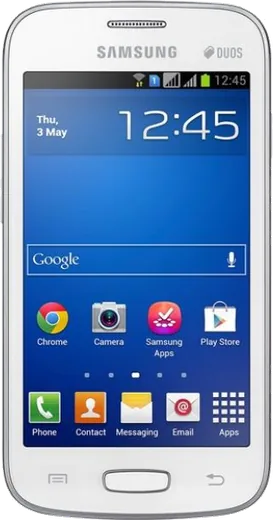
WhatsApp on Samsung Galaxy Star Pro S7260
Samsung Android

WhatsApp for Samsung Galaxy Star Pro S7260

Install the official WhatsApp on your Samsung Galaxy Star Pro S7260 in a few simple steps.

WhatsApp Messenger 4.7 · 64.2M reviews Free · Android · ~40 MB · by WhatsApp LLC
Download WhatsApp

Ask a question / report a problem

You can ask any question about WhatsApp support on the Samsung Galaxy Star Pro S7260 — leave it below and we'll help.

Ask a question

Can the Samsung Galaxy Star Pro S7260 run WhatsApp?

Not supported
  • Operating systemAndroid
  • WhatsApp versionNot supported

Latest known WhatsApp problems on Samsung Galaxy Star Pro S7260

1

WhatsApp won't install or keeps stopping on my Samsung Galaxy Star Pro S7260

Modern WhatsApp dropped support for Android 4.1 Jelly Bean (the Star Pro's OS), so the current Play Store build will refuse to install or crash on launch. Your only stopgap is an older compatible APK, but WhatsApp eventually cuts these old builds off the server and you may not be able to verify your number anymore. Realistically you'll need a newer phone to keep using WhatsApp reliably. See how others solved this on Reddit
2

Is the Samsung Galaxy Star Pro S7260 still usable for WhatsApp in 2024?

The Star Pro shares the fate of other Star-series and vintage Galaxy models: its Android 4.1 version is below WhatsApp's minimum requirement, so it can no longer run a supported version. You can still use it for calls, SMS, and as an offline media player, but for messaging treat it as a retro/backup device. If you want WhatsApp on a budget, even a used Android 5.0+ phone will work far better. See how others solved this on Reddit
3

WhatsApp keeps freezing the whole phone on my Galaxy Star Pro

On a low-RAM device like the Star Pro (512MB), WhatsApp freezes when memory fills up. Go to Settings > Application manager > WhatsApp > Clear cache (not Clear data, which deletes chats), then reboot. Reduce the load by turning off media auto-download in WhatsApp under Settings > Chat settings > Media auto-download, and uninstall unused apps to free RAM. If it still locks up, a large old chat database is usually the culprit, so back up and start fresh. See how others solved this on Reddit
4

WhatsApp photos and videos won't show up in my Gallery on the Galaxy Star Pro S7260

This is a media-indexing issue: a .nomedia file in the WhatsApp folder stops the Gallery from scanning received images and videos. Using a file manager, open Internal storage or SD card > WhatsApp > Media, delete any .nomedia file, then reboot so the Gallery rescans. Also open WhatsApp > Settings > Chats and make sure 'Media visibility' is turned on. See how others solved this on Reddit
5

How do I move my old WhatsApp chats from my Galaxy Star Pro to a new phone?

On the Star Pro, open WhatsApp > Settings > Chat settings > Chat backup and run a local backup, since Google Drive backup may not work on Android 4.x. Then copy the entire /WhatsApp folder (especially the Databases folder) from the phone's storage to the same location on the new phone before installing WhatsApp. When you install and verify the same phone number, WhatsApp detects the local backup and prompts you to restore. See how others solved this on Reddit
6

Can I run two WhatsApp accounts on my dual-SIM Galaxy Star Pro S7260?

WhatsApp allows only one account per app install, and the Star Pro's old Android has no built-in app cloning or Dual Messenger feature, so you can't natively register both SIM numbers. You're limited to one WhatsApp tied to one number; the second SIM still handles calls and SMS normally. To run two numbers you'd need a newer phone with Dual Messenger, or install WhatsApp Business as a separate app for the second number. See how others solved this on Reddit

Ask a question / report a problem

You can ask any question about WhatsApp support on the Samsung Galaxy Star Pro S7260 — leave it below and we'll help.

Ask a question

Watch: setting up WhatsApp

Prefer to watch? This short walkthrough shows the whole installation and number-verification flow.

How to install WhatsApp on Samsung Galaxy Star Pro S7260 — video walkthrough

How to install WhatsApp on Samsung Galaxy Star Pro S7260

1

Choose how to download

On your Samsung Galaxy Star Pro S7260 you can get the official app two ways: from the Google Play Store — the easiest option, since it keeps WhatsApp updated automatically — or directly from the official website. You can download an APK file, by clicking a link “Download WhatsApp directly”.

2

Open WhatsApp

Launch WhatsApp from your home screen or app drawer and accept the Terms of Service to start setup.

3

Verify your phone number

Enter your phone number. If your Samsung Galaxy Star Pro S7260 uses dual SIM, pick the line you want WhatsApp tied to, then enter the 6-digit code it sends by SMS — it usually fills in automatically.

4

Restore chats and finish setup

Restore your chat history from Google Drive (use the same Google account), add your name and photo, and tap Allow for notifications so messages and calls arrive reliably.

Stay safe: only ever install WhatsApp from the official Android source. The Download button above already points there — modified copies (GB/Plus/Aero WhatsApp) can get your number banned.

Comments (13)

No registration needed. No email required.
M
marc_realDec 12, 2025

Yo simple and fast 👌

F
finn96Dec 5, 2025

Guys installed in 2 min lol

AppWhatsOfficialDec 6, 2025

Thanks for the feedback!

S
sara.uNov 29, 2025

ugh im so confused someone help meeee :(

AppWhatsOfficialDec 2, 2025

Relax, it is simpler than it looks. Press Download, install, then verify with the SMS code. You got this! It is easier than it looks, promise.

J
jay_tomSep 27, 2025

My galaxy star pro s7260 was being difficult but this sorted it

T
tina_leoAug 31, 2025

Tbh cheers for the clear instructions 👌

B
bea.zAug 25, 2025

honestly no problems installing on my Galaxy Star Pro S7260 👍

T
techguyAug 24, 2025

Can i install without google play thanks

AppWhatsOfficialAug 25, 2025

Happy to help, sure. Turn on unknown sources for your browser and grab the official APK, the guide explains how. Feel free to ask if you get stuck.

J
joe.mJun 29, 2025

why is it downloading so slowly thanks

AppWhatsOfficialJul 1, 2025

No worries, it depends on your connection. Try switching to wifi if you can, and the download should finish in under a minute on most networks. Hope that helps!

M
mmmaaaxxxJun 1, 2025

how do i set my profile picture anyone

AppWhatsOfficialJun 2, 2025

Happy to help, in Settings tap your profile at the top, then the camera icon lets you pick or take a new picture. Feel free to ask if you get stuck.

B
big_chrisMay 6, 2025

update super easy to follow

U
ugh_helpMay 2, 2025

تم التثبيت بدون مشاكل على Samsung Galaxy Star Pro S7260

A
anonApr 8, 2025

Installiert und läuft auf meinem samsung galaxy star pro s7260

J
just_yukiApr 6, 2025

Finalmente semplicissimo, il mio samsung galaxy star pro s7260 è pronto grazie