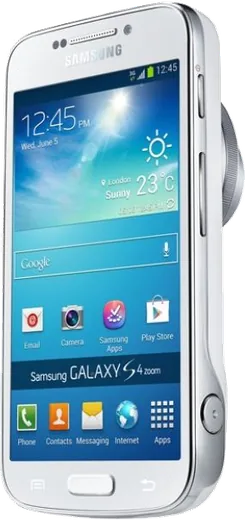
WhatsApp on Samsung Galaxy S4 zoom
Samsung Android

WhatsApp for Samsung Galaxy S4 zoom

Install the official WhatsApp on your Samsung Galaxy S4 zoom in a few simple steps.

WhatsApp Messenger 4.7 · 64.2M reviews Free · Android · ~40 MB · by WhatsApp LLC
Download WhatsApp

Ask a question / report a problem

You can ask any question about WhatsApp support on the Samsung Galaxy S4 zoom — leave it below and we'll help.

Ask a question

Can the Samsung Galaxy S4 zoom run WhatsApp?

Not supported
  • Operating systemAndroid
  • WhatsApp versionNot supported

Latest known WhatsApp problems on Samsung Galaxy S4 zoom

1

Can the Samsung Galaxy S4 Zoom still run WhatsApp and other social media apps?

The S4 Zoom ships with Android 4.4 KitKat, and modern WhatsApp dropped support for that version, so the current Play Store build won't install or will stop opening. Your best bet is to sideload an older WhatsApp APK (around version 2.21.x) from a trusted archive like APKMirror after enabling Settings > Security > Unknown sources, then verify your number before the older client is cut off. Treat it as a temporary, unreliable setup rather than a daily driver. See how others solved this on Reddit
2

What are the best practical uses for a Galaxy S4 Zoom stuck on Android 4.4 KitKat?

Because most current apps refuse KitKat, the Zoom shines as a dedicated 16MP point-and-shoot with a real 10x optical zoom, physical zoom ring, and xenon flash, plus an offline media or music player. Pair it with apps that still ship KitKat-compatible APKs (an older VLC, a podcast player, or OsmAnd with offline maps), and keep it on Wi-Fi only to limit security exposure from the outdated OS. See how others solved this on Reddit
3

Are there alternatives to the Galaxy S4 Zoom that run Android 5 or newer with a real optical zoom?

The direct successor is the Samsung Galaxy K Zoom, which shipped with Android 4.4 but received an official Android 5.1.1 Lollipop update and keeps a 10x optical zoom in a slimmer body. If you want something newer, the Galaxy Camera 2 or modern hybrid-zoom phones like the Galaxy S20 Ultra or S23 Ultra are options, though none replicate the K Zoom's true mechanical zoom lens on a phone running Lollipop. See how others solved this on Reddit
4

Can I use the Galaxy S4 Zoom as a simplified or distraction-free phone?

Yes, it works well as a minimalist device since the aging OS naturally limits app bloat. Install a lightweight launcher that still supports KitKat, disable or hide unused stock apps via Settings > Application manager, and lean on the dialer, SMS, and camera. Turning off mobile data in Settings > Data usage keeps it focused on calls and photos. See how others solved this on Reddit
5

Is the Galaxy S4 Zoom worth buying today as a rare collector or camera device?

For around $50-60 it's a fair pick if you want the novelty of a phone with a genuine 10x optical zoom and a xenon flash rather than a primary smartphone. Buy one with a healthy battery (the B740AE/B740AC packs are still findable), expect KitKat-era app limitations, and keep it on Wi-Fi for camera transfers and light browsing rather than banking or messaging. See how others solved this on Reddit
6

Why won't apps from the Play Store install on my Galaxy S4 Zoom anymore?

Google Play now serves app versions targeting much newer Android levels, so most listings show "your device isn't compatible" against the Zoom's 4.4 KitKat. Update Google Play services as far as it will go via Settings > Apps, and for must-have apps download a KitKat-compatible older APK from APKMirror after enabling Settings > Security > Unknown sources, accepting that many modern apps simply have no working build. See how others solved this on Reddit

Ask a question / report a problem

You can ask any question about WhatsApp support on the Samsung Galaxy S4 zoom — leave it below and we'll help.

Ask a question

Watch: setting up WhatsApp

Prefer to watch? This short walkthrough shows the whole installation and number-verification flow.

How to install WhatsApp on Samsung Galaxy S4 zoom — video walkthrough

How to install WhatsApp on Samsung Galaxy S4 zoom

1

Choose how to download

On your Samsung Galaxy S4 zoom you can get the official app two ways: from the Google Play Store — the easiest option, since it keeps WhatsApp updated automatically — or directly from the official website. You can download an APK file, by clicking a link “Download WhatsApp directly”.

2

Open WhatsApp

Launch WhatsApp from your home screen or app drawer and accept the Terms of Service to start setup.

3

Verify your phone number

Enter your phone number. If your Samsung Galaxy S4 zoom uses dual SIM, pick the line you want WhatsApp tied to, then enter the 6-digit code it sends by SMS — it usually fills in automatically.

4

Restore chats and finish setup

Restore your chat history from Google Drive (use the same Google account), add your name and photo, and tap Allow for notifications so messages and calls arrive reliably.

Stay safe: only ever install WhatsApp from the official Android source. The Download button above already points there — modified copies (GB/Plus/Aero WhatsApp) can get your number banned.

Comments (6)

No registration needed. No email required.
R
rosa_jayMay 1, 2026

well works like a charm on the s4 zoom :)

Q
quickfixDec 22, 2025

echt ohne probleme auf meinem Samsung Galaxy S4 zoom installiert

P
plz help meeMay 21, 2025

cant do this alone HELP how do i download

AppWhatsOfficialMay 22, 2025

Hey, no need to stress! Tap the green Download button at the top, follow the steps, and you will have WhatsApp in a minute. You got this!

I
its_kaiDec 5, 2024

ngl all good on my s4zoom now

H
helpmeNov 16, 2024

honestly 10 out of 10 ✌️

P
pablo60Nov 3, 2024

omg whatsapp works fine on my s4 zoom thanks again

AppWhatsOfficialNov 4, 2024

That is great to hear!