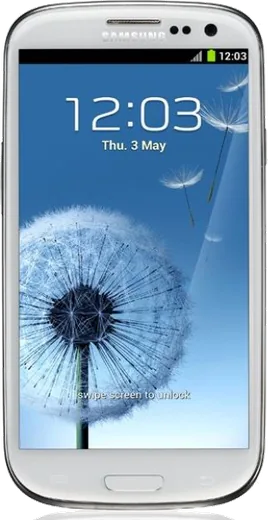
WhatsApp on Samsung Galaxy S3
Samsung Android

WhatsApp for Samsung Galaxy S3

Install the official WhatsApp on your Samsung Galaxy S3 in a few simple steps.

WhatsApp Messenger 4.7 · 64.2M reviews Free · Android · ~40 MB · by WhatsApp LLC
Download WhatsApp

Ask a question / report a problem

You can ask any question about WhatsApp support on the Samsung Galaxy S3 — leave it below and we'll help.

Ask a question

Can the Samsung Galaxy S3 run WhatsApp?

Not supported
  • Operating systemAndroid
  • WhatsApp versionNot supported

Latest known WhatsApp problems on Samsung Galaxy S3

1

Can I still install and use WhatsApp on a Samsung Galaxy S3 in 2024?

No. WhatsApp ended support for Android 4.x, and the Galaxy S3 (Android 4.1-4.4) is below the current minimum, so the Play Store version won't install or activate. Sideloading an old WhatsApp APK from an archive like APKMirror also fails, because those builds have passed WhatsApp's activation cutoff and can no longer verify your number. The realistic fixes are flashing a newer custom ROM (see below) or moving your SIM and chats to a newer phone. See how others solved this on Reddit
2

WhatsApp won't open on my Galaxy S3 Mini anymore, what can I do?

The S3 Mini ships with Android 4.1, which is below WhatsApp's minimum supported version, so the app refuses to launch once your installed build expires. This is a server-side cutoff, not a phone setting you can change, so clearing data or reinstalling won't help. The practical options are to move your number and chats to a newer phone, or keep the S3 Mini offline as a music/media device only. See how others solved this on Reddit
3

Is a used Galaxy S3 still worth buying just for WhatsApp and calls?

For basic calls and texts it can still work, but WhatsApp no longer supports its old Android, so messaging will fail on stock firmware. Before buying, ask whether the seller flashed a custom ROM like LineageOS, which can bump the full-size S3 (i9300) to a much newer Android and restore Play Store and WhatsApp compatibility. A stock, unrooted S3 is best treated as a backup or secondary phone rather than a daily WhatsApp device. See how others solved this on Reddit
4

Can I make my old Galaxy S3 usable again for messaging?

Often yes, but it usually means flashing a custom ROM, since the factory Android 4.x is too old for current apps. On the full-size S3 (i9300) you unlock the bootloader, install a recovery like TWRP, then flash a community LineageOS build plus GApps to regain the Play Store and a working WhatsApp. Note the S3 Mini (i8190) has much weaker custom-ROM support, so confirm an actively maintained ROM exists for your exact model before relying on this. See how others solved this on Reddit
5

How do I move my WhatsApp chats off a Galaxy S3 before it stops working?

In WhatsApp open Settings, then Chats, then Chat backup, and back up to Google Drive using the Google account on the phone. On your new Android device, install WhatsApp, verify the same number, and tap Restore when prompted so the Drive backup loads. If the S3's WhatsApp is too old to back up to Drive, copy the local backup from the phone's WhatsApp/Databases folder to the same folder on the new phone before first launch, then choose Restore. See how others solved this on Reddit

Ask a question / report a problem

You can ask any question about WhatsApp support on the Samsung Galaxy S3 — leave it below and we'll help.

Ask a question

Watch: setting up WhatsApp

Prefer to watch? This short walkthrough shows the whole installation and number-verification flow.

How to install WhatsApp on Samsung Galaxy S3 — video walkthrough

How to install WhatsApp on Samsung Galaxy S3

1

Choose how to download

On your Samsung Galaxy S3 you can get the official app two ways: from the Google Play Store — the easiest option, since it keeps WhatsApp updated automatically — or directly from the official website. You can download an APK file, by clicking a link “Download WhatsApp directly”.

2

Open WhatsApp

Launch WhatsApp from your home screen or app drawer and accept the Terms of Service to start setup.

3

Verify your phone number

Enter your phone number. If your Samsung Galaxy S3 uses dual SIM, pick the line you want WhatsApp tied to, then enter the 6-digit code it sends by SMS — it usually fills in automatically.

4

Restore chats and finish setup

Restore your chat history from Google Drive (use the same Google account), add your name and photo, and tap Allow for notifications so messages and calls arrive reliably.

Stay safe: only ever install WhatsApp from the official Android source. The Download button above already points there — modified copies (GB/Plus/Aero WhatsApp) can get your number banned.

Comments (10)

No registration needed. No email required.
M
mr_alexMay 20, 2026

finally set up whatsapp on my dads galaxy S3 no problem 🎉

T
tom00Apr 18, 2026

echt beste seite, hat sofort geklappt auf meinem samsung galaxy s3 👍

I
im_ellaJan 6, 2026

Omg this worked great on my Samsung Galaxy S3 😍

M
mike.tDec 19, 2025

Tbh even my grandma could do this

M
mia55Oct 23, 2025

Echt beste seite, sofort geklappt

D
deni.iJul 18, 2025

Well installed on my samsung galaxy s3, super simple lol

L
luca.iMay 18, 2025

Honestly smooth and simple, no issues thx

A
alex_chrNov 27, 2024

well it worked first try

T
the_real_jaySep 28, 2024

Update did it on my samsung galaxy s3 in like 2 minutes cheers

AppWhatsOfficialSep 30, 2024

Thanks for sharing!

X
xX_ashSep 5, 2024

hey whyyy is this so hard pls help me get whatsapp :(

AppWhatsOfficialSep 6, 2024

Take a breath, we got you. Press Download above, then Install, then verify your number. That is all it takes. It is easier than it looks, promise.