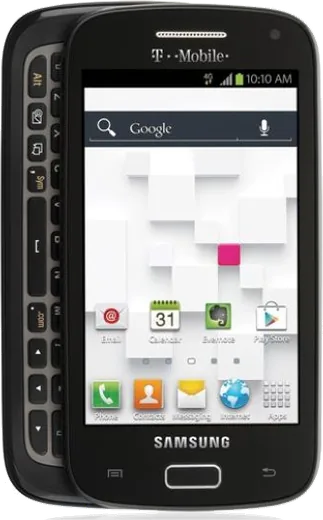
WhatsApp on Samsung Galaxy S Relay 4G T699
Samsung Android

WhatsApp for Samsung Galaxy S Relay 4G T699

Install the official WhatsApp on your Samsung Galaxy S Relay 4G T699 in a few simple steps.

WhatsApp Messenger 4.7 · 64.2M reviews Free · Android · ~40 MB · by WhatsApp LLC
Download WhatsApp

Ask a question / report a problem

You can ask any question about WhatsApp support on the Samsung Galaxy S Relay 4G T699 — leave it below and we'll help.

Ask a question

Can the Samsung Galaxy S Relay 4G T699 run WhatsApp?

Not supported
  • Operating systemAndroid
  • WhatsApp versionNot supported

Latest known WhatsApp problems on Samsung Galaxy S Relay 4G T699

1

Does the Samsung Galaxy S Relay 4G T699 still work on T-Mobile's network?

In practice, no. The T699 is an LTE-era handset that relied on T-Mobile's HSPA+/3G for voice and lacks VoLTE, and T-Mobile retired its 3G/UMTS network in 2022 and now requires VoLTE for calls. Without VoLTE the phone can't reliably place calls or texts on the current network even where LTE data exists. There is no setting or update that adds VoLTE or re-enables the T699, so an active line needs a newer VoLTE-capable phone. See how others solved this on Reddit
2

Can I unlock the Galaxy S Relay 4G T699 to use it on another carrier?

Unlocking only removes the carrier lock; it can't add the modern LTE bands and VoLTE that US carriers now require, so even an unlocked T699 won't get reliable service on T-Mobile, AT&T, or their MVNOs. To request the unlock you contact T-Mobile (or use the carrier's unlock request, not a menu in Settings > About phone), but it won't restore voice service on a phone this old. It's best treated as a backup or offline device rather than an active line. See how others solved this on Reddit
3

Why doesn't the Galaxy S Relay 4G T699 have a Wi-Fi Calling option to keep it usable?

The T699 shipped on an old Android build (Ice Cream Sandwich/Jelly Bean) that predates the modern carrier Wi-Fi Calling toggle, so there's no working Wi-Fi Calling switch under Settings even though the phone has Wi-Fi. You can still use Wi-Fi for a browser or an over-the-top messaging app like a VoIP service, but it can't route your carrier number over Wi-Fi. Real Wi-Fi Calling requires a newer Samsung, where it lives under Settings > Connections > Wi-Fi Calling. See how others solved this on Reddit
4

Are there physical-keyboard alternatives to the Galaxy S Relay 4G T699 that work on T-Mobile now?

Since the T699 can't do VoLTE, owners who want that hardware-keyboard feel usually move to newer QWERTY-slider or keyboard-case devices that support T-Mobile's LTE bands and VoLTE. Check any replacement's band and VoLTE compatibility on T-Mobile's IMEI/device checker before buying, since a keyboard alone doesn't guarantee it will activate. The Relay itself can stay useful purely over Wi-Fi for note-taking or as a small media device. See how others solved this on Reddit
5

Can I still use the Galaxy S Relay 4G T699 offline as a music or backup device after losing service?

Yes. With no cellular service the T699 still works as an offline Android device over Wi-Fi for music, photos, and stored apps. Load files via USB to its internal storage or a microSD card, play them with a media app, and use Settings > Wi-Fi to get online for downloads. Leaving the SIM out also helps battery life, since it stops the phone constantly searching for a network it can no longer use. See how others solved this on Reddit

Ask a question / report a problem

You can ask any question about WhatsApp support on the Samsung Galaxy S Relay 4G T699 — leave it below and we'll help.

Ask a question

Watch: setting up WhatsApp

Prefer to watch? This short walkthrough shows the whole installation and number-verification flow.

How to install WhatsApp on Samsung Galaxy S Relay 4G T699 — video walkthrough

How to install WhatsApp on Samsung Galaxy S Relay 4G T699

1

Choose how to download

On your Samsung Galaxy S Relay 4G T699 you can get the official app two ways: from the Google Play Store — the easiest option, since it keeps WhatsApp updated automatically — or directly from the official website. You can download an APK file, by clicking a link “Download WhatsApp directly”.

2

Open WhatsApp

Launch WhatsApp from your home screen or app drawer and accept the Terms of Service to start setup.

3

Verify your phone number

Enter your phone number. If your Samsung Galaxy S Relay 4G T699 uses dual SIM, pick the line you want WhatsApp tied to, then enter the 6-digit code it sends by SMS — it usually fills in automatically.

4

Restore chats and finish setup

Restore your chat history from Google Drive (use the same Google account), add your name and photo, and tap Allow for notifications so messages and calls arrive reliably.

Stay safe: only ever install WhatsApp from the official Android source. The Download button above already points there — modified copies (GB/Plus/Aero WhatsApp) can get your number banned.

Comments (6)

No registration needed. No email required.
P
phoneaddictMar 10, 2026

omg this worked great on my Samsung Galaxy S Relay 4G T699 🙏

A
amy21Dec 6, 2025

pleaseee my Samsung Galaxy S Relay 4G T699 wont install whatsapp i give up 😩

AppWhatsOfficialDec 9, 2025

We are here to help. Hit Download, follow the steps on this page, and if the code is slow just request it again. You will be set up on your phone in no time.

I
ivan98Sep 25, 2025

Hey sehr einfach, in 2 minuten auf meinem galaxy s relay 4g t699 erledigt 🙏

M
maxx_tanJun 12, 2025

guys saved me so much time lol

J
joe_andJan 9, 2025

Two thumbs up :)

H
halppAug 13, 2024

Hi no contacts appear in the app

AppWhatsOfficialAug 18, 2024

Hey there, add the contact in your phone with the full country code, then open WhatsApp and refresh. They should appear. Let us know if you need anything else.