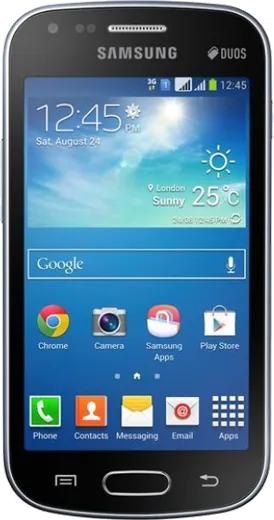
WhatsApp on Samsung Galaxy S Duos 2 S7582
Samsung Android

WhatsApp for Samsung Galaxy S Duos 2 S7582

Install the official WhatsApp on your Samsung Galaxy S Duos 2 S7582 in a few simple steps.

WhatsApp Messenger 4.7 · 64.2M reviews Free · Android · ~40 MB · by WhatsApp LLC
Download WhatsApp

Ask a question / report a problem

You can ask any question about WhatsApp support on the Samsung Galaxy S Duos 2 S7582 — leave it below and we'll help.

Ask a question

Can the Samsung Galaxy S Duos 2 S7582 run WhatsApp?

Not supported
  • Operating systemAndroid
  • WhatsApp versionNot supported

Latest known WhatsApp problems on Samsung Galaxy S Duos 2 S7582

1

What is the highest Android version I can run on the Galaxy S Duos 2 S7582?

Samsung shipped the S7582 with Android 4.2.2 Jelly Bean and never released an official update beyond it. Through community custom ROMs the realistic ceiling is around Android 7.1 (LineageOS 14.1 Nougat builds from XDA), because the older Broadcom chipset has no driver support for anything newer. Treat any Nougat build as semi-experimental and expect rough edges such as an unreliable camera, dual-SIM quirks, or occasional Wi-Fi instability. See how others solved this on Reddit
2

How do I install a custom recovery and ROM on the S Duos 2?

The S7582 bootloader is not signature-locked like modern Samsungs, so you don't need an unlock code. Note there is no 'OEM unlock' toggle on Android 4.2.2 (that setting only appeared on Android 5.0+), so ignore guides that tell you to enable it. Instead, flash a custom recovery (TWRP) with Odin on a Windows PC over USB. First enable Developer options via Settings > About device, then tap Build number seven times, and turn on USB debugging. After TWRP is flashed, boot into recovery (Volume Up + Home + Power), wipe data/cache, then flash the ROM ZIP plus a matching GApps package from your SD card. See how others solved this on Reddit
3

Where can I find a working custom ROM for the Galaxy S Duos 2 S7582?

The S7582 is community-supported, not officially supported by LineageOS, so the reliable source is the XDA Developers forum thread for the GT-S7582 (the 'kyle3g' device family) rather than the official LineageOS download site. Only flash a build that lists S7582 specifically: the closely named S7580 and S7562 use different ZIPs and will not boot correctly on this model. Read the thread's first post for the required firmware base and kernel before flashing. See how others solved this on Reddit
4

My S Duos 2 is too slow on Android 4.2.2 — will a custom ROM help?

A lightweight ROM (such as a Nougat LineageOS build) drops Samsung's heavy TouchWiz layer and can improve responsiveness on the 768MB of RAM, but keep expectations modest since the dual-core Broadcom CPU is the real bottleneck. Before reflashing, try the built-in cleanup: open Settings > Application manager, swipe to the All tab, and disable or uninstall bloatware, then move apps and media to the SD card via Settings > Storage. See how others solved this on Reddit
5

Will flashing a custom ROM break dual-SIM or the camera on my S7582?

On many community ROMs for the S7582, dual-SIM and the camera are the two features most likely to misbehave because Broadcom never released full open-source drivers. Check the XDA thread's known-issues list for the specific build before flashing, and make a full Nandroid backup in TWRP so you can restore stock if a feature fails. If dual-SIM or the camera is essential to you, stick to a build whose changelog explicitly confirms both are working. See how others solved this on Reddit
6

How do I back up my S Duos 2 before flashing so I can return to stock?

Back up personal data first by signing into Settings > Accounts > Google and enabling sync, which saves contacts, calendar, and supported app data to your Google account. For a full system snapshot, boot into TWRP and use Backup to save System, Data, and Boot to the SD card, letting you restore the exact pre-flash state. Also keep the original Samsung 4.2.2 stock firmware (an Odin .tar.md5) on your PC as a last-resort recovery if a ROM fails to boot. See how others solved this on Reddit

Ask a question / report a problem

You can ask any question about WhatsApp support on the Samsung Galaxy S Duos 2 S7582 — leave it below and we'll help.

Ask a question

Watch: setting up WhatsApp

Prefer to watch? This short walkthrough shows the whole installation and number-verification flow.

How to install WhatsApp on Samsung Galaxy S Duos 2 S7582 — video walkthrough

How to install WhatsApp on Samsung Galaxy S Duos 2 S7582

1

Choose how to download

On your Samsung Galaxy S Duos 2 S7582 you can get the official app two ways: from the Google Play Store — the easiest option, since it keeps WhatsApp updated automatically — or directly from the official website. You can download an APK file, by clicking a link “Download WhatsApp directly”.

2

Open WhatsApp

Launch WhatsApp from your home screen or app drawer and accept the Terms of Service to start setup.

3

Verify your phone number

Enter your phone number. If your Samsung Galaxy S Duos 2 S7582 uses dual SIM, pick the line you want WhatsApp tied to, then enter the 6-digit code it sends by SMS — it usually fills in automatically.

4

Restore chats and finish setup

Restore your chat history from Google Drive (use the same Google account), add your name and photo, and tap Allow for notifications so messages and calls arrive reliably.

Stay safe: only ever install WhatsApp from the official Android source. The Download button above already points there — modified copies (GB/Plus/Aero WhatsApp) can get your number banned.

Comments (10)

No registration needed. No email required.
B
budgetkingJun 12, 2026

anyone? safe to install or no

AppWhatsOfficialJun 13, 2026

No worries, totally safe. We only link to the genuine WhatsApp, so there is no risk of malware as long as you use the button above.

X
xX_valJun 6, 2026

Worked like a charm thanks again

E
ella_sarNov 28, 2025

sorry but can i recover my chats thanks

AppWhatsOfficialDec 2, 2025

Hey there, if you made a backup before, sign in with the same number and tap Restore when asked. WhatsApp pulls your chats from the cloud backup.

B
budgetkingOct 6, 2025

update did it on my Galaxy S Duos 2 S7582 in like 2 minutes 🔥

M
marc71Apr 2, 2025

il mio samsung galaxy s duos 2 s7582 ha finalmente whatsapp, fantastico 👍

K
kate.hJan 30, 2025

Tbh this is the only one that worked for me lol

N
newbieOct 20, 2024

Franchement a marché parfaitement sur mon galaxy sduos2s7582 merci

L
luca.jSep 18, 2024

is this the official whatsapp or a modded one pls

AppWhatsOfficialSep 21, 2024

Only the official app here. Modified versions can get your account banned, so we never link to them. Happy chatting!

N
not_rayAug 19, 2024

Ngl the download was a bit slow but it worked thanks again

B
big_tomAug 18, 2024

PLEASE i need whatsapp on my Samsung Galaxy S Duos 2 S7582 its urgent 😩

AppWhatsOfficialAug 22, 2024

Relax, it is simpler than it looks. Press Download, install, then verify with the SMS code. You got this! You got this!