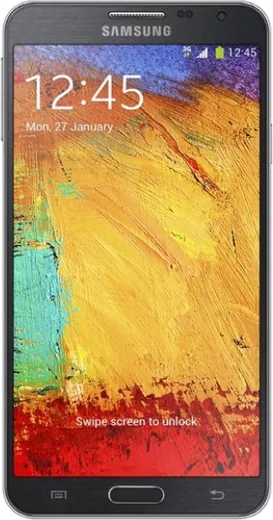
WhatsApp on Samsung Galaxy Note 3 Neo
Samsung Android

WhatsApp for Samsung Galaxy Note 3 Neo

Install the official WhatsApp on your Samsung Galaxy Note 3 Neo in a few simple steps.

WhatsApp Messenger 4.7 · 64.2M reviews Free · Android · ~40 MB · by WhatsApp LLC
Download WhatsApp

Ask a question / report a problem

You can ask any question about WhatsApp support on the Samsung Galaxy Note 3 Neo — leave it below and we'll help.

Ask a question

Can the Samsung Galaxy Note 3 Neo run WhatsApp?

Not supported
  • Operating systemAndroid
  • WhatsApp versionNot supported

Latest known WhatsApp problems on Samsung Galaxy Note 3 Neo

1

My Galaxy Note 3 Neo suddenly crashed and now it won't boot past the logo. How do I fix it?

First force a hard reboot by holding Power + Volume Down for about 10-15 seconds until the screen goes black and it restarts. If it still hangs at the logo, boot into recovery (power off, then hold Power + Volume Up + Home together), use the volume keys to highlight Wipe cache partition, press Power to select, then reboot, this clears corrupt cache without erasing your data. If that fails, a Wipe data/factory reset from the same recovery menu usually revives it, though it erases everything not backed up to your Google account. See how others solved this on Reddit
2

Samsung stopped updating the Note 3 Neo. Can I install a newer Android with a custom ROM like LineageOS?

There are no official LineageOS builds for this device, so search XDA Developers for unofficial LineageOS or AOSP ports for your exact Neo variant (codename hlte3g / N750x, not the regular Note 3's hltexx) rather than the LineageOS site. You'll need to unlock the bootloader and flash a custom recovery (TWRP) via Odin first, then sideload the ROM plus a compatible GApps package. Back up everything beforehand, since flashing wipes the device and flashing a build for the wrong model can brick it. See how others solved this on Reddit
3

My Note 3 Neo is almost a decade old and getting sluggish. How do I keep it usable as a daily driver?

Go to Settings > Application manager, disable bloatware you never use, and clear cached files under Settings > Storage to free up space. The biggest real-world win is replacing the aging battery, the Note 3 Neo has a removable back, so a fresh battery is a cheap fix that restores performance and runtime. Reducing home-screen widgets and turning off animations in Developer options (set Window/Transition/Animator scales to 0.5x or off) also makes the older hardware feel noticeably snappier. See how others solved this on Reddit
4

Lots of my apps no longer install on the Note 3 Neo because of the old Android version. What can I do?

Many current Play Store apps require a newer Android than the Note 3 Neo runs, so look for older compatible versions of the APK from a trusted archive like APKMirror that still support Android 4.x/5.x. For staying online, lightweight "Lite" or "Go" versions of apps (Facebook Lite, Google Go, etc.) run far better on the limited RAM. If you want modern app support long-term, a custom ROM that bumps the Android version is the only real path, as covered above. See how others solved this on Reddit
5

What's the best way to repurpose my old Note 3 Neo instead of throwing it away?

Wipe it first via Settings > Backup and reset > Factory data reset, then it makes a great dedicated device: a music/podcast player, a Wi-Fi security or dash cam, or a controller for smart-home gear. Its removable battery and microSD slot make it handy as an offline media player you can load with files directly. Installing a lightweight custom ROM removes Samsung bloat and squeezes more life out of the hardware for these single-purpose roles. See how others solved this on Reddit

Ask a question / report a problem

You can ask any question about WhatsApp support on the Samsung Galaxy Note 3 Neo — leave it below and we'll help.

Ask a question

Watch: setting up WhatsApp

Prefer to watch? This short walkthrough shows the whole installation and number-verification flow.

How to install WhatsApp on Samsung Galaxy Note 3 Neo — video walkthrough

How to install WhatsApp on Samsung Galaxy Note 3 Neo

1

Choose how to download

On your Samsung Galaxy Note 3 Neo you can get the official app two ways: from the Google Play Store — the easiest option, since it keeps WhatsApp updated automatically — or directly from the official website. You can download an APK file, by clicking a link “Download WhatsApp directly”.

2

Open WhatsApp

Launch WhatsApp from your home screen or app drawer and accept the Terms of Service to start setup.

3

Verify your phone number

Enter your phone number. If your Samsung Galaxy Note 3 Neo uses dual SIM, pick the line you want WhatsApp tied to, then enter the 6-digit code it sends by SMS — it usually fills in automatically.

4

Restore chats and finish setup

Restore your chat history from Google Drive (use the same Google account), add your name and photo, and tap Allow for notifications so messages and calls arrive reliably.

Stay safe: only ever install WhatsApp from the official Android source. The Download button above already points there — modified copies (GB/Plus/Aero WhatsApp) can get your number banned.

Comments (4)

No registration needed. No email required.
M
mr_peteMar 12, 2026

Someone omggg i cant install it someone heeelp

AppWhatsOfficialMar 13, 2026

Breathe! Follow the steps above one by one, tap Download first, and you will be chatting in no time. Reply here if you get stuck.

M
mia00Feb 19, 2026

Guys set up whatsapp on my dads Galaxy Note 3 Neo no problem

L
lou.vOct 8, 2025

finally easy install on my galaxy note 3 Neo 🎉

A
andy00Nov 27, 2024

Installé sur le Galaxy Note 3 Neo de ma mère sans probleme