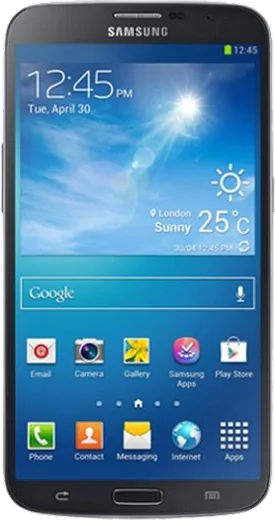
WhatsApp on Samsung Galaxy Mega 6.3 I9200
Samsung Android

WhatsApp for Samsung Galaxy Mega 6.3 I9200

Install the official WhatsApp on your Samsung Galaxy Mega 6.3 I9200 in a few simple steps.

WhatsApp Messenger 4.7 · 64.2M reviews Free · Android · ~40 MB · by WhatsApp LLC
Download WhatsApp

Ask a question / report a problem

You can ask any question about WhatsApp support on the Samsung Galaxy Mega 6.3 I9200 — leave it below and we'll help.

Ask a question

Can the Samsung Galaxy Mega 6.3 I9200 run WhatsApp?

Not supported
  • Operating systemAndroid
  • WhatsApp versionNot supported

Latest known WhatsApp problems on Samsung Galaxy Mega 6.3 I9200

1

Why does WhatsApp keep crashing or freezing on my Galaxy Mega 6.3 I9200?

The Mega 6.3 shipped with Android 4.2/4.4, and current WhatsApp builds run heavily on this old hardware, so the first fix is to clear the cache via Settings > Application manager > swipe to All > WhatsApp > Clear cache (avoid Clear data, which wipes local chats). If it still stalls, free up RAM by closing background apps and make sure you have at least 1 GB free internal storage, since WhatsApp slows badly when the I9200's small partition fills up. See how others solved this on Reddit
2

WhatsApp notifications don't show up on my Galaxy Mega 6.3 unless I open the app

Samsung's power saving aggressively suspends WhatsApp in the background. Go to Settings > Application manager > WhatsApp and confirm Notifications are allowed, then under Settings > Power saving mode turn power saving OFF so WhatsApp isn't frozen. Finally open WhatsApp > Settings > Notifications and re-enable the message and group alerts. See how others solved this on Reddit
3

WhatsApp won't download or send photos and videos on my Galaxy Mega 6.3 I9200

Media failures on this phone are usually a storage or permission issue: open WhatsApp > Settings > Storage and data and check that Media auto-download is enabled for Mobile data and Wi-Fi. Then in Settings > Application manager > WhatsApp > Permissions make sure Storage is granted, and confirm your SD card or internal storage isn't full, since the I9200's limited space blocks new downloads. See how others solved this on Reddit
4

WhatsApp keeps spamming me with 'You were added to' group notifications on my Galaxy Mega 6.3

These are system messages for every group you're added to, and you can silence them per group: open the group, tap the group name > Custom notifications > tick Use custom notifications and set it to mute. To stop strangers adding you in the first place, go to WhatsApp > Settings > Account > Privacy > Groups and switch it to My contacts so only people you know can pull you into groups. See how others solved this on Reddit
5

WhatsApp notifications are duplicated or going crazy on my Galaxy Mega 6.3

Repeated or doubled alerts usually come from a stale notification queue, so force stop WhatsApp via Settings > Application manager > WhatsApp > Force stop, then clear cache and reopen it. If duplicates persist, toggle WhatsApp > Settings > Notifications off and back on, and check that you don't have a second messaging app or notification mirror surfacing the same WhatsApp alerts. See how others solved this on Reddit
6

WhatsApp messages arrive late or only when I unlock my Galaxy Mega 6.3

Delayed delivery is almost always Samsung's battery management putting WhatsApp to sleep. Open Settings > Application manager > WhatsApp and disable any 'restrict background data' or power-saving limits, and if your software version has it, remove WhatsApp from the sleeping/deep-sleeping apps list. Then confirm WhatsApp > Settings > Notifications has Message and Group notifications enabled so alerts arrive in real time. See how others solved this on Reddit

Ask a question / report a problem

You can ask any question about WhatsApp support on the Samsung Galaxy Mega 6.3 I9200 — leave it below and we'll help.

Ask a question

Watch: setting up WhatsApp

Prefer to watch? This short walkthrough shows the whole installation and number-verification flow.

How to install WhatsApp on Samsung Galaxy Mega 6.3 I9200 — video walkthrough

How to install WhatsApp on Samsung Galaxy Mega 6.3 I9200

1

Choose how to download

On your Samsung Galaxy Mega 6.3 I9200 you can get the official app two ways: from the Google Play Store — the easiest option, since it keeps WhatsApp updated automatically — or directly from the official website. You can download an APK file, by clicking a link “Download WhatsApp directly”.

2

Open WhatsApp

Launch WhatsApp from your home screen or app drawer and accept the Terms of Service to start setup.

3

Verify your phone number

Enter your phone number. If your Samsung Galaxy Mega 6.3 I9200 uses dual SIM, pick the line you want WhatsApp tied to, then enter the 6-digit code it sends by SMS — it usually fills in automatically.

4

Restore chats and finish setup

Restore your chat history from Google Drive (use the same Google account), add your name and photo, and tap Allow for notifications so messages and calls arrive reliably.

Stay safe: only ever install WhatsApp from the official Android source. The Download button above already points there — modified copies (GB/Plus/Aero WhatsApp) can get your number banned.

Comments (4)

No registration needed. No email required.
R
rosa19Feb 10, 2026

ugh stuck and so stressed how do i get whatsapp on galaxy mega6.3i9200 🙏

AppWhatsOfficialFeb 12, 2026

Breathe! Follow the steps above one by one, tap Download first, and you will be chatting in no time.

S
sara28Apr 12, 2025

well my new galaxy mega 6.3 i9200 is all set up now 👍

N
nick_mikOct 17, 2024

wow installé sur le samsung galaxy mega 6.3 i9200 de ma mère sans probleme

N
nightowlJul 25, 2024

so no registration needed, love that 🙏