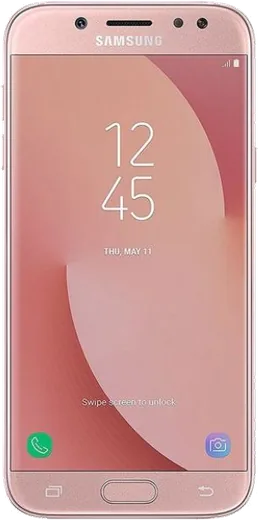
WhatsApp on Samsung Galaxy J7 Pro
Samsung Android

WhatsApp for Samsung Galaxy J7 Pro

Install the official WhatsApp on your Samsung Galaxy J7 Pro in a few simple steps.

WhatsApp Messenger 4.7 · 64.2M reviews Free · Android · ~40 MB · by WhatsApp LLC
Download WhatsApp

Ask a question / report a problem

You can ask any question about WhatsApp support on the Samsung Galaxy J7 Pro — leave it below and we'll help.

Ask a question

Can the Samsung Galaxy J7 Pro run WhatsApp?

Fully supported
  • Operating systemAndroid
  • WhatsApp versionLatest supported

Latest known WhatsApp problems on Samsung Galaxy J7 Pro

1

Is WhatsApp dropping support for my Samsung Galaxy J7 Pro?

The Galaxy J7 Pro shipped with Android 7.0 Nougat and was later updated to Android 9 Pie, which still meets WhatsApp's current minimum (Android 5.0+), so you are fine for now. WhatsApp periodically raises that floor, so install any pending updates under Settings > Software update and keep WhatsApp current from the Play Store to avoid a sudden cutoff. If your unit is still stuck on Nougat and never received the Pie update, that older version is the real risk factor to watch. See how others solved this on Reddit
2

Will WhatsApp stop working on old Android versions like Lollipop?

WhatsApp ends support for very old Android releases (the Lollipop 5.x era) on a rolling basis, but the J7 Pro runs Nougat or Pie, so it is above that threshold. Confirm your version under Settings > About phone > Software information; if it reads Android 7 or higher you will keep getting WhatsApp updates. If support ever does lapse, your chats stay locked into the last working build, so back them up to Google Drive before moving to a newer device. See how others solved this on Reddit
3

Why doesn't my Galaxy J7 Pro ring for incoming WhatsApp calls?

This is almost always Samsung's battery optimization putting WhatsApp to sleep. Go to Settings > Apps > WhatsApp > Battery and set it to Unrestricted, then under Settings > Device care > Battery remove WhatsApp from any Sleeping or Deep sleeping app list. Also check that Settings > Apps > WhatsApp > Notifications is on and that Do Not Disturb is off, and inside WhatsApp confirm a call ringtone is selected under Settings > Notifications. After that the phone should ring even when the screen is locked. See how others solved this on Reddit
4

WhatsApp says 'You need the official version of WhatsApp' on my J7 Pro - how do I fix it?

This error appears when you have an unofficial mod (like GBWhatsApp) or an outdated sideloaded APK installed, and the only safe fix is to back up your chats first, then uninstall that version. Install the genuine app fresh from the Google Play Store, open it, and restore your backup from Google Drive when prompted. Avoid third-party WhatsApp clones entirely, as they can get your number banned and are not officially encrypted. See how others solved this on Reddit
5

My Galaxy J7 keeps saying it's running out of storage space and WhatsApp won't update - what can I do?

WhatsApp media is the usual culprit, so open WhatsApp > Settings > Storage and data > Manage storage and delete large forwarded videos and the 'Larger than 5 MB' items. Then move photos to a microSD card via My Files, clear cache under Settings > Apps > WhatsApp > Storage > Clear cache, and uninstall unused apps. Keeping a few GB free lets the Play Store finish WhatsApp updates that otherwise stall. See how others solved this on Reddit
6

WhatsApp says I need the official app even though I already have the genuine one installed - any solution?

Even with the genuine app, this can trigger if your J7 Pro's date and time are wrong or the install got corrupted, so first set Settings > General management > Date and time to Automatic. If it persists, clear WhatsApp's cache (not data) under Settings > Apps > WhatsApp > Storage > Clear cache, make sure the app is fully updated in the Play Store, and reboot. As a last resort, back up to Google Drive, reinstall from Play, and restore. See how others solved this on Reddit

Ask a question / report a problem

You can ask any question about WhatsApp support on the Samsung Galaxy J7 Pro — leave it below and we'll help.

Ask a question

Watch: setting up WhatsApp

Prefer to watch? This short walkthrough shows the whole installation and number-verification flow.

How to install WhatsApp on Samsung Galaxy J7 Pro — video walkthrough

How to install WhatsApp on Samsung Galaxy J7 Pro

1

Choose how to download

On your Samsung Galaxy J7 Pro you can get the official app two ways: from the Google Play Store — the easiest option, since it keeps WhatsApp updated automatically — or directly from the official website. You can download an APK file, by clicking a link “Download WhatsApp directly”.

2

Open WhatsApp

Launch WhatsApp from your home screen or app drawer and accept the Terms of Service to start setup.

3

Verify your phone number

Enter your phone number. If your Samsung Galaxy J7 Pro uses dual SIM, pick the line you want WhatsApp tied to, then enter the 6-digit code it sends by SMS — it usually fills in automatically.

4

Restore chats and finish setup

Restore your chat history from Google Drive (use the same Google account), add your name and photo, and tap Allow for notifications so messages and calls arrive reliably.

Stay safe: only ever install WhatsApp from the official Android source. The Download button above already points there — modified copies (GB/Plus/Aero WhatsApp) can get your number banned.

Comments (6)

No registration needed. No email required.
W
whatsappfanMay 6, 2026

endlich mein Galaxy J7 Pro hat endlich whatsapp, klasse 👍

B
ben38Dec 26, 2025

quick q why is it downloading so slowly

AppWhatsOfficialJan 1, 2026

No worries, it depends on your connection. Try switching to wifi if you can, and the download should finish in under a minute on most networks.

R
rob00Aug 23, 2025

so best guide for the samsung galaxy j7 pro by far thx

D
deni.yFeb 16, 2025

update did this on my j7pro and it just worked thanks again

B
budgetkingDec 20, 2024

omg my whole family is waiting pls help me install it

AppWhatsOfficialDec 24, 2024

Take a breath, we got you. Press Download above, then Install, then verify your number. That is all it takes. You got this!

R
ray_denNov 24, 2024

honestly bookmarking this site for sure 👌

AppWhatsOfficialNov 25, 2024

Thanks for sharing!