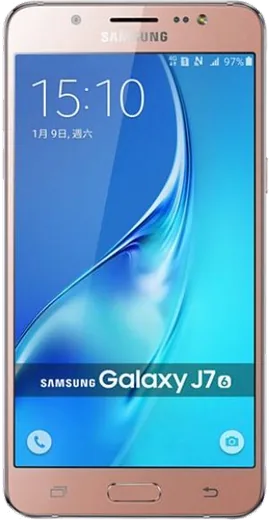
WhatsApp on Samsung Galaxy J7 (2016)
Samsung Android

WhatsApp for Samsung Galaxy J7 (2016)

Install the official WhatsApp on your Samsung Galaxy J7 (2016) in a few simple steps.

WhatsApp Messenger 4.7 · 64.2M reviews Free · Android · ~40 MB · by WhatsApp LLC
Download WhatsApp

Ask a question / report a problem

You can ask any question about WhatsApp support on the Samsung Galaxy J7 (2016) — leave it below and we'll help.

Ask a question

Can the Samsung Galaxy J7 (2016) run WhatsApp?

Fully supported
  • Operating systemAndroid
  • WhatsApp versionLatest supported

Latest known WhatsApp problems on Samsung Galaxy J7 (2016)

1

Will WhatsApp stop working on my Galaxy J7 (2016)?

The original Galaxy J7 (2016) shipped with Android 5.1.1 Lollipop and later updated to Android 6.0.1 Marshmallow, and WhatsApp has been dropping support for Android versions below 6.0, so a device stuck on 5.1.1 can lose WhatsApp entirely. Check your version under Settings > About phone (or About device) > Software information; if it still shows Android 5.1.1, install any pending update first, and if none is available you will eventually need a newer phone or a custom ROM to keep WhatsApp running. See how others solved this on Reddit
2

WhatsApp says it will drop support for my phone soon, what do I do?

WhatsApp periodically ends support for older Android versions, and the J7 (2016) on Android 6.0 sits right at the cutoff line, so you may see an in-app warning with a deadline. Back up your chats now via WhatsApp > Settings > Chats > Chat backup (sign in with your Google account so the backup lands in Google Drive), so that whenever you move to a newer device you can restore every conversation during setup. See how others solved this on Reddit
3

My Galaxy J7 keeps saying 'running out of storage space' even though WhatsApp is the main app I use, how do I fix it?

WhatsApp media (received photos, videos and voice notes) is usually the biggest space hog on a J7 with only 16GB. Go to Settings > Apps > WhatsApp > Storage and tap Clear cache, then inside WhatsApp open Settings > Storage and data > Manage storage to delete large files and forwarded media; also move photos to Google Photos and free up device copies, and disable WhatsApp media auto-download under WhatsApp > Settings > Storage and data. See how others solved this on Reddit
4

Is it worth upgrading from my Galaxy J7 or can I keep using it?

Many owners keep a J7 going for years, but once WhatsApp and your banking apps stop receiving updates on Android 6.0, day-to-day use gets frustrating. If you want to stay on a budget Samsung, a Galaxy A-series (A15/A25 or newer) gives you years of One UI and WhatsApp support; before switching, run WhatsApp > Settings > Chats > Chat backup so you can restore your chats on the new phone. See how others solved this on Reddit
5

Can I install LineageOS on my Galaxy J7 to get a newer Android and keep WhatsApp working?

Yes, the J7 (2016) has unofficial LineageOS builds that bring it up to a much newer Android, which restores WhatsApp compatibility, but the process unlocks the bootloader, wipes the phone and voids your warranty. Back up everything first (including a WhatsApp chat backup to Google Drive), confirm your exact model number under Settings > About phone before flashing, and follow a build maintained specifically for your variant since the wrong firmware can brick the device. See how others solved this on Reddit
6

How usable is the Galaxy J7 on Android 6.0 in 2025 for everyday messaging?

Android 6.0 Marshmallow still handles calls and basic texting, but modern apps including newer WhatsApp builds run slowly or refuse to update, and you stop getting security patches. To squeeze the most life out of it, keep only essential apps, clear app caches regularly via Settings > Apps > [app] > Storage > Clear cache, and limit background data for heavy apps under Settings > Data usage > [app] > Restrict background data so messaging stays responsive. See how others solved this on Reddit

Ask a question / report a problem

You can ask any question about WhatsApp support on the Samsung Galaxy J7 (2016) — leave it below and we'll help.

Ask a question

Watch: setting up WhatsApp

Prefer to watch? This short walkthrough shows the whole installation and number-verification flow.

How to install WhatsApp on Samsung Galaxy J7 (2016) — video walkthrough

How to install WhatsApp on Samsung Galaxy J7 (2016)

1

Choose how to download

On your Samsung Galaxy J7 (2016) you can get the official app two ways: from the Google Play Store — the easiest option, since it keeps WhatsApp updated automatically — or directly from the official website. You can download an APK file, by clicking a link “Download WhatsApp directly”.

2

Open WhatsApp

Launch WhatsApp from your home screen or app drawer and accept the Terms of Service to start setup.

3

Verify your phone number

Enter your phone number. If your Samsung Galaxy J7 (2016) uses dual SIM, pick the line you want WhatsApp tied to, then enter the 6-digit code it sends by SMS — it usually fills in automatically.

4

Restore chats and finish setup

Restore your chat history from Google Drive (use the same Google account), add your name and photo, and tap Allow for notifications so messages and calls arrive reliably.

Stay safe: only ever install WhatsApp from the official Android source. The Download button above already points there — modified copies (GB/Plus/Aero WhatsApp) can get your number banned.

Comments (4)

No registration needed. No email required.
N
noobmasterMay 5, 2025

Installato e funzionante sul mio j7 grazie

F
finn_tomJan 2, 2025

hey omggg i cant install it someone heeelp 😩

AppWhatsOfficialJan 3, 2025

You are almost there! Tap Download, allow the install, open WhatsApp and confirm your number.

I
ivan.tDec 24, 2024

verified my number on the Galaxy J7 with no trouble 👍

P
pablo.zNov 6, 2024

well installed whatsapp on my samsung galaxy j7 with no issues 🔥