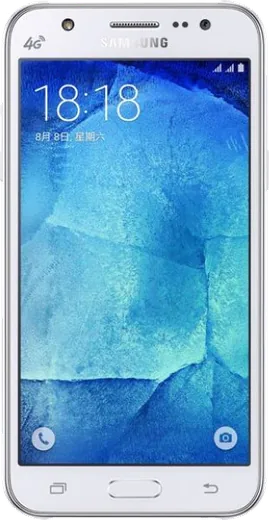
WhatsApp on Samsung Galaxy J5
Samsung Android

WhatsApp for Samsung Galaxy J5

Install the official WhatsApp on your Samsung Galaxy J5 in a few simple steps.

WhatsApp Messenger 4.7 · 64.2M reviews Free · Android · ~40 MB · by WhatsApp LLC
Download WhatsApp

Ask a question / report a problem

You can ask any question about WhatsApp support on the Samsung Galaxy J5 — leave it below and we'll help.

Ask a question

Can the Samsung Galaxy J5 run WhatsApp?

Support ending soon
  • Operating systemAndroid
  • WhatsApp versionLatest supported

Latest known WhatsApp problems on Samsung Galaxy J5

1

WhatsApp stopped working on my Galaxy J5 running Android 5.1.1 Lollipop

WhatsApp has raised its minimum Android version over time, so older J5 units stuck on 5.1.1 will eventually see the app refuse to open or update. First check Settings > Software update to see if a newer Android build is offered for your model. If none is available, there is no way to keep WhatsApp running indefinitely on an unsupported OS, so the reliable fix is moving your chats to a newer phone. Back up first via WhatsApp > three-dot menu > Settings > Chats > Chat backup so your history survives the move. See how others solved this on Reddit
2

I deleted WhatsApp from my Galaxy J5 and now I can't reinstall it

On older J5 phones the Play Store often marks WhatsApp "incompatible" once the Android version is below the app's current minimum, which is why reinstalling fails. Open the Play Store and search WhatsApp Messenger; if it shows as incompatible, download the official APK from whatsapp.com/android and allow installs by enabling unknown sources (on this era of Samsung it is under Settings > Lock screen and security > Unknown sources). If even the latest APK refuses to run, the OS is below WhatsApp's cutoff and the app can no longer be installed on that device. See how others solved this on Reddit
3

How do I open WhatsApp on my old Galaxy J5 without overwriting my current messages?

If you re-verify the same number on the old J5, WhatsApp moves the active session to that phone and logs you out of your newer device, but it will not overwrite your Google Drive backup unless you trigger a new backup. To read the old chats safely, keep the phone in airplane mode and do not re-verify the number, or use a file manager to copy the /WhatsApp/Databases and /WhatsApp/Media folders off the device. Only verify the number on the old phone if you intend to make it the active device. See how others solved this on Reddit
4

How do I recover WhatsApp data from my Samsung Galaxy J5 Prime?

Your messages live in the phone's local database plus any Google Drive backup tied to your number. To restore, reinstall WhatsApp, verify the same number, and when prompted choose Restore from Google Drive (you can confirm a backup exists under WhatsApp > Settings > Chats > Chat backup). If there is no Drive backup but the phone still works, connect the J5 to a PC and copy the /WhatsApp/Databases folder; the most recent msgstore.db can be restored during a fresh install on a phone using the same number. See how others solved this on Reddit
5

WhatsApp GIFs aren't working on my Galaxy J5

GIF playback can fail when the app's cache is corrupted or storage is nearly full, which is common given the J5's limited memory. Free up space and clear the cache via Settings > Apps > WhatsApp > Storage > Clear cache, then reopen the app. If GIFs still won't load, make sure WhatsApp is updated and you have a stable connection, since the GIF search panel fetches them from the network in real time. See how others solved this on Reddit
6

How do I stop my Galaxy J5 from showing notifications while I'm using WhatsApp Web?

WhatsApp keeps mirroring notifications to the phone by design, but you can silence them on the J5 while you work on the desktop. Go to Settings > Apps > WhatsApp > Notifications and turn them off, or pull down the notification shade, press and hold a WhatsApp alert, and set it to silent. Re-enable them afterward so you don't miss messages once you close WhatsApp Web. See how others solved this on Reddit

Ask a question / report a problem

You can ask any question about WhatsApp support on the Samsung Galaxy J5 — leave it below and we'll help.

Ask a question

Watch: setting up WhatsApp

Prefer to watch? This short walkthrough shows the whole installation and number-verification flow.

How to install WhatsApp on Samsung Galaxy J5 — video walkthrough

How to install WhatsApp on Samsung Galaxy J5

1

Choose how to download

On your Samsung Galaxy J5 you can get the official app two ways: from the Google Play Store — the easiest option, since it keeps WhatsApp updated automatically — or directly from the official website. You can download an APK file, by clicking a link “Download WhatsApp directly”.

2

Open WhatsApp

Launch WhatsApp from your home screen or app drawer and accept the Terms of Service to start setup.

3

Verify your phone number

Enter your phone number. If your Samsung Galaxy J5 uses dual SIM, pick the line you want WhatsApp tied to, then enter the 6-digit code it sends by SMS — it usually fills in automatically.

4

Restore chats and finish setup

Restore your chat history from Google Drive (use the same Google account), add your name and photo, and tap Allow for notifications so messages and calls arrive reliably.

Stay safe: only ever install WhatsApp from the official Android source. The Download button above already points there — modified copies (GB/Plus/Aero WhatsApp) can get your number banned.

Comments (4)

No registration needed. No email required.
F
finn41May 20, 2026

wow installed whatsapp on my j5 with no issues thx

L
leo39Nov 19, 2025

Guys anyone pls i cant download it heeeelp me 🙏

AppWhatsOfficialNov 22, 2025

Don't worry, you can do this! Use the Download button, install the app, and enter your number to verify.

Z
zoe87Jun 20, 2025

Endlich tolle anleitung, hat auf meinem samsung galaxy j5 geklappt 😍

A
andy00Oct 11, 2024

set up whatsapp on my dads Samsung Galaxy J5 no problem thanks again