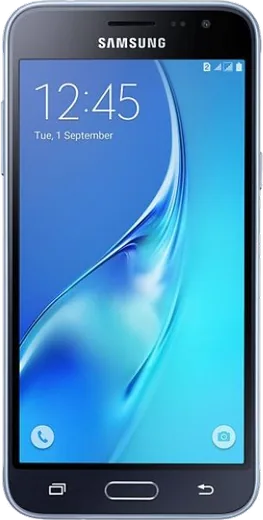
WhatsApp on Samsung Galaxy J3
Samsung Android

WhatsApp for Samsung Galaxy J3

Install the official WhatsApp on your Samsung Galaxy J3 in a few simple steps.

WhatsApp Messenger 4.7 · 64.2M reviews Free · Android · ~40 MB · by WhatsApp LLC
Download WhatsApp

Ask a question / report a problem

You can ask any question about WhatsApp support on the Samsung Galaxy J3 — leave it below and we'll help.

Ask a question

Can the Samsung Galaxy J3 run WhatsApp?

Not supported
  • Operating systemAndroid
  • WhatsApp versionNot supported

Latest known WhatsApp problems on Samsung Galaxy J3

1

Why do my WhatsApp notifications not pop up on my Samsung Galaxy J3?

Samsung's aggressive battery management is usually the cause. Go to Settings > Apps > WhatsApp > Battery and set it to Unrestricted, then open Settings > Device care (or Device maintenance) > Battery, find WhatsApp under the app power management / sleeping apps list, and make sure it is not set to "Put app to sleep" or "Deep sleeping." Next open Settings > Apps > WhatsApp > Notifications and confirm notifications are allowed with sound and pop-up enabled. This keeps WhatsApp running in the background so messages arrive instantly. See how others solved this on Reddit
2

How do I fix WhatsApp notifications not working at all on my Galaxy J3?

Start inside WhatsApp: tap the three-dot menu > Settings > Notifications and make sure each tone is set rather than "None." Then check the system level at Settings > Apps > WhatsApp > Notifications and confirm it is turned on. Make sure background data is allowed under Settings > Apps > WhatsApp > Mobile data (enable "Allow background data usage"), and that WhatsApp is not in the sleeping apps list under Settings > Device care > Battery. Restarting the phone afterward lets the notification service reconnect. See how others solved this on Reddit
3

Why does my Galaxy J3 not show incoming WhatsApp calls?

WhatsApp needs permission to display over other apps and to run freely in the background. Go to Settings > Apps > WhatsApp > Permissions and grant the Phone permission, then enable "Appear on top" / "Display over other apps" (under Settings > Apps > Special access > Appear on top if it is not listed in the app's permissions). Next set the app's battery usage to Unrestricted and keep it out of the sleeping apps list so the call screen can wake the device. If calls still fail to appear, reinstalling WhatsApp from the Play Store re-registers the call service. See how others solved this on Reddit
4

Why is WhatsApp so laggy and slow on my older Samsung Galaxy J3?

The J3 has limited RAM, so clear WhatsApp's cache via Settings > Apps > WhatsApp > Storage > Clear cache, and delete old media-heavy chats to free space. Update the app through the Play Store, since outdated builds run poorly on legacy hardware, and keep WhatsApp off the sleeping apps list so Samsung's memory saver does not keep closing it. If it still struggles, lowering auto-download under WhatsApp Settings > Storage and data reduces the load on the device. See how others solved this on Reddit
5

Why do WhatsApp notifications not reach my paired Samsung Galaxy watch from my J3?

Notifications only forward to a watch if they first appear on the phone, so on the J3 confirm WhatsApp notifications are enabled and that the app is not being put to sleep by battery management. Then open the Galaxy Wearable app, go to Watch settings > Notifications, and make sure WhatsApp is toggled on in the app list, including the "Notifications while using phone" option. If it still does not relay, toggle WhatsApp off and back on in Galaxy Wearable to re-sync. See how others solved this on Reddit
6

Why am I getting WhatsApp notifications on a device that doesn't even have WhatsApp installed?

This almost always means a paired wearable is mirroring the alerts from your phone, or a device is linked through WhatsApp's Linked Devices feature. Open the Galaxy Wearable app and remove WhatsApp from its notification list so the watch stops mirroring. On your main phone, open WhatsApp > Settings > Linked Devices and log out any device you no longer use. If a phone is showing them, check Settings > Apps > Special access > Notification access and revoke access for any companion or relay app you don't recognize. See how others solved this on Reddit

Ask a question / report a problem

You can ask any question about WhatsApp support on the Samsung Galaxy J3 — leave it below and we'll help.

Ask a question

Watch: setting up WhatsApp

Prefer to watch? This short walkthrough shows the whole installation and number-verification flow.

How to install WhatsApp on Samsung Galaxy J3 — video walkthrough

How to install WhatsApp on Samsung Galaxy J3

1

Choose how to download

On your Samsung Galaxy J3 you can get the official app two ways: from the Google Play Store — the easiest option, since it keeps WhatsApp updated automatically — or directly from the official website. You can download an APK file, by clicking a link “Download WhatsApp directly”.

2

Open WhatsApp

Launch WhatsApp from your home screen or app drawer and accept the Terms of Service to start setup.

3

Verify your phone number

Enter your phone number. If your Samsung Galaxy J3 uses dual SIM, pick the line you want WhatsApp tied to, then enter the 6-digit code it sends by SMS — it usually fills in automatically.

4

Restore chats and finish setup

Restore your chat history from Google Drive (use the same Google account), add your name and photo, and tap Allow for notifications so messages and calls arrive reliably.

Stay safe: only ever install WhatsApp from the official Android source. The Download button above already points there — modified copies (GB/Plus/Aero WhatsApp) can get your number banned.

Comments (6)

No registration needed. No email required.
L
lou.zFeb 12, 2026

honestly my Galaxy J3 was being difficult but this sorted it 🙏

K
kai32Aug 13, 2025

i tried everything pls help meee install whatsapp on Samsung Galaxy J3 pls

AppWhatsOfficialAug 17, 2025

Hey, no need to stress! Tap the green Download button at the top, follow the steps, and you will have WhatsApp in a minute.

K
kev_ytJun 11, 2025

perfect, exactly what i needed thanks again

R
raj07Feb 23, 2025

me funcionó al instante en mi Galaxy J3 💯

T
theuserJan 18, 2025

yo 10 out of 10 thx

J
jay.cAug 6, 2024

man finally got whatsapp running on my samsung galaxy j3 🔥