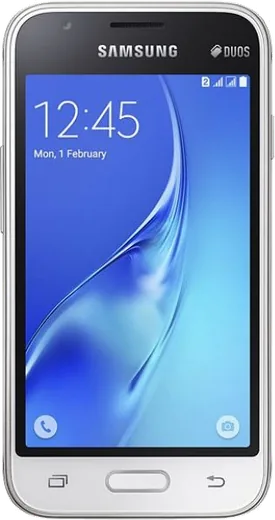
WhatsApp on Samsung Galaxy J1 Mini
Samsung Android

WhatsApp for Samsung Galaxy J1 Mini

Install the official WhatsApp on your Samsung Galaxy J1 Mini in a few simple steps.

WhatsApp Messenger 4.7 · 64.2M reviews Free · Android · ~40 MB · by WhatsApp LLC
Download WhatsApp

Ask a question / report a problem

You can ask any question about WhatsApp support on the Samsung Galaxy J1 Mini — leave it below and we'll help.

Ask a question

Can the Samsung Galaxy J1 Mini run WhatsApp?

Supported
  • Operating systemAndroid
  • WhatsApp versionLatest supported

Latest known WhatsApp problems on Samsung Galaxy J1 Mini

1

Can I still install and use WhatsApp on a Samsung Galaxy J1 Mini in 2026?

The J1 Mini ships with Android 5.1 (Lollipop), which current WhatsApp no longer supports, so the latest version will refuse to install or will stop connecting. Your only workaround is to side-load an older compatible WhatsApp APK from a trusted archive like APKMirror, but be aware these legacy builds can also be cut off at any time. For reliable messaging, treat this phone as a backup and run WhatsApp on a newer device instead. See how others solved this on Reddit
2

WhatsApp won't install from the Play Store on my Samsung Galaxy J1 Mini, what do I do?

The Play Store hides or blocks WhatsApp when your Android version is below the app's minimum requirement, which is the case on the J1 Mini's Android 5.1. First check for any updates under Settings > About device > Software update, then in the Play Store clear its cache via Settings > Apps > Google Play Store > Storage > Clear cache and try again. If it still won't appear, you'll need to manually install an older WhatsApp APK, since no current store version is compatible with this Android version. See how others solved this on Reddit
3

WhatsApp keeps freezing and running out of memory on my Galaxy J1 Mini, how can I fix it?

The J1 Mini only has about 768MB-1GB of RAM, so WhatsApp media and a long chat history quickly overwhelm it. Free up memory by going to Settings > Application manager > WhatsApp > Storage > Clear cache, and inside WhatsApp turn off auto-download under Settings > Storage and data > Media auto-download (uncheck photos, audio, and video). Regularly deleting old media-heavy chats and keeping few other apps open will noticeably reduce the freezing. See how others solved this on Reddit
4

WhatsApp storage is filling up my Galaxy J1 Mini's tiny 8GB and I can't update anything, what now?

The J1 Mini's 8GB internal storage fills fast, which blocks WhatsApp from updating or saving new media. Insert a microSD card to offload photos and videos, then inside WhatsApp open Settings > Storage and data > Manage storage to bulk-delete large files and forwarded items. Also clear cached data via Settings > Storage > Cached data to recover space so the app can function. See how others solved this on Reddit
5

WhatsApp notifications and calls are very slow or delayed on my old Samsung Galaxy J1 Mini, how do I improve it?

Aggressive battery saving on the J1 Mini often delays WhatsApp message and call notifications. Turn off any battery restriction by checking Settings > Battery and any power-saving mode so WhatsApp can run in the background, and confirm notifications are enabled inside WhatsApp under Settings > Notifications. Since this phone runs on slower hardware and is limited to 3G, staying on a stable Wi-Fi connection will give you the most reliable calls. See how others solved this on Reddit
6

Will Samsung ever release a bug-fix or security update for the Galaxy J1 Mini to keep WhatsApp working?

No, the Galaxy J1 Mini reached end-of-life years ago and Samsung will not issue any further OS or security updates, so it stays on Android 5.1 permanently. This is why newer WhatsApp versions drop support for it, and there is no official update path to restore compatibility. To keep using WhatsApp safely with your number, back up your chats to Google Drive and migrate to a newer Android phone. See how others solved this on Reddit

Ask a question / report a problem

You can ask any question about WhatsApp support on the Samsung Galaxy J1 Mini — leave it below and we'll help.

Ask a question

Watch: setting up WhatsApp

Prefer to watch? This short walkthrough shows the whole installation and number-verification flow.

How to install WhatsApp on Samsung Galaxy J1 Mini — video walkthrough

How to install WhatsApp on Samsung Galaxy J1 Mini

1

Choose how to download

On your Samsung Galaxy J1 Mini you can get the official app two ways: from the Google Play Store — the easiest option, since it keeps WhatsApp updated automatically — or directly from the official website. You can download an APK file, by clicking a link “Download WhatsApp directly”.

2

Open WhatsApp

Launch WhatsApp from your home screen or app drawer and accept the Terms of Service to start setup.

3

Verify your phone number

Enter your phone number. If your Samsung Galaxy J1 Mini uses dual SIM, pick the line you want WhatsApp tied to, then enter the 6-digit code it sends by SMS — it usually fills in automatically.

4

Restore chats and finish setup

Restore your chat history from Google Drive (use the same Google account), add your name and photo, and tap Allow for notifications so messages and calls arrive reliably.

Stay safe: only ever install WhatsApp from the official Android source. The Download button above already points there — modified copies (GB/Plus/Aero WhatsApp) can get your number banned.

Comments (6)

No registration needed. No email required.
X
xX_samMay 11, 2026

sorry but can i use the same number on two phones ?

AppWhatsOfficialMay 16, 2026

Sure, whatsApp supports linked devices now, so you can use your account on more than one phone. Open Linked Devices in Settings to add another.

W
whatsappfanApr 3, 2026

So works like a charm on the samsung galaxy j1 mini 🔥

M
mr_andyMar 31, 2026

Update this worked great on my Samsung Galaxy J1 Mini 😍

M
mr_beaMar 1, 2026

This worked great on my j1 mini ❤️

X
xX_saraFeb 9, 2025

pleaseee my galaxy j1 mini wont install whatsapp i give up :(

AppWhatsOfficialFeb 11, 2025

Take a breath, we got you. Press Download above, then Install, then verify your number. That is all it takes. You will be set up on your phone in no time.

L
lou_kNov 22, 2024

Davvero passaggi chiarissimi per il samsung galaxy j1 mini