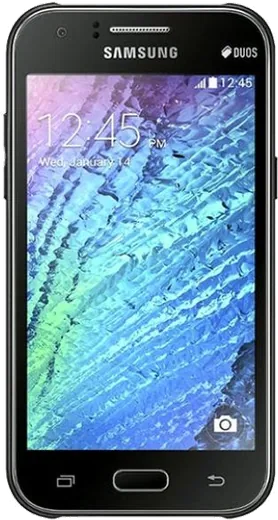
WhatsApp on Samsung Galaxy J1 4G
Samsung Android

WhatsApp for Samsung Galaxy J1 4G

Install the official WhatsApp on your Samsung Galaxy J1 4G in a few simple steps.

WhatsApp Messenger 4.7 · 64.2M reviews Free · Android · ~40 MB · by WhatsApp LLC
Download WhatsApp

Ask a question / report a problem

You can ask any question about WhatsApp support on the Samsung Galaxy J1 4G — leave it below and we'll help.

Ask a question

Can the Samsung Galaxy J1 4G run WhatsApp?

Not supported
  • Operating systemAndroid
  • WhatsApp versionNot supported

Latest known WhatsApp problems on Samsung Galaxy J1 4G

1

WhatsApp says my Galaxy J1 4G phone date is inaccurate and won't connect, how do I fix it?

This means the clock drifted because the J1's old Android build lost network time sync. Open Settings > Date and time, turn off Automatic date and time, then set the correct date, time, and time zone manually. Once the date matches today exactly, reopen WhatsApp and it should connect. If you prefer, you can turn Automatic back on after it syncs, but on this older phone manual is often more reliable. See how others solved this on Reddit
2

Can the Samsung Galaxy J1 4G still run WhatsApp in 2026, or is it too old?

The J1 4G runs an old Android version, and WhatsApp has dropped support for very old releases, so a fresh Play Store install may refuse to set up. Try installing from Google Play first; if it blocks you, you can side-load an older compatible WhatsApp APK, but expect some media and backup features to be limited and updates to eventually stop entirely. See how others solved this on Reddit
3

WhatsApp keeps freezing and running out of storage on my Galaxy J1 4G, what can I do?

The J1 4G has very little RAM and internal storage, so WhatsApp media fills it fast. Open Settings > Application manager > WhatsApp and tap Clear cache, then inside WhatsApp go to Settings > Storage and data to delete large chats and downloaded media. Also turn off auto-download under WhatsApp Settings > Storage and data > Media auto-download, and keep some internal space free for the app's database. See how others solved this on Reddit
4

Is the Galaxy J1 4G too slow and laggy to use WhatsApp reliably as a daily phone?

Owners report the entry-level J-series chip struggles once several apps are installed. Keep WhatsApp smoother by uninstalling apps you don't use from Settings > Application manager and restarting the phone regularly. Keep at least a few hundred MB of internal storage free, since WhatsApp needs headroom for incoming media and its database, and avoid running other heavy apps alongside it. See how others solved this on Reddit
5

Should I keep my Galaxy J1 4G just for WhatsApp or move my account to a newer phone?

The J1 4G works as a light WhatsApp device, but its aging Android and small storage mean security updates have ended and the app may stop supporting it soon. If you only need messaging and it still installs WhatsApp, it's fine as a backup. For daily reliable use, back up your chats to Google Drive under WhatsApp Settings > Chats > Chat backup, then restore them on a newer Android phone. See how others solved this on Reddit

Ask a question / report a problem

You can ask any question about WhatsApp support on the Samsung Galaxy J1 4G — leave it below and we'll help.

Ask a question

Watch: setting up WhatsApp

Prefer to watch? This short walkthrough shows the whole installation and number-verification flow.

How to install WhatsApp on Samsung Galaxy J1 4G — video walkthrough

How to install WhatsApp on Samsung Galaxy J1 4G

1

Choose how to download

On your Samsung Galaxy J1 4G you can get the official app two ways: from the Google Play Store — the easiest option, since it keeps WhatsApp updated automatically — or directly from the official website. You can download an APK file, by clicking a link “Download WhatsApp directly”.

2

Open WhatsApp

Launch WhatsApp from your home screen or app drawer and accept the Terms of Service to start setup.

3

Verify your phone number

Enter your phone number. If your Samsung Galaxy J1 4G uses dual SIM, pick the line you want WhatsApp tied to, then enter the 6-digit code it sends by SMS — it usually fills in automatically.

4

Restore chats and finish setup

Restore your chat history from Google Drive (use the same Google account), add your name and photo, and tap Allow for notifications so messages and calls arrive reliably.

Stay safe: only ever install WhatsApp from the official Android source. The Download button above already points there — modified copies (GB/Plus/Aero WhatsApp) can get your number banned.

Comments (7)

No registration needed. No email required.
M
ms_pabloMay 11, 2026

HELP it just wont work on my Samsung Galaxy J1 4G 😩

AppWhatsOfficialMay 15, 2026

Take a breath, we got you. Press Download above, then Install, then verify your number. That is all it takes. Reply here if you get stuck.

J
joe_danOct 18, 2025

Guys very clear steps cheers

AppWhatsOfficialOct 19, 2025

Perfect, enjoy chatting!

R
ray99Oct 10, 2025

danke, mein samsung galaxy j1 4g hat jetzt whatsapp 🙏

L
lina.mSep 16, 2025

Clear steps for the Galaxy J1 4G, cheers

Z
zoe_kJul 23, 2025

Guys no contacts appear in the app pls

AppWhatsOfficialJul 25, 2025

Sure, whatsApp reads contacts from your phone book, so save the number there with the country code, then pull down to refresh your chat list. Let us know if you need anything else.

S
sam_ashJun 1, 2025

set up whatsapp on my dads galaxy j14g no problem 😍

N
nooooMar 25, 2025

Quick q does it work on older android versions

AppWhatsOfficialMar 27, 2025

Good question, it depends. WhatsApp drops support for very old systems over time. If the store still offers you the app, your phone is supported. Glad to help.