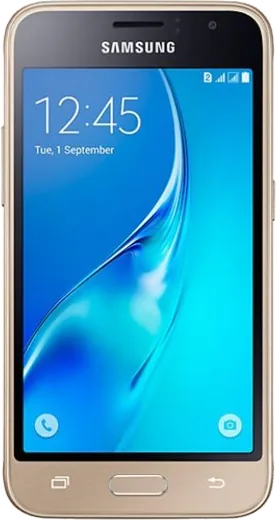
WhatsApp on Samsung Galaxy J1 (2016)
Samsung Android

WhatsApp for Samsung Galaxy J1 (2016)

Install the official WhatsApp on your Samsung Galaxy J1 (2016) in a few simple steps.

WhatsApp Messenger 4.7 · 64.2M reviews Free · Android · ~40 MB · by WhatsApp LLC
Download WhatsApp

Ask a question / report a problem

You can ask any question about WhatsApp support on the Samsung Galaxy J1 (2016) — leave it below and we'll help.

Ask a question

Can the Samsung Galaxy J1 (2016) run WhatsApp?

Support ending soon
  • Operating systemAndroid
  • WhatsApp versionLatest supported

Latest known WhatsApp problems on Samsung Galaxy J1 (2016)

1

Does WhatsApp still work on the Samsung Galaxy J1 (2016) in 2026?

WhatsApp keeps raising its minimum Android requirement, and the J1 (2016) ships with Android 5.1 Lollipop, which current WhatsApp versions no longer support, so the app may stop receiving updates or refuse to launch. Open Settings > About device to confirm your Android version. There is no safe way to force a current WhatsApp build onto Lollipop, so if it stops working the only real fix is to move your number to a newer phone. Keep the J1 as a backup device only. See how others solved this on Reddit
2

Why does WhatsApp keep crashing or freezing on my Galaxy J1?

The J1 has only about 1GB of RAM, so WhatsApp often crashes when memory fills up from other apps running in the background. Close everything else via the recent-apps key, then go to Settings > Application manager > WhatsApp > Storage and tap Clear cache (not Clear data, which deletes local message copies). Restarting the phone before opening WhatsApp also frees enough RAM to keep it stable. See how others solved this on Reddit
3

My Galaxy J1 is always out of storage and WhatsApp won't update or download media. How do I fix it?

The J1 (2016) has only 8GB of internal storage, and WhatsApp media plus system files quickly fill it. Insert a microSD card, then in WhatsApp go to Settings > Storage and data to find and delete large files, and in phone Settings > Storage move photos and downloads to the SD card. In WhatsApp's Storage and data settings you can also turn off Media auto-download on mobile and Wi-Fi to stop new files from piling up. See how others solved this on Reddit
4

How do I back up my WhatsApp chats before moving off my Galaxy J1 to a newer Samsung?

Before retiring the J1, open WhatsApp > Settings > Chats > Chat backup and link your Google account, then tap Back up to save chats to Google Drive. On your new Samsung phone, install WhatsApp, verify the same phone number, and choose Restore when prompted so your history comes back. Make sure both phones use the same Google account, since WhatsApp restores from the Drive backup tied to it. See how others solved this on Reddit
5

Is it worth keeping a Samsung Galaxy J1 (2016) just for WhatsApp?

The J1 can still handle basic WhatsApp texting if the installed version still launches, but its 1GB RAM and Android 5.1 base mean video calls and frequent media will struggle. A practical setup is to keep it as a secondary or kids' device on Wi-Fi only, with media auto-download disabled and an SD card for storage. For your main number, plan to migrate to a newer phone since WhatsApp support for Lollipop is effectively ending. See how others solved this on Reddit

Ask a question / report a problem

You can ask any question about WhatsApp support on the Samsung Galaxy J1 (2016) — leave it below and we'll help.

Ask a question

Watch: setting up WhatsApp

Prefer to watch? This short walkthrough shows the whole installation and number-verification flow.

How to install WhatsApp on Samsung Galaxy J1 (2016) — video walkthrough

How to install WhatsApp on Samsung Galaxy J1 (2016)

1

Choose how to download

On your Samsung Galaxy J1 (2016) you can get the official app two ways: from the Google Play Store — the easiest option, since it keeps WhatsApp updated automatically — or directly from the official website. You can download an APK file, by clicking a link “Download WhatsApp directly”.

2

Open WhatsApp

Launch WhatsApp from your home screen or app drawer and accept the Terms of Service to start setup.

3

Verify your phone number

Enter your phone number. If your Samsung Galaxy J1 (2016) uses dual SIM, pick the line you want WhatsApp tied to, then enter the 6-digit code it sends by SMS — it usually fills in automatically.

4

Restore chats and finish setup

Restore your chat history from Google Drive (use the same Google account), add your name and photo, and tap Allow for notifications so messages and calls arrive reliably.

Stay safe: only ever install WhatsApp from the official Android source. The Download button above already points there — modified copies (GB/Plus/Aero WhatsApp) can get your number banned.

Comments (5)

No registration needed. No email required.
M
maxx_rayApr 22, 2026

my Samsung Galaxy J1 has whatsapp now thanks to this

AppWhatsOfficialApr 25, 2026

Good to hear!

J
joe.hOct 5, 2025

guys set up whatsapp on my dads samsung galaxy j1 no problem

T
techguyJul 25, 2025

Ey instalado y funcionando en mi Samsung Galaxy J1 🎉

R
ray_officialSep 2, 2024

Guys no play store on my phone, will this work pls

AppWhatsOfficialSep 5, 2024

No problem. Without Play Store you can use the official APK, just allow installs from your browser first. Happy chatting!

T
theuserJul 23, 2024

Ugh PLEASE i need whatsapp on my galaxy j1 its urgent 😭

AppWhatsOfficialJul 27, 2024

Breathe! Follow the steps above one by one, tap Download first, and you will be chatting in no time. Reply here if you get stuck.