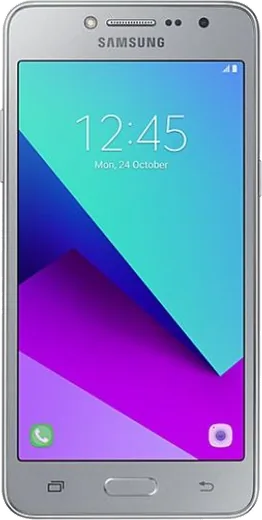
WhatsApp on Samsung Galaxy Grand Prime Plus
Samsung Android

WhatsApp for Samsung Galaxy Grand Prime Plus

Install the official WhatsApp on your Samsung Galaxy Grand Prime Plus in a few simple steps.

WhatsApp Messenger 4.7 · 64.2M reviews Free · Android · ~40 MB · by WhatsApp LLC
Download WhatsApp

Ask a question / report a problem

You can ask any question about WhatsApp support on the Samsung Galaxy Grand Prime Plus — leave it below and we'll help.

Ask a question

Can the Samsung Galaxy Grand Prime Plus run WhatsApp?

Support ending soon
  • Operating systemAndroid
  • WhatsApp versionLatest supported

Latest known WhatsApp problems on Samsung Galaxy Grand Prime Plus

1

I forgot the password/PIN on my Galaxy Grand Prime Plus and I'm locked out. How do I unlock it?

If the phone is signed into a Google account, the fastest route is Find My Device (google.com/android/find) signed into that same account, where you can remotely Erase the device and set it up fresh. To wipe it manually, power off, then hold Volume Up + Home + Power together until the recovery menu appears, choose Wipe data/factory reset with the volume keys and confirm with the Power button. Note that on this older Android 6 device you'll need the previously synced Google account credentials afterward to clear the Factory Reset Protection (FRP) lock. See how others solved this on Reddit
2

My Galaxy Grand Prime Plus feels slower and the battery drains faster after a few years. How can I speed it up?

Go to Settings > Apps, and for heavy apps like Facebook, Chrome and Gallery tap Storage > Clear cache to free up its tiny internal storage. Then disable bloatware you don't use via Settings > Apps > (select app) > Disable, and reduce animations through Developer options (unlock it by tapping Settings > About phone > Build number seven times) by setting Window, Transition and Animator scales to 0.5x. After backing up your data to Google Drive and Google Photos, a factory reset often restores noticeable responsiveness on aging units. See how others solved this on Reddit
3

Storage on my Galaxy Grand Prime Plus is always full and I can't update apps. What should I do?

This model ships with only 8GB internal storage, so insert a microSD card, then move media via Settings > Apps > (app) > Storage > Change to SD card where the app allows it, and set the Camera app to save to SD card. Offload photos by enabling backup in the Google Photos app, then use its Free up space option to delete already-backed-up copies. Regularly clearing app caches under Settings > Apps helps keep enough room for Play Store updates. See how others solved this on Reddit
4

I'm switching from my old Galaxy Grand Prime Plus to a newer Samsung. How do I move my data over?

Install Samsung Smart Switch on the old phone (it's built into newer Galaxy models under Settings > Accounts and backup > Bring data from old device) and transfer wirelessly over Wi-Fi, which avoids needing a cable adapter for this micro-USB phone. For contacts and calendar, first confirm they're synced under Settings > Accounts > Google so they reappear automatically on the new phone. Photos move cleanly if you've backed them up in Google Photos beforehand and sign into the same account on the new device. See how others solved this on Reddit
5

My family member uses a Galaxy Grand Prime Plus and keeps installing risky apps or running out of space. How can I lock it down?

Open the Play Store, tap the profile/menu, then Settings > Parental controls to limit app installs by content rating with a PIN. Turn off installs from unknown sources via Settings > Lock screen and security > Unknown sources so sideloaded APKs are blocked. You can also remotely locate the phone and, if needed, lock or erase it through Find My Device tied to that Google account. See how others solved this on Reddit
6

Coming from an iPhone to the Galaxy Grand Prime Plus, how do I bring my contacts, photos and messages across?

Use Samsung Smart Switch, which has an iOS mode that imports contacts, calendar and photos by signing into your iCloud account directly in the app. Before starting, back up your iPhone to iCloud and, if you used iMessage, turn it off at Settings > Messages > iMessage on the iPhone so future SMS texts reach your Samsung. As an alternative for photos, install Google Photos on both devices, or download your library from iCloud and re-sync it through your Google account. See how others solved this on Reddit

Ask a question / report a problem

You can ask any question about WhatsApp support on the Samsung Galaxy Grand Prime Plus — leave it below and we'll help.

Ask a question

Watch: setting up WhatsApp

Prefer to watch? This short walkthrough shows the whole installation and number-verification flow.

How to install WhatsApp on Samsung Galaxy Grand Prime Plus — video walkthrough

How to install WhatsApp on Samsung Galaxy Grand Prime Plus

1

Choose how to download

On your Samsung Galaxy Grand Prime Plus you can get the official app two ways: from the Google Play Store — the easiest option, since it keeps WhatsApp updated automatically — or directly from the official website. You can download an APK file, by clicking a link “Download WhatsApp directly”.

2

Open WhatsApp

Launch WhatsApp from your home screen or app drawer and accept the Terms of Service to start setup.

3

Verify your phone number

Enter your phone number. If your Samsung Galaxy Grand Prime Plus uses dual SIM, pick the line you want WhatsApp tied to, then enter the 6-digit code it sends by SMS — it usually fills in automatically.

4

Restore chats and finish setup

Restore your chat history from Google Drive (use the same Google account), add your name and photo, and tap Allow for notifications so messages and calls arrive reliably.

Stay safe: only ever install WhatsApp from the official Android source. The Download button above already points there — modified copies (GB/Plus/Aero WhatsApp) can get your number banned.

Comments (7)

No registration needed. No email required.
M
mike.wDec 29, 2025

Omg i tried 3 other guides before this one

M
mike_samOct 7, 2025

wow smooth install on the galaxy grandprimeplus 🎉

U
ugh_helpSep 12, 2025

Ugh cant do this alone HELP how do i download 😭

AppWhatsOfficialSep 15, 2025

Take a breath, we got you. Press Download above, then Install, then verify your number. That is all it takes. It is easier than it looks, promise.

B
bea_tanMay 21, 2025

no problems installing on my Galaxy Grand Prime Plus

C
chris74Apr 30, 2025

quick q the app opens to a black screen anyone

AppWhatsOfficialMay 5, 2025

Thanks for asking, restart the phone, and if the black screen stays, clear the app data and install the latest build again. Hope that helps!

X
xX_ivanDec 5, 2024

hé ça a marché tout de suite sur mon grand prime plus

L
lurkerSep 7, 2024

Honestly did this on my Samsung Galaxy Grand Prime Plus and it just worked :)