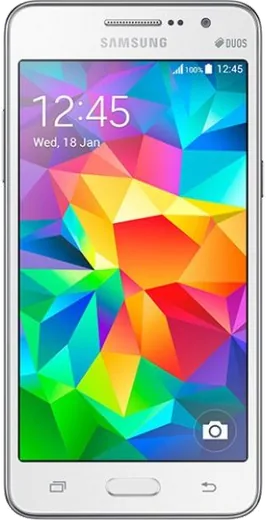
WhatsApp on Samsung Galaxy Grand Prime
Samsung Android

WhatsApp for Samsung Galaxy Grand Prime

Install the official WhatsApp on your Samsung Galaxy Grand Prime in a few simple steps.

WhatsApp Messenger 4.7 · 64.2M reviews Free · Android · ~40 MB · by WhatsApp LLC
Download WhatsApp

Ask a question / report a problem

You can ask any question about WhatsApp support on the Samsung Galaxy Grand Prime — leave it below and we'll help.

Ask a question

Can the Samsung Galaxy Grand Prime run WhatsApp?

Not supported
  • Operating systemAndroid
  • WhatsApp versionNot supported

Latest known WhatsApp problems on Samsung Galaxy Grand Prime

1

Can WhatsApp still run on my Galaxy Grand Prime with Android 5.1.1?

Yes for now. WhatsApp dropped support for Android versions below 5.0, and 5.1.1 Lollipop is still above the current minimum, so the app can install and run on the Grand Prime. Install or update it only through the Google Play Store, since older sideloaded APKs often fail to verify or register the number. Expect WhatsApp to eventually raise its minimum and cut off this version, so back up your chats regularly while you still can. See how others solved this on Reddit
2

How do I unlock my Samsung Galaxy Grand Prime if I forgot the PIN or it's carrier-locked?

These are two different locks. For a forgotten screen lock, do a factory reset: power off, then hold Volume Up + Home + Power together until the recovery menu appears, and choose Wipe data/factory reset (this erases everything, so it only helps if you have a backup). For a carrier network lock, you need an unlock code from the original carrier or a reputable unlock service. With a non-accepted SIM inserted, the phone prompts for the network unlock code, which you type on the keypad. The Grand Prime has no built-in SIM-unlock toggle in Settings. See how others solved this on Reddit
3

I restored WhatsApp from Google Drive but my chat boxes are empty, how do I fix it?

Empty chats after a restore usually mean WhatsApp couldn't read the backup. Confirm you signed in with the exact same phone number and the same Google account that holds the backup. Uninstall WhatsApp, reinstall from the Play Store, and when prompted during setup tap Restore (don't skip it), letting it finish on Wi-Fi without closing the app. If it still fails, a more recent local backup may exist in Internal storage/WhatsApp/Databases, which WhatsApp will offer to restore from automatically when no Drive backup loads. See how others solved this on Reddit
4

How do I turn off the predictive text suggestion bar on my Grand Prime while keeping autocorrect?

Go to Settings > Language and input, tap the gear next to Samsung keyboard, and turn off Predictive text to hide the suggestion strip across the top. The correction features are separate toggles in that same menu, such as Auto replace and Auto capitalize, so you can leave those enabled while the predictions are off. See how others solved this on Reddit
5

Is the Galaxy Grand Prime still usable as a basic phone for WhatsApp and calls in 2026?

It can still handle calls, texts, and a current WhatsApp install, but the aging battery and roughly 1 GB of RAM mean you should keep only a few apps installed and use a microSD card for storage. Treat it as a light secondary or backup phone, keep WhatsApp chat backups in Google Drive, and be aware that app support for Android 5.1.1 will keep shrinking over time. See how others solved this on Reddit

Ask a question / report a problem

You can ask any question about WhatsApp support on the Samsung Galaxy Grand Prime — leave it below and we'll help.

Ask a question

Watch: setting up WhatsApp

Prefer to watch? This short walkthrough shows the whole installation and number-verification flow.

How to install WhatsApp on Samsung Galaxy Grand Prime — video walkthrough

How to install WhatsApp on Samsung Galaxy Grand Prime

1

Choose how to download

On your Samsung Galaxy Grand Prime you can get the official app two ways: from the Google Play Store — the easiest option, since it keeps WhatsApp updated automatically — or directly from the official website. You can download an APK file, by clicking a link “Download WhatsApp directly”.

2

Open WhatsApp

Launch WhatsApp from your home screen or app drawer and accept the Terms of Service to start setup.

3

Verify your phone number

Enter your phone number. If your Samsung Galaxy Grand Prime uses dual SIM, pick the line you want WhatsApp tied to, then enter the 6-digit code it sends by SMS — it usually fills in automatically.

4

Restore chats and finish setup

Restore your chat history from Google Drive (use the same Google account), add your name and photo, and tap Allow for notifications so messages and calls arrive reliably.

Stay safe: only ever install WhatsApp from the official Android source. The Download button above already points there — modified copies (GB/Plus/Aero WhatsApp) can get your number banned.

Comments (7)

No registration needed. No email required.
C
chris_realApr 8, 2026

davvero il miglior sito, funzionato al primo colpo sul mio Galaxy Grand Prime

D
dan75Mar 29, 2026

hey anyone pls i cant download it heeeelp me :(

AppWhatsOfficialApr 1, 2026

Hey, no need to stress! Tap the green Download button at the top, follow the steps, and you will have WhatsApp in a minute. You got this!

T
tan.hMar 9, 2026

honestly whatsapp is working on my galaxy grandprime now 🙏

T
tan.uFeb 28, 2026

Anyone? does whatsapp support the grandprime pls

AppWhatsOfficialMar 4, 2026

Hey there, yes, WhatsApp supports the your phone. Just make sure your phone is on an up to date version of its operating system for the best experience. Let us know if you need anything else.

K
kev.yMay 22, 2025

Great stuff, much appreciated

A
andy43Feb 27, 2025

The download was a bit slow but it worked 👌

N
nina1990Jul 23, 2024

ngl this worked great on my Samsung Galaxy Grand Prime 👌