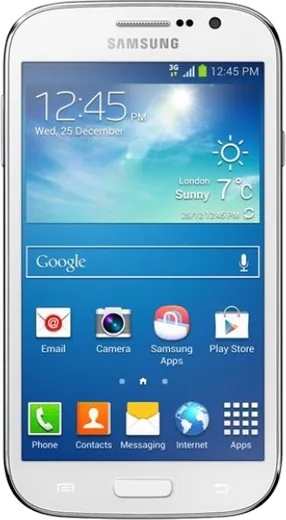
WhatsApp on Samsung Galaxy Grand Neo
Samsung Android

WhatsApp for Samsung Galaxy Grand Neo

Install the official WhatsApp on your Samsung Galaxy Grand Neo in a few simple steps.

WhatsApp Messenger 4.7 · 64.2M reviews Free · Android · ~40 MB · by WhatsApp LLC
Download WhatsApp

Ask a question / report a problem

You can ask any question about WhatsApp support on the Samsung Galaxy Grand Neo — leave it below and we'll help.

Ask a question

Can the Samsung Galaxy Grand Neo run WhatsApp?

Not supported
  • Operating systemAndroid
  • WhatsApp versionNot supported

Latest known WhatsApp problems on Samsung Galaxy Grand Neo

1

Can I install a custom ROM on my Galaxy Grand Neo (GT-i9060) to make it faster?

The GT-i9060 has a community custom ROM scene (CyanogenMod and later LineageOS-based builds), but you must first flash a custom recovery like TWRP using Odin on a PC, then wipe and install the ROM zip from recovery. Stick to a ROM thread on XDA-Developers that names your exact model (i9060 vs i9060I), make a full Nandroid backup in TWRP first, and accept that flashing wipes all data and voids your warranty. A clean LineageOS build runs noticeably lighter than the stock TouchWiz Jelly Bean, but expect occasional bugs since support is community-driven and unofficial. See how others solved this on Reddit
2

I can't sign in to my Google account on the Grand Neo running Android 4.x - it keeps failing

Old Android 4.1/4.2 builds carry outdated security certificates that Google's servers now reject, which breaks both account sign-in and the Play Store. First go to Settings > Date and time, set the correct date and time, then open the Play Store and let Google Play Services update itself. If sign-in still fails, sideloading a newer Google Play Services APK that matches Android 4.x and the armeabi-v7a architecture from a trusted source like APKMirror often restores it. There is no in-phone setting that fixes the expired certificates, so updating Play Services is the key step. See how others solved this on Reddit
3

How do I transfer my contacts, photos and data from the Grand Neo to a new phone?

The most reliable route on this old device is to back up to Google: on the Grand Neo go to Settings > Accounts > Google and sync Contacts, then turn on backup in the Google Photos app for your pictures, and sign into the same account on the new phone to pull everything down. Samsung Smart Switch can also transfer contacts, messages and media directly, but it is poorly supported on Android 4.x and may crash, so use the new phone's Smart Switch to 'receive' if needed. Doing the photo and contact sync over Wi-Fi first is the safest path and avoids relying on the flaky app on the older OS. See how others solved this on Reddit
4

My old Grand Neo has gotten really slow and laggy - can I speed it up without flashing a ROM?

With only 1GB of RAM the stock TouchWiz interface struggles, so disable bloatware you don't use via Settings > Application manager, swipe to the 'All' tab, tap each unwanted Samsung app and choose Disable. Unlock Developer options by tapping Settings > About device > Build number seven times, then set Window, Transition and Animator animation scales to 0.5x or off. After backing up your data, a factory reset via Settings > Backup and reset > Factory data reset clears years of accumulated junk and usually gives the single biggest speed boost. See how others solved this on Reddit
5

The Play Store and apps say they're not compatible or won't update on my Grand Neo anymore

Most current apps now require Android 5.0 or newer while the Grand Neo is stuck on 4.2/4.4, so the Play Store blocks newer versions by design. To run an app anyway, search APKMirror for an older release that supports your Android version and the armeabi-v7a architecture, then sideload it after enabling Settings > Security > Unknown sources. Be selective about banking or payment apps, since outdated versions can be insecure and may stop working server-side regardless of what you install. See how others solved this on Reddit

Ask a question / report a problem

You can ask any question about WhatsApp support on the Samsung Galaxy Grand Neo — leave it below and we'll help.

Ask a question

Watch: setting up WhatsApp

Prefer to watch? This short walkthrough shows the whole installation and number-verification flow.

How to install WhatsApp on Samsung Galaxy Grand Neo — video walkthrough

How to install WhatsApp on Samsung Galaxy Grand Neo

1

Choose how to download

On your Samsung Galaxy Grand Neo you can get the official app two ways: from the Google Play Store — the easiest option, since it keeps WhatsApp updated automatically — or directly from the official website. You can download an APK file, by clicking a link “Download WhatsApp directly”.

2

Open WhatsApp

Launch WhatsApp from your home screen or app drawer and accept the Terms of Service to start setup.

3

Verify your phone number

Enter your phone number. If your Samsung Galaxy Grand Neo uses dual SIM, pick the line you want WhatsApp tied to, then enter the 6-digit code it sends by SMS — it usually fills in automatically.

4

Restore chats and finish setup

Restore your chat history from Google Drive (use the same Google account), add your name and photo, and tap Allow for notifications so messages and calls arrive reliably.

Stay safe: only ever install WhatsApp from the official Android source. The Download button above already points there — modified copies (GB/Plus/Aero WhatsApp) can get your number banned.

Comments (5)

No registration needed. No email required.
B
budgetkingFeb 13, 2026

Ngl installed on my grand neo, super simple

AppWhatsOfficialFeb 16, 2026

Thanks for sharing!

N
not_tomSep 14, 2025

enfin des étapes super claires pour le samsung galaxy grand neo

S
sara_xXMar 9, 2025

yo even my grandma could do this

L
lou80Dec 14, 2024

pleeeease i really need whatsapp on my Samsung Galaxy Grand Neo today

AppWhatsOfficialDec 17, 2024

Don't worry, you can do this! Use the Download button, install the app, and enter your number to verify. Reply here if you get stuck.

G
gabe12Nov 5, 2024

guys does it work on older android versions anyone

AppWhatsOfficialNov 8, 2024

Older phones can work as long as the app is still offered to them. Updating the OS where possible helps a lot. Happy chatting!