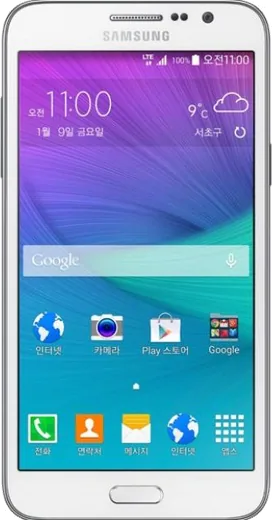
WhatsApp on Samsung Galaxy Grand Max
Samsung Android

WhatsApp for Samsung Galaxy Grand Max

Install the official WhatsApp on your Samsung Galaxy Grand Max in a few simple steps.

WhatsApp Messenger 4.7 · 64.2M reviews Free · Android · ~40 MB · by WhatsApp LLC
Download WhatsApp

Ask a question / report a problem

You can ask any question about WhatsApp support on the Samsung Galaxy Grand Max — leave it below and we'll help.

Ask a question

Can the Samsung Galaxy Grand Max run WhatsApp?

Not supported
  • Operating systemAndroid
  • WhatsApp versionNot supported

Latest known WhatsApp problems on Samsung Galaxy Grand Max

1

Why is my Samsung Galaxy Grand Max so slow and laggy?

On an older budget phone like the Grand Max, lag usually comes from background apps and a cluttered cache rather than the hardware itself. Go to Settings > Apps (or Application manager), tap each heavy app (Facebook, Chrome, the gallery) and clear its cache, then disable bloatware you never use. Keep at least 1-2 GB of internal storage free, since the phone slows dramatically when storage is nearly full. Restarting once a day and turning off unused live wallpapers or animations under Settings > Display also helps a lot. See how others solved this on Reddit
2

My Galaxy Grand Max storage is almost full, how do I free up space?

Go to Settings > Storage and clear cached data, then move photos and videos to a microSD card via My Files > Device storage by long-pressing and choosing Move. Offload backups to the cloud with Google Photos (free backup) or Google Drive, then delete the local copies, and uninstall or disable apps you rarely open. Clearing WhatsApp media (open WhatsApp > Settings > Storage and data) usually reclaims the most space on a low-storage phone. See how others solved this on Reddit
3

Is the Samsung Galaxy Grand Max still usable in 2024-2025?

It still works for calls, texts, WhatsApp and light browsing, but its older Android version no longer gets security updates and some newer apps may refuse to install or run smoothly. Keep it lean by sticking to lightweight or "Lite"/"Go" versions of apps, and use it mainly for messaging and media rather than heavy multitasking. For banking or 2FA, treat it cautiously, since the outdated, unpatched OS is the real limitation, not the screen or battery. See how others solved this on Reddit
4

How do I move all my data from an iPhone to the Galaxy Grand Max?

Install Samsung Smart Switch from the Play Store (it is not preinstalled on this older model), then use it to pull contacts, photos and calendars from an iCloud backup or directly over Wi-Fi. Before you start, turn off iMessage on the iPhone (Settings > Messages > iMessage off) so your texts arrive as SMS. Photos can also simply be re-downloaded by installing Google Photos and signing in with your Google account. See how others solved this on Reddit
5

What are the real downsides of the Galaxy Grand Max compared to a flagship?

Being a low-cost model, the Grand Max uses a slower processor, less RAM and a weaker camera than the Galaxy S series, so heavy games, multitasking and low-light photos suffer. It also stopped receiving Android updates years ago, which is the biggest practical gap versus a current phone. For everyday calls, messaging and social apps it is fine, but expect to manage storage and close background apps actively to keep it responsive. See how others solved this on Reddit
6

I switched from iPhone to the Galaxy Grand Max, what should I set up first?

Sign in to your Google account (Settings > Accounts > Add account > Google) so contacts, mail and Google Photos sync automatically, then install Gboard and your usual apps from the Play Store to recreate your iPhone setup. Enable Find My Mobile (Settings > Security, or via findmymobile.samsung.com with a Samsung account) as the Android equivalent of Find My iPhone. The keyboard, gallery and notification shade work differently, so give it a few days to adjust. See how others solved this on Reddit

Ask a question / report a problem

You can ask any question about WhatsApp support on the Samsung Galaxy Grand Max — leave it below and we'll help.

Ask a question

Watch: setting up WhatsApp

Prefer to watch? This short walkthrough shows the whole installation and number-verification flow.

How to install WhatsApp on Samsung Galaxy Grand Max — video walkthrough

How to install WhatsApp on Samsung Galaxy Grand Max

1

Choose how to download

On your Samsung Galaxy Grand Max you can get the official app two ways: from the Google Play Store — the easiest option, since it keeps WhatsApp updated automatically — or directly from the official website. You can download an APK file, by clicking a link “Download WhatsApp directly”.

2

Open WhatsApp

Launch WhatsApp from your home screen or app drawer and accept the Terms of Service to start setup.

3

Verify your phone number

Enter your phone number. If your Samsung Galaxy Grand Max uses dual SIM, pick the line you want WhatsApp tied to, then enter the 6-digit code it sends by SMS — it usually fills in automatically.

4

Restore chats and finish setup

Restore your chat history from Google Drive (use the same Google account), add your name and photo, and tap Allow for notifications so messages and calls arrive reliably.

Stay safe: only ever install WhatsApp from the official Android source. The Download button above already points there — modified copies (GB/Plus/Aero WhatsApp) can get your number banned.

Comments (7)

No registration needed. No email required.
K
kate83Mar 19, 2026

ehi facilissimo, fatto in 2 minuti 🙏

S
sam00Nov 17, 2025

yo all good on my galaxy grandmax now

N
newphoneOct 21, 2025

someone cant do this alone HELP how do i download :(

AppWhatsOfficialOct 22, 2025

You are almost there! Tap Download, allow the install, open WhatsApp and confirm your number. You got this!

D
deni_proJun 11, 2025

honestly set up whatsapp on my dads galaxy grand max no problem

T
tina_solFeb 12, 2025

set up whatsapp on my dads grandmax no problem cheers

K
kate51Feb 8, 2025

tbh downloaded and installed on my grand max 🙏

C
chris_robJan 19, 2025

Omg did this on my grandmax and it just worked :)