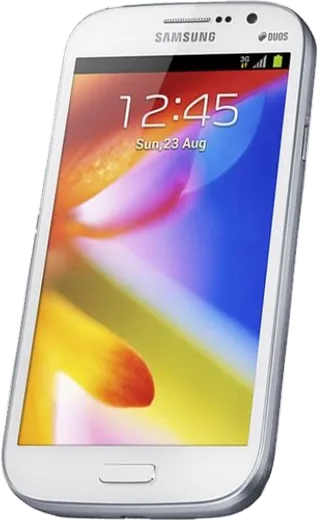
WhatsApp on Samsung Galaxy Grand I9080
Samsung Android

WhatsApp for Samsung Galaxy Grand I9080

Install the official WhatsApp on your Samsung Galaxy Grand I9080 in a few simple steps.

WhatsApp Messenger 4.7 · 64.2M reviews Free · Android · ~40 MB · by WhatsApp LLC
Download WhatsApp

Ask a question / report a problem

You can ask any question about WhatsApp support on the Samsung Galaxy Grand I9080 — leave it below and we'll help.

Ask a question

Can the Samsung Galaxy Grand I9080 run WhatsApp?

Not supported
  • Operating systemAndroid
  • WhatsApp versionNot supported

Latest known WhatsApp problems on Samsung Galaxy Grand I9080

1

Can I still install WhatsApp on the Samsung Galaxy Grand I9080?

No. The Grand I9080 runs Android 4.2.2 at most, and WhatsApp requires Android 6.0 Marshmallow or newer, so the current app cannot be installed or activated on it.
2

My Galaxy Grand I9080 had WhatsApp before, why did it stop working?

Older WhatsApp builds that once ran on Jelly Bean have reached their cut-off dates. WhatsApp regularly raises its minimum Android version, and the Grand I9080 cannot upgrade past 4.2.2, so those old versions now expire and refuse to verify your number.
3

Can I update my Galaxy Grand I9080 to Android 6.0 to meet the requirement?

No official update exists. Samsung's last release for the GT-I9080 was Android 4.2.2 Jelly Bean, and there is no supported way to bring it to Android 6.0 Marshmallow.
4

Is the Grand I9080 the dual-SIM version of WhatsApp?

The GT-I9080 is the single-SIM Galaxy Grand; the dual-SIM model is the I9082 Grand Duos. In either case the Android 4.2.2 limit blocks current WhatsApp, so the SIM count does not change compatibility.
5

Can I keep my WhatsApp number if I move off the Grand I9080?

Yes. Install WhatsApp on a phone running Android 6.0+ or iOS 15.1+, register the same number, and your account moves over. Back up your chats first if your old phone can still open WhatsApp.
6

Will sideloading a WhatsApp APK make it work on the Grand I9080?

No. Even if an APK installs, current WhatsApp checks the Android version at launch and quits on anything below 6.0, so the Grand I9080's 4.2.2 system still blocks it.

Ask a question / report a problem

You can ask any question about WhatsApp support on the Samsung Galaxy Grand I9080 — leave it below and we'll help.

Ask a question

Watch: setting up WhatsApp

Prefer to watch? This short walkthrough shows the whole installation and number-verification flow.

How to install WhatsApp on Samsung Galaxy Grand I9080 — video walkthrough

How to install WhatsApp on Samsung Galaxy Grand I9080

1

Choose how to download

On your Samsung Galaxy Grand I9080 you can get the official app two ways: from the Google Play Store — the easiest option, since it keeps WhatsApp updated automatically — or directly from the official website. You can download an APK file, by clicking a link “Download WhatsApp directly”.

2

Open WhatsApp

Launch WhatsApp from your home screen or app drawer and accept the Terms of Service to start setup.

3

Verify your phone number

Enter your phone number. If your Samsung Galaxy Grand I9080 uses dual SIM, pick the line you want WhatsApp tied to, then enter the 6-digit code it sends by SMS — it usually fills in automatically.

4

Restore chats and finish setup

Restore your chat history from Google Drive (use the same Google account), add your name and photo, and tap Allow for notifications so messages and calls arrive reliably.

Stay safe: only ever install WhatsApp from the official Android source. The Download button above already points there — modified copies (GB/Plus/Aero WhatsApp) can get your number banned.

Comments (7)

No registration needed. No email required.
M
maxx92Apr 7, 2026

Ok so perfect, exactly what i needed 👌

AppWhatsOfficialApr 11, 2026

Happy it helped you!

L
leo81Nov 7, 2025

man this fixed whatsapp on my galaxy grandi9080

I
im_theoJul 31, 2025

i dont want people to see im online thanks

AppWhatsOfficialAug 2, 2025

Of course, in Privacy settings you can set Last Seen and Online to Nobody, so no one sees when you are active. Glad to help.

B
ben.zJan 29, 2025

endlich whatsapp auf meinem grandi9080 installiert

P
pablo.kJan 8, 2025

smooth and simple, no issues 👍

L
leo_kSep 7, 2024

So whatsapp is working on my galaxy grand i9080 now thx

M
mike_solSep 2, 2024

guys help meee i pressed everything and nothing 😭 pls

AppWhatsOfficialSep 6, 2024

Don't worry, you can do this! Use the Download button, install the app, and enter your number to verify.