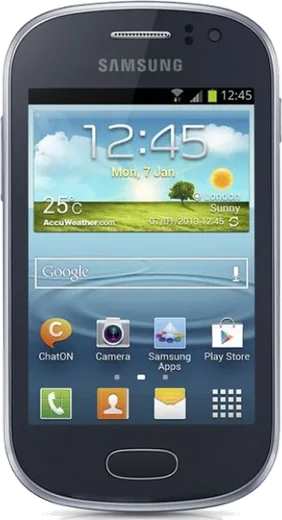
WhatsApp on Samsung Galaxy Fame S6810
Samsung Android

WhatsApp for Samsung Galaxy Fame S6810

Install the official WhatsApp on your Samsung Galaxy Fame S6810 in a few simple steps.

WhatsApp Messenger 4.7 · 64.2M reviews Free · Android · ~40 MB · by WhatsApp LLC
Download WhatsApp

Ask a question / report a problem

You can ask any question about WhatsApp support on the Samsung Galaxy Fame S6810 — leave it below and we'll help.

Ask a question

Can the Samsung Galaxy Fame S6810 run WhatsApp?

Not supported
  • Operating systemAndroid
  • WhatsApp versionNot supported

Latest known WhatsApp problems on Samsung Galaxy Fame S6810

1

Is the Samsung Galaxy Fame S6810 still usable in 2026, or is it too old?

The Galaxy Fame ships with Android 4.1 Jelly Bean and a single-core 1 GHz CPU, so most current Play Store apps will refuse to install because they require a much newer Android version. You can still use it for calls, SMS, the camera, alarms, music and offline tools, but treat it as a backup or secondary phone rather than a daily driver. Avoid logging into banking or email apps on it, since it no longer receives Google security patches. See how others solved this on Reddit
2

My Galaxy Fame S6810 storage is always full and apps won't update

The Fame has only about 4 GB of internal storage with under 1 GB usable, so move apps to the microSD card via Settings > Application manager > tap each app > Move to SD card. Clear cached data under Settings > Storage > Cached data, and set the Camera app to save photos to the SD card. Uninstalling Play Store updates (Settings > Application manager > Google Play Store > Uninstall updates) can also free space and stop update-loop errors. See how others solved this on Reddit
3

Can I root my Galaxy Fame S6810 and install a custom ROM to make it faster?

Yes, the GT-S6810 can be rooted with Odin on a Windows PC by flashing a CF-Auto-Root or a custom recovery (TWRP/CWM) built specifically for the S6810 codename 'nevisxx' — never use a file made for another model, as a mismatched ROM can brick it. After installing a recovery you can flash a lightweight custom ROM, but options for this chip are scarce and unofficial, so back up your stock firmware first. Rooting voids the warranty, so only do it if the phone is already out of support. Note that this early entry-level model predates Samsung Knox, so there is no Knox efuse to trip. See how others solved this on Reddit
4

My Galaxy Fame S6810 is very slow and laggy when switching apps

With only 512 MB of RAM the Fame chokes when several apps stay open, so close them from the recent-apps list and disable bloatware via Settings > Application manager > All > tap the app > Turn off. Reduce the load by enabling Settings > Developer options and setting the Window, Transition and Animator scales to 0.5x or off. After backing up your data, a factory reset (Settings > Backup and reset > Factory data reset) usually restores noticeably smoother performance. See how others solved this on Reddit
5

WhatsApp no longer works on my Galaxy Fame S6810 — how do I keep messaging?

WhatsApp has ended support for older Android versions, so the Fame's Jelly Bean release can no longer activate the current app, and new installs from the Play Store will fail. If it was already installed it may keep running until the cut-off date shown in-app. The practical fix is to move your number to a newer phone using WhatsApp's change-number or 'Transfer account' flow on the new device, since there is no supported way to run current WhatsApp on this hardware. See how others solved this on Reddit

Ask a question / report a problem

You can ask any question about WhatsApp support on the Samsung Galaxy Fame S6810 — leave it below and we'll help.

Ask a question

Watch: setting up WhatsApp

Prefer to watch? This short walkthrough shows the whole installation and number-verification flow.

How to install WhatsApp on Samsung Galaxy Fame S6810 — video walkthrough

How to install WhatsApp on Samsung Galaxy Fame S6810

1

Choose how to download

On your Samsung Galaxy Fame S6810 you can get the official app two ways: from the Google Play Store — the easiest option, since it keeps WhatsApp updated automatically — or directly from the official website. You can download an APK file, by clicking a link “Download WhatsApp directly”.

2

Open WhatsApp

Launch WhatsApp from your home screen or app drawer and accept the Terms of Service to start setup.

3

Verify your phone number

Enter your phone number. If your Samsung Galaxy Fame S6810 uses dual SIM, pick the line you want WhatsApp tied to, then enter the 6-digit code it sends by SMS — it usually fills in automatically.

4

Restore chats and finish setup

Restore your chat history from Google Drive (use the same Google account), add your name and photo, and tap Allow for notifications so messages and calls arrive reliably.

Stay safe: only ever install WhatsApp from the official Android source. The Download button above already points there — modified copies (GB/Plus/Aero WhatsApp) can get your number banned.

Comments (6)

No registration needed. No email required.
V
val_kevMar 12, 2026

update installed on my Samsung Galaxy Fame S6810, super simple

AppWhatsOfficialMar 16, 2026

Thanks for the feedback!

K
kate_marFeb 9, 2026

guys whyyy is this so hard pls help me get whatsapp 😭

AppWhatsOfficialFeb 12, 2026

Breathe! Follow the steps above one by one, tap Download first, and you will be chatting in no time. Reply here if you get stuck.

C
chris78Jul 24, 2025

semplicissimo, il mio fames6810 è pronto

F
finn88Mar 25, 2025

Hey the app crashes every time i open it pls

AppWhatsOfficialMar 29, 2025

No worries, crashes are often an old version. Remove it, update your OS, and reinstall the newest build from the official source. Hope that helps!

D
dan4Sep 16, 2024

finally got it working on my galaxy fames6810 first try

I
ivan_solSep 4, 2024

update whatsapp running great on my Samsung Galaxy Fame S6810 💯