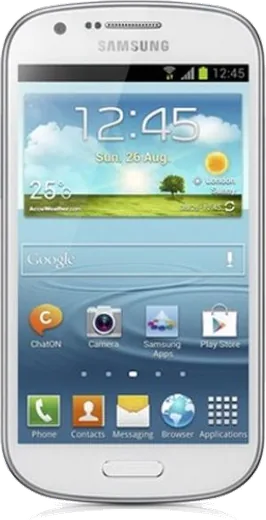
WhatsApp on Samsung Galaxy Express I8730
Samsung Android

WhatsApp for Samsung Galaxy Express I8730

Install the official WhatsApp on your Samsung Galaxy Express I8730 in a few simple steps.

WhatsApp Messenger 4.7 · 64.2M reviews Free · Android · ~40 MB · by WhatsApp LLC
Download WhatsApp

Ask a question / report a problem

You can ask any question about WhatsApp support on the Samsung Galaxy Express I8730 — leave it below and we'll help.

Ask a question

Can the Samsung Galaxy Express I8730 run WhatsApp?

Not supported
  • Operating systemAndroid
  • WhatsApp versionNot supported

Latest known WhatsApp problems on Samsung Galaxy Express I8730

1

Why does WhatsApp keep crashing or refusing to update on my Samsung Galaxy Express I8730?

The Express I8730 shipped with Android 4.1/4.2 Jelly Bean, and current WhatsApp builds no longer support such old Android versions, so the app can become unstable or stop updating from the Play Store. First clear its cache via Settings > Application manager > WhatsApp > Clear cache, then reopen the app. If it still misbehaves, the practical fix is to install the last WhatsApp version that supported Jelly Bean rather than forcing the newest build, since this hardware has aged out of WhatsApp's minimum OS requirements. Keep an eye on WhatsApp's official end-of-support notices, because at some point the app stops working on this OS entirely. See how others solved this on Reddit
2

Why did my WhatsApp notifications suddenly change or stop showing up on the Galaxy Express I8730?

After a WhatsApp update or a reboot, the notification settings can reset, or the system stops it running in the background. Open WhatsApp > Menu > Settings > Notifications and confirm message tones, pop-ups and vibration are enabled, then check Settings > Application manager > WhatsApp and make sure 'Show notifications' is ticked. If you use Power saving mode, turn it off under Settings > Power saving mode so WhatsApp can keep its background connection and deliver pushes while the screen is off. See how others solved this on Reddit
3

Why am I not getting any WhatsApp notifications at all on my Galaxy Express I8730?

On Jelly Bean devices, completely missing notifications are usually caused by a restricted background data connection or a dropped push connection. Make sure background data is allowed by checking that 'Restrict background data' is off under Settings > Data usage, and keep the connection alive while idle via Settings > Wi-Fi > (Menu) Advanced > Keep Wi-Fi on during sleep > Always. Restarting the phone after these changes forces WhatsApp to re-register with its notification servers, which usually restores alerts. See how others solved this on Reddit
4

How do I fix WhatsApp notifications that arrive late or all at once on the Galaxy Express I8730?

Delayed bursts happen when the phone puts the network to sleep to save power and then dumps everything when you wake it. Turn off any power saving under Settings > Power saving mode, and stop Wi-Fi from sleeping via Settings > Wi-Fi > (Menu) Advanced > Keep Wi-Fi on during sleep > Always. Clearing the WhatsApp cache via Settings > Application manager > WhatsApp > Clear cache can also help the push connection stay alive instead of reconnecting in bursts. See how others solved this on Reddit
5

Why won't WhatsApp photos and videos download or appear in my Gallery on the Galaxy Express I8730?

This phone has limited internal storage, so a nearly full memory often stops WhatsApp from saving incoming media. Free up space, then confirm auto-download is enabled under WhatsApp > Menu > Settings > Chat settings > Media auto-download for both mobile data and Wi-Fi. If media downloads but never shows in the Gallery, the WhatsApp Images folder likely contains a hidden '.nomedia' file that hides it from the Gallery scanner; use a file manager to delete that '.nomedia' file (do not create one), then reboot so the Gallery re-scans the folder. See how others solved this on Reddit
6

Why do my WhatsApp notifications keep repeating or duplicating on the Galaxy Express I8730?

Duplicate or repeating alerts usually come from a stale notification cache or from WhatsApp being open on the phone and on WhatsApp Web at the same time. Clear the cache via Settings > Application manager > WhatsApp > Clear cache, then log out of any browser sessions from WhatsApp > Menu > WhatsApp Web > Log out from all computers. Finally, toggle notifications off and back on in both Settings > Application manager > WhatsApp and WhatsApp > Menu > Settings > Notifications to reset the behavior. See how others solved this on Reddit

Ask a question / report a problem

You can ask any question about WhatsApp support on the Samsung Galaxy Express I8730 — leave it below and we'll help.

Ask a question

Watch: setting up WhatsApp

Prefer to watch? This short walkthrough shows the whole installation and number-verification flow.

How to install WhatsApp on Samsung Galaxy Express I8730 — video walkthrough

How to install WhatsApp on Samsung Galaxy Express I8730

1

Choose how to download

On your Samsung Galaxy Express I8730 you can get the official app two ways: from the Google Play Store — the easiest option, since it keeps WhatsApp updated automatically — or directly from the official website. You can download an APK file, by clicking a link “Download WhatsApp directly”.

2

Open WhatsApp

Launch WhatsApp from your home screen or app drawer and accept the Terms of Service to start setup.

3

Verify your phone number

Enter your phone number. If your Samsung Galaxy Express I8730 uses dual SIM, pick the line you want WhatsApp tied to, then enter the 6-digit code it sends by SMS — it usually fills in automatically.

4

Restore chats and finish setup

Restore your chat history from Google Drive (use the same Google account), add your name and photo, and tap Allow for notifications so messages and calls arrive reliably.

Stay safe: only ever install WhatsApp from the official Android source. The Download button above already points there — modified copies (GB/Plus/Aero WhatsApp) can get your number banned.

Comments (5)

No registration needed. No email required.
M
mobilegeekApr 7, 2026

Franchement a marché parfaitement sur mon express i8730

A
andy99May 23, 2025

Finally it worked first try 😍

T
techguyMar 6, 2025

SOS i cant figure out how to install whatsapp heeelp 😭

AppWhatsOfficialMar 8, 2025

Breathe! Follow the steps above one by one, tap Download first, and you will be chatting in no time. Reply here if you get stuck.

N
needwhatsappFeb 9, 2025

sorry but do i need to uninstall my old whatsapp first thanks

AppWhatsOfficialFeb 11, 2025

Good question, you can keep the old one. Installing the newest build simply updates it and your chats stay put. Reach out anytime.

L
luca.lNov 12, 2024

ngl installed in 2 min thx