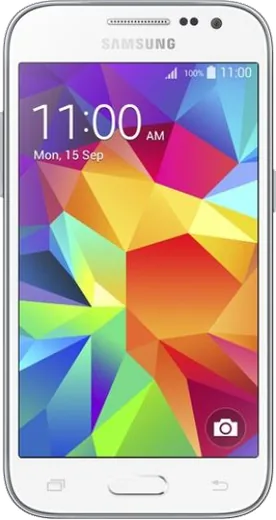
WhatsApp on Samsung Galaxy Core Prime
Samsung Android

WhatsApp for Samsung Galaxy Core Prime

Install the official WhatsApp on your Samsung Galaxy Core Prime in a few simple steps.

WhatsApp Messenger 4.7 · 64.2M reviews Free · Android · ~40 MB · by WhatsApp LLC
Download WhatsApp

Ask a question / report a problem

You can ask any question about WhatsApp support on the Samsung Galaxy Core Prime — leave it below and we'll help.

Ask a question

Can the Samsung Galaxy Core Prime run WhatsApp?

Not supported
  • Operating systemAndroid
  • WhatsApp versionNot supported

Latest known WhatsApp problems on Samsung Galaxy Core Prime

1

Can I still use WhatsApp on the Galaxy Core Prime with Android 5.1.1?

WhatsApp ended support for older Android versions, and current builds no longer activate on Lollipop (Android 5.0/5.1), so the up-to-date app will not register or receive messages on the Core Prime's stock Android 5.1.1. Your practical options are limited: install an old WhatsApp APK that still launched on Lollipop (it works only until the servers cut it off and gets no security updates), or flash a custom ROM that raises the phone to a newer Android version. For reliable day-to-day messaging, the dependable fix is to move your number to a newer phone. See how others solved this on Reddit
2

WhatsApp restored 0 messages and left empty chat boxes on my Samsung after a Google Drive restore

Empty chats after a restore usually mean the backup is tied to a different Google account or phone number than the one you verified with, so WhatsApp creates the chat shells but finds no data to pull. Uninstall WhatsApp, reinstall it, and on the restore screen make sure you are signed into the exact Google account that holds the backup and are verifying the same number. If Drive still pulls nothing, check for a local backup on the phone: on Android 11 and newer these live in Android/media/com.whatsapp/WhatsApp/Databases (older phones use Internal storage/WhatsApp/Databases), and WhatsApp will offer to restore from the local file if one is present. See how others solved this on Reddit
3

I lost all my WhatsApp chats when switching to my Samsung Galaxy phone

Chats go missing during a switch when the Google Drive backup did not finish, or the phone number/Google account on the new device does not match the one that made the backup. Before moving, open WhatsApp on the old phone and force a fresh backup under Settings > Chats > Chat backup > Back Up, then on the new phone verify the same number and accept the restore prompt during setup. If you skipped that prompt, the only way back is to uninstall, reinstall, and restore again, since the offer to restore appears only during the initial verification. See how others solved this on Reddit
4

How do I unlock my Samsung Galaxy Core Prime if it is carrier or network locked?

For a carrier (SIM) lock, the proper route is to contact the original carrier and request an unlock code once any contract is paid off; they provide a code you enter after inserting a SIM from another network. Be wary of random paid unlock services, as a phone this old attracts scams. If instead you are locked out by a forgotten screen PIN, remote PIN removal is no longer offered, so the reliable recovery is a factory reset from recovery mode (hold Volume Up + Home + Power), which erases the device; you can sign back in afterward with the Google account that was on the phone. See how others solved this on Reddit
5

Is the Galaxy Core Prime too old and slow to keep using as a daily phone?

The Core Prime shipped with a low-end quad-core chip and only about 1 GB of RAM, so by modern standards it struggles with current apps and lost most app support years ago. To squeeze a bit more life out of it, clear app caches via Settings > Storage, uninstall apps you do not use, and consider a factory reset to clear years of buildup. For an active line it is best kept as a backup or media device, since many chat and banking apps no longer support its Android version. See how others solved this on Reddit

Ask a question / report a problem

You can ask any question about WhatsApp support on the Samsung Galaxy Core Prime — leave it below and we'll help.

Ask a question

Watch: setting up WhatsApp

Prefer to watch? This short walkthrough shows the whole installation and number-verification flow.

How to install WhatsApp on Samsung Galaxy Core Prime — video walkthrough

How to install WhatsApp on Samsung Galaxy Core Prime

1

Choose how to download

On your Samsung Galaxy Core Prime you can get the official app two ways: from the Google Play Store — the easiest option, since it keeps WhatsApp updated automatically — or directly from the official website. You can download an APK file, by clicking a link “Download WhatsApp directly”.

2

Open WhatsApp

Launch WhatsApp from your home screen or app drawer and accept the Terms of Service to start setup.

3

Verify your phone number

Enter your phone number. If your Samsung Galaxy Core Prime uses dual SIM, pick the line you want WhatsApp tied to, then enter the 6-digit code it sends by SMS — it usually fills in automatically.

4

Restore chats and finish setup

Restore your chat history from Google Drive (use the same Google account), add your name and photo, and tap Allow for notifications so messages and calls arrive reliably.

Stay safe: only ever install WhatsApp from the official Android source. The Download button above already points there — modified copies (GB/Plus/Aero WhatsApp) can get your number banned.

Comments (6)

No registration needed. No email required.
P
priya.bDec 7, 2025

well my samsung galaxy core prime has whatsapp now thanks to this

Z
zoe65Nov 11, 2025

Cant do this alone HELP how do i download 😩

AppWhatsOfficialNov 13, 2025

Relax, it is simpler than it looks. Press Download, install, then verify with the SMS code. You got this! You got this!

R
rosa.mApr 19, 2025

Ngl set up whatsapp on my dads core prime no problem cheers

F
finn_greJan 9, 2025

Le meilleur site, marché du premier coup sur mon Samsung Galaxy Core Prime 👍

M
mike_realSep 6, 2024

hi does it work on older android versions

AppWhatsOfficialSep 10, 2024

Of course, it depends. WhatsApp drops support for very old systems over time. If the store still offers you the app, your phone is supported. Glad to help.

M
mobilegeekJul 31, 2024

Guys got it working on my galaxy core prime first try 🔥

AppWhatsOfficialAug 4, 2024

Perfect, enjoy chatting!