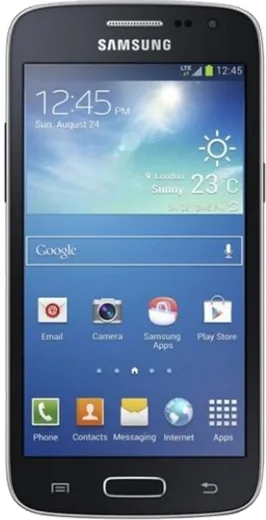
WhatsApp on Samsung Galaxy Core LTE
Samsung Android

WhatsApp for Samsung Galaxy Core LTE

Install the official WhatsApp on your Samsung Galaxy Core LTE in a few simple steps.

WhatsApp Messenger 4.7 · 64.2M reviews Free · Android · ~40 MB · by WhatsApp LLC
Download WhatsApp

Ask a question / report a problem

You can ask any question about WhatsApp support on the Samsung Galaxy Core LTE — leave it below and we'll help.

Ask a question

Can the Samsung Galaxy Core LTE run WhatsApp?

Not supported
  • Operating systemAndroid
  • WhatsApp versionNot supported

Latest known WhatsApp problems on Samsung Galaxy Core LTE

1

WhatsApp won't install on my Galaxy Core LTE because the Android version is too old

WhatsApp has dropped support for older Android releases, and the Galaxy Core LTE shipped with Android 4.4 KitKat, which is below the current minimum. Check your version under Settings > About device > Software information. If the Play Store blocks the install, you can sideload an older compatible WhatsApp APK from WhatsApp's official site (whatsapp.com/android), but be aware older builds eventually stop connecting to WhatsApp's servers, so this is only a short-term fix. See how others solved this on Reddit
2

WhatsApp notifications don't arrive on my Galaxy Core LTE until I open the app

This is usually Android's power saving killing WhatsApp's background sync. Go to Settings > Application manager > WhatsApp and confirm background data isn't restricted, then open Settings > Power saving and make sure WhatsApp is excluded from any battery-saving mode. Finally, check that notifications are enabled inside WhatsApp under Settings > Notifications. See how others solved this on Reddit
3

My Galaxy Core LTE is stuck on an old Android version and modern apps keep failing

The Core LTE received very few official updates and remains on an old TouchWiz Android 4.4 build that current apps no longer target. Confirm there's nothing newer under Settings > About device > Software update; if it reports up to date, that's the last version Samsung released. A custom ROM could bring newer Android, but it voids the warranty and risks bricking, so weigh that carefully. See how others solved this on Reddit
4

Is the Galaxy Core LTE still usable as a basic WhatsApp and calls phone in 2026?

As a minimalist or backup device it still handles calls and texts fine, but its aging hardware and unsupported Android make heavier apps like WhatsApp slow and increasingly unreliable. To get the most out of it, keep only essential apps installed and disable bloatware via Settings > Application manager. For dependable everyday WhatsApp use, though, a newer budget phone is the practical choice. See how others solved this on Reddit
5

WhatsApp runs very slowly and lags on my Galaxy Core LTE

The Core LTE only has about 1GB of RAM, so WhatsApp competing with background apps causes lag. Clear WhatsApp's cache via Settings > Application manager > WhatsApp > Storage > Clear cache, and disable unused preinstalled apps to free memory. Restarting the phone regularly and trimming chat backups (WhatsApp > Settings > Chats > Chat backup) also help it respond faster. See how others solved this on Reddit
6

What phone should I move to if WhatsApp stops working on my Galaxy Core LTE?

Since the Core LTE can no longer meet WhatsApp's Android requirements, the safest path is any current budget Android running a supported OS version. Before switching, back up your chats with WhatsApp > Settings > Chats > Chat backup to Google Drive, then restore on the new phone during setup using the same phone number and Google account. This carries your message history over without losing anything. See how others solved this on Reddit

Ask a question / report a problem

You can ask any question about WhatsApp support on the Samsung Galaxy Core LTE — leave it below and we'll help.

Ask a question

Watch: setting up WhatsApp

Prefer to watch? This short walkthrough shows the whole installation and number-verification flow.

How to install WhatsApp on Samsung Galaxy Core LTE — video walkthrough

How to install WhatsApp on Samsung Galaxy Core LTE

1

Choose how to download

On your Samsung Galaxy Core LTE you can get the official app two ways: from the Google Play Store — the easiest option, since it keeps WhatsApp updated automatically — or directly from the official website. You can download an APK file, by clicking a link “Download WhatsApp directly”.

2

Open WhatsApp

Launch WhatsApp from your home screen or app drawer and accept the Terms of Service to start setup.

3

Verify your phone number

Enter your phone number. If your Samsung Galaxy Core LTE uses dual SIM, pick the line you want WhatsApp tied to, then enter the 6-digit code it sends by SMS — it usually fills in automatically.

4

Restore chats and finish setup

Restore your chat history from Google Drive (use the same Google account), add your name and photo, and tap Allow for notifications so messages and calls arrive reliably.

Stay safe: only ever install WhatsApp from the official Android source. The Download button above already points there — modified copies (GB/Plus/Aero WhatsApp) can get your number banned.

Comments (5)

No registration needed. No email required.
N
noah1990Apr 30, 2026

Finally the download was a bit slow but it worked

M
mmmaaaxxxMar 30, 2026

hey i tried everything pls help meee install whatsapp on Galaxy Core LTE pls

AppWhatsOfficialApr 3, 2026

You are almost there! Tap Download, allow the install, open WhatsApp and confirm your number. You will be set up on your phone in no time.

J
joe.zApr 10, 2025

installé sans souci sur mon Galaxy Core LTE merci

J
jay99Mar 11, 2025

verified my number on the galaxy core lte with no trouble lol

S
sol_benDec 17, 2024

Finally running whatsapp on my galaxy core lte like new 🔥

AppWhatsOfficialDec 20, 2024

Thanks, enjoy the app!