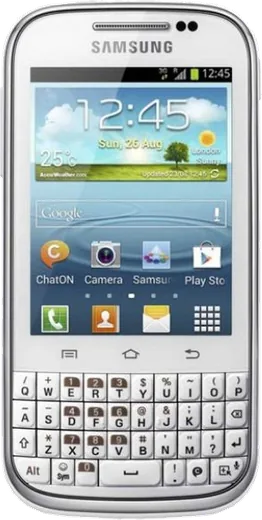
WhatsApp on Samsung Galaxy Chat B5330
Samsung Android

WhatsApp for Samsung Galaxy Chat B5330

Install the official WhatsApp on your Samsung Galaxy Chat B5330 in a few simple steps.

WhatsApp Messenger 4.7 · 64.2M reviews Free · Android · ~40 MB · by WhatsApp LLC
Download WhatsApp

Ask a question / report a problem

You can ask any question about WhatsApp support on the Samsung Galaxy Chat B5330 — leave it below and we'll help.

Ask a question

Can the Samsung Galaxy Chat B5330 run WhatsApp?

Not supported
  • Operating systemAndroid
  • WhatsApp versionNot supported

Latest known WhatsApp problems on Samsung Galaxy Chat B5330

1

WhatsApp won't install on my Samsung Galaxy Chat B5330 anymore — how do I get it working?

The B5330 runs Android 4.0 (Ice Cream Sandwich), which modern WhatsApp no longer supports, so the Play Store will block the current version. Your only option is to sideload an old compatible APK (roughly the 2016-era builds) from a trusted archive like APKMirror, after enabling Settings > Security > Unknown sources. Be aware that WhatsApp permanently dropped support for this Android version, so even an old APK may fail to verify your number now. See how others solved this on Reddit
2

Can I actually use the Galaxy Chat B5330 as a simple call-and-text phone without all the distractions?

Yes — the physical QWERTY keyboard makes it a solid texting device, and you can strip it down by disabling apps you don't want via Settings > Application manager > swipe to the All tab > select an app > Disable. For calls and SMS just use the stock Phone and Messaging apps, and turn off mobile data under Settings > Wireless and networks > Mobile networks to avoid background app activity. This effectively turns it into a focused messaging phone with a tactile keyboard. See how others solved this on Reddit
3

My Galaxy Chat B5330 is laggy and the storage fills up constantly — how can I speed it up?

The B5330 is built on modest hardware (around 256MB RAM and only ~150MB of usable internal storage), so it chokes quickly. Move apps and media to a microSD card via Settings > Application manager > select app > Move to SD card, and set the camera to save photos to the card. Clear cached data under Settings > Storage > Cached data, and disable bloatware you never use through the Application manager to free up memory. Keeping only a handful of active apps makes a noticeable difference on this hardware. See how others solved this on Reddit
4

Can I use my Samsung Galaxy Chat B5330 as an offline MP3 player?

Yes — load music onto a microSD card and play it with the built-in Music app, which works fine even with mobile data and Wi-Fi switched off. For longer battery life put it in Airplane mode via the notification shade or Settings > Wireless and networks, then re-enable just Bluetooth if you want wireless headphones. The microSD slot lets you carry far more tracks than the tiny internal storage allows. See how others solved this on Reddit
5

Where can I still buy a working Samsung Galaxy Chat B5330 and what should I check before buying?

These are long discontinued, so you'll only find them used on eBay, local marketplaces, or specialist retro-phone sellers — expect varying condition and no factory warranty. Before paying, confirm the seller did a factory reset (Settings > Backup and reset > Factory data reset) so it isn't locked to someone's old Google account, and ask whether the battery still holds a charge since replacements are scarce. Test that the QWERTY keys all respond, as worn keypads are common on these aged units. See how others solved this on Reddit
6

Is it worth rooting my Galaxy Chat B5330 to get more out of it?

Rooting can free up space by removing system bloat, but the B5330's weak hardware limits how much benefit you'll actually feel. If you go this route, use an established rooting tool for older Samsung devices and back up your data first via Settings > Backup and reset, since a failed flash can brick the phone. For most owners, simply disabling unused apps in the Application manager achieves the same practical speedup with zero risk. See how others solved this on Reddit

Ask a question / report a problem

You can ask any question about WhatsApp support on the Samsung Galaxy Chat B5330 — leave it below and we'll help.

Ask a question

Watch: setting up WhatsApp

Prefer to watch? This short walkthrough shows the whole installation and number-verification flow.

How to install WhatsApp on Samsung Galaxy Chat B5330 — video walkthrough

How to install WhatsApp on Samsung Galaxy Chat B5330

1

Choose how to download

On your Samsung Galaxy Chat B5330 you can get the official app two ways: from the Google Play Store — the easiest option, since it keeps WhatsApp updated automatically — or directly from the official website. You can download an APK file, by clicking a link “Download WhatsApp directly”.

2

Open WhatsApp

Launch WhatsApp from your home screen or app drawer and accept the Terms of Service to start setup.

3

Verify your phone number

Enter your phone number. If your Samsung Galaxy Chat B5330 uses dual SIM, pick the line you want WhatsApp tied to, then enter the 6-digit code it sends by SMS — it usually fills in automatically.

4

Restore chats and finish setup

Restore your chat history from Google Drive (use the same Google account), add your name and photo, and tap Allow for notifications so messages and calls arrive reliably.

Stay safe: only ever install WhatsApp from the official Android source. The Download button above already points there — modified copies (GB/Plus/Aero WhatsApp) can get your number banned.

Comments (5)

No registration needed. No email required.
L
lou1990May 29, 2026

honestly perfect, exactly what i needed 😍

X
xX_robMay 17, 2026

Installato sul galaxy chatb5330 di mia madre senza problemi 🙏

B
big_ivanOct 23, 2025

omg PLEASE i need whatsapp on my galaxy chatb5330 its urgent

AppWhatsOfficialOct 24, 2025

We are here to help. Hit Download, follow the steps on this page, and if the code is slow just request it again. You got this!

T
theo.mJul 31, 2025

anyone? the download is very slow is that normal

AppWhatsOfficialAug 4, 2025

Hi! It depends on your connection. Try switching to wifi if you can, and the download should finish in under a minute on most networks. Happy chatting!

R
ray_jayMay 16, 2025

Ok so worked perfect on my Samsung Galaxy Chat B5330 thx

AppWhatsOfficialMay 17, 2025

That is great to hear!