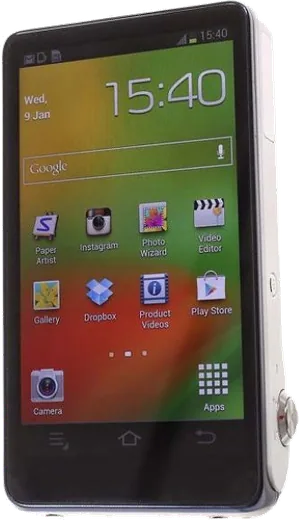
WhatsApp on Samsung Galaxy Camera GC100
Samsung Android

WhatsApp for Samsung Galaxy Camera GC100

Install the official WhatsApp on your Samsung Galaxy Camera GC100 in a few simple steps.

WhatsApp Messenger 4.7 · 64.2M reviews Free · Android · ~40 MB · by WhatsApp LLC
Download WhatsApp

Ask a question / report a problem

You can ask any question about WhatsApp support on the Samsung Galaxy Camera GC100 — leave it below and we'll help.

Ask a question

Can the Samsung Galaxy Camera GC100 run WhatsApp?

Not supported
  • Operating systemAndroid
  • WhatsApp versionNot supported

Latest known WhatsApp problems on Samsung Galaxy Camera GC100

1

Why does my Galaxy Camera GC100 have shutter lag and produce blurry photos?

Most blur and lag on the GC100 come from autofocus hunting in low light. Half-press the shutter and wait for the focus box to turn green before pressing fully. For moving subjects switch the mode dial to a faster scene like Sports, or use Expert mode (P/A/S/M) to raise the ISO and shutter speed. Brace the camera with both hands or a flat surface, and keep firmware current via Settings > About device > Software update, which can reduce capture delay on this model. See how others solved this on Reddit
2

What web browser still works on the Galaxy Camera GC100 with old Android 4?

The stock Android 4.x browser can no longer open most modern sites because of outdated TLS/SSL support. Install a lighter alternative such as an older Firefox or Lightning Browser build that still supports Android 4.1-4.3 (Jelly Bean); if the Play Store only offers versions too new for the device, sideload an archived compatible APK from a trusted mirror. Because this Android version no longer gets security patches, keep browsing minimal and avoid signing into sensitive accounts. See how others solved this on Reddit
3

How do I stop the Samsung Music app from auto-playing on my Galaxy Camera GC100?

A common cause is Bluetooth: the GC100 can auto-launch and resume music when a previously paired speaker or headset reconnects, so unpair or forget that device under Settings > Bluetooth. To stop it immediately, go to Settings > Application manager > All, open Samsung Music (or Music), and tap Force stop. If it keeps relaunching in the background, tap Disable/Turn off on that same app entry so it cannot start on its own. See how others solved this on Reddit
4

Is the Galaxy Camera GC100 still worth using as an older Samsung Android device in 2026?

Yes, as a dedicated camera it still holds up thanks to its 21x optical zoom and large touchscreen, even though Android 4.x no longer receives updates. Keep it on Wi-Fi only for transferring shots and back photos up to a microSD card or Google Photos rather than relying on aging cloud apps. Treat it as a single-purpose camera and avoid logging sensitive accounts into it, since the OS is unpatched. See how others solved this on Reddit
5

Can I install a custom ROM on the Galaxy Camera GC100 to make it faster?

Custom ROMs for the GC100 are rare and risky because it is a niche camera-phone hybrid, so expect a lot of trial and error and a real chance of bricking. If you still want to try, back up first, unlock the bootloader, and flash only a build confirmed for the exact EK-GC100 model using Odin or a custom recovery. For most owners a factory reset (Settings > Backup and reset > Factory data reset) is a much safer way to regain speed than chasing a custom ROM. See how others solved this on Reddit

Ask a question / report a problem

You can ask any question about WhatsApp support on the Samsung Galaxy Camera GC100 — leave it below and we'll help.

Ask a question

Watch: setting up WhatsApp

Prefer to watch? This short walkthrough shows the whole installation and number-verification flow.

How to install WhatsApp on Samsung Galaxy Camera GC100 — video walkthrough

How to install WhatsApp on Samsung Galaxy Camera GC100

1

Choose how to download

On your Samsung Galaxy Camera GC100 you can get the official app two ways: from the Google Play Store — the easiest option, since it keeps WhatsApp updated automatically — or directly from the official website. You can download an APK file, by clicking a link “Download WhatsApp directly”.

2

Open WhatsApp

Launch WhatsApp from your home screen or app drawer and accept the Terms of Service to start setup.

3

Verify your phone number

Enter your phone number. If your Samsung Galaxy Camera GC100 uses dual SIM, pick the line you want WhatsApp tied to, then enter the 6-digit code it sends by SMS — it usually fills in automatically.

4

Restore chats and finish setup

Restore your chat history from Google Drive (use the same Google account), add your name and photo, and tap Allow for notifications so messages and calls arrive reliably.

Stay safe: only ever install WhatsApp from the official Android source. The Download button above already points there — modified copies (GB/Plus/Aero WhatsApp) can get your number banned.

Comments (6)

No registration needed. No email required.
E
ella_kMay 3, 2026

SOS i cant figure out how to install whatsapp heeelp 🙏

AppWhatsOfficialMay 6, 2026

Breathe! Follow the steps above one by one, tap Download first, and you will be chatting in no time. Reply here if you get stuck.

B
big_ellaMar 30, 2026

worked perfect on my samsung galaxy camera gc100 🙏

A
andy.cJan 5, 2026

So whatsapp running great on my Samsung Galaxy Camera GC100

X
xX_kateOct 10, 2025

Well smooth and simple, no issues ❤️

A
ash_proDec 19, 2024

Finalmente il miglior sito, funzionato al primo colpo sul mio Samsung Galaxy Camera GC100

C
coolcatDec 18, 2024

my Galaxy Camera GC100 was being difficult but this sorted it