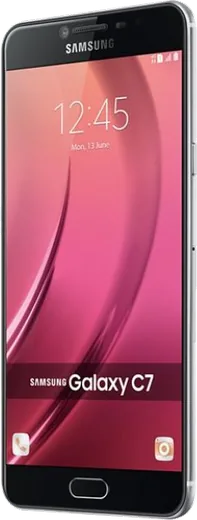
WhatsApp on Samsung Galaxy C7
Samsung Android

WhatsApp for Samsung Galaxy C7

Install the official WhatsApp on your Samsung Galaxy C7 in a few simple steps.

WhatsApp Messenger 4.7 · 64.2M reviews Free · Android · ~40 MB · by WhatsApp LLC
Download WhatsApp

Ask a question / report a problem

You can ask any question about WhatsApp support on the Samsung Galaxy C7 — leave it below and we'll help.

Ask a question

Can the Samsung Galaxy C7 run WhatsApp?

Fully supported
  • Operating systemAndroid
  • WhatsApp versionLatest supported

Latest known WhatsApp problems on Samsung Galaxy C7

1

WhatsApp keeps saying 'this version became out of date' on my Galaxy C7 and won't let me back in

The Galaxy C7 shipped with an older Android version, so newer WhatsApp builds eventually drop support for it and you get stuck in that loop. First try installing the APK directly from whatsapp.com/android (enable 'Install unknown apps' for your browser when prompted), since the Play Store may only offer a build your OS can no longer run. Before doing anything, open WhatsApp > Settings > Chats > Chat backup and save to Google Drive so nothing is lost. If sideloading still fails, the lasting fix is moving your number and that backup to a phone running a newer Android. See how others solved this on Reddit
2

WhatsApp says 'Internet may not be available' on my Galaxy C7 even though other apps work fine

This is usually a connection or background-data restriction rather than a real outage. Go to Settings > Apps > WhatsApp > Mobile data and Wi-Fi, and make sure 'Allow background data usage' and 'Allow data usage while Data saver is on' are enabled. Then toggle Airplane mode on and off to reset the connection. If it only happens on Wi-Fi, forget the network under Settings > Connections > Wi-Fi and rejoin it, and clear the app cache via Settings > Apps > WhatsApp > Storage > Clear cache. See how others solved this on Reddit
3

WhatsApp notification sounds randomly stop working on my Galaxy C7

On the C7's One UI this is almost always battery optimization putting WhatsApp to sleep. Go to Settings > Apps > WhatsApp > Battery and set it to 'Unrestricted', then confirm WhatsApp is not listed under Settings > Battery and device care > Battery > Background usage limits > Sleeping apps. After that, re-check Settings > Notifications and, inside WhatsApp > Settings > Notifications, that an actual tone (not 'None') is selected for message and group notifications. See how others solved this on Reddit
4

Is my older Samsung Galaxy C7 still reliable enough to keep using WhatsApp on?

The C7 still runs WhatsApp, but as an older device it no longer gets security or OS updates, which is what eventually breaks WhatsApp support and notifications. To stretch its life, keep a few GB of storage free (Settings > Battery and device care > Storage), clear WhatsApp media you don't need, and back up chats regularly to Google Drive via WhatsApp > Settings > Chats > Chat backup. Once WhatsApp starts refusing to update, that's the signal the device has aged out and it's time to migrate your number to a newer phone. See how others solved this on Reddit
5

Can I reply to WhatsApp from a smartwatch paired with my Galaxy C7?

Yes, as long as the watch is paired and has notification access. Pair it through the Galaxy Wearable or Wear OS companion app, then grant notification access (Settings > Apps > 3-dot menu > Special access > Notification access, or via the watch's companion app) so WhatsApp alerts mirror to your wrist. Whether you get full quick-reply or voice-reply depends on your watch model and on the WhatsApp version your aging C7 can still run, so test with one chat first. See how others solved this on Reddit

Ask a question / report a problem

You can ask any question about WhatsApp support on the Samsung Galaxy C7 — leave it below and we'll help.

Ask a question

Watch: setting up WhatsApp

Prefer to watch? This short walkthrough shows the whole installation and number-verification flow.

How to install WhatsApp on Samsung Galaxy C7 — video walkthrough

How to install WhatsApp on Samsung Galaxy C7

1

Choose how to download

On your Samsung Galaxy C7 you can get the official app two ways: from the Google Play Store — the easiest option, since it keeps WhatsApp updated automatically — or directly from the official website. You can download an APK file, by clicking a link “Download WhatsApp directly”.

2

Open WhatsApp

Launch WhatsApp from your home screen or app drawer and accept the Terms of Service to start setup.

3

Verify your phone number

Enter your phone number. If your Samsung Galaxy C7 uses dual SIM, pick the line you want WhatsApp tied to, then enter the 6-digit code it sends by SMS — it usually fills in automatically.

4

Restore chats and finish setup

Restore your chat history from Google Drive (use the same Google account), add your name and photo, and tap Allow for notifications so messages and calls arrive reliably.

Stay safe: only ever install WhatsApp from the official Android source. The Download button above already points there — modified copies (GB/Plus/Aero WhatsApp) can get your number banned.

Comments (5)

No registration needed. No email required.
S
saaaaamAug 27, 2025

Ok so installed on my Samsung Galaxy C7, super simple thx

L
lina24Jul 20, 2025

whatsapp works fine on my Samsung Galaxy C7 🙏

M
mobilegeekApr 25, 2025

Update best guide for the Galaxy C7 by far 👌

R
raj_aleNov 8, 2024

uff por fin pude instalar whatsapp en mi Samsung Galaxy C7

M
ms_tanSep 3, 2024

help meee i pressed everything and nothing 😭

AppWhatsOfficialSep 5, 2024

Hey, no need to stress! Tap the green Download button at the top, follow the steps, and you will have WhatsApp in a minute.