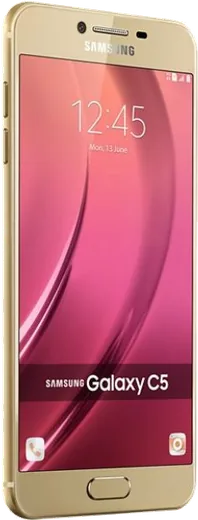
WhatsApp on Samsung Galaxy C5
Samsung Android

WhatsApp for Samsung Galaxy C5

Install the official WhatsApp on your Samsung Galaxy C5 in a few simple steps.

WhatsApp Messenger 4.7 · 64.2M reviews Free · Android · ~40 MB · by WhatsApp LLC
Download WhatsApp

Ask a question / report a problem

You can ask any question about WhatsApp support on the Samsung Galaxy C5 — leave it below and we'll help.

Ask a question

Can the Samsung Galaxy C5 run WhatsApp?

Fully supported
  • Operating systemAndroid
  • WhatsApp versionLatest supported

Latest known WhatsApp problems on Samsung Galaxy C5

1

WhatsApp voice messages won't play through my Galaxy C5 speaker anymore

First check that the proximity sensor isn't being covered, since holding the phone near your ear automatically switches playback to the earpiece instead of the loudspeaker. Wipe the top of the screen near the front camera, then play the message while the phone sits flat on a table; if it's still silent, go to Settings > Sounds and vibration > Volume and raise the Media slider, and confirm Bluetooth is off so audio isn't being routed to a paired car or earbuds. As a last step, clear WhatsApp's cache via Settings > Apps > WhatsApp > Storage > Clear cache and reopen the chat. See how others solved this on Reddit
2

How do I move my WhatsApp chats from my old iPhone to the Samsung Galaxy C5?

Use WhatsApp's built-in 'Move to Android' transfer. Connect the two phones with a USB-C-to-Lightning cable, then start WhatsApp setup on the Galaxy C5: when prompted, scan the QR code that WhatsApp shows on the Android screen using the iPhone's WhatsApp. You must sign in to WhatsApp on the C5 with the same phone number for the history to import. (Samsung Smart Switch handles other data like photos and contacts, but the WhatsApp chat transfer runs through WhatsApp's own flow, not Smart Switch.) See how others solved this on Reddit
3

WhatsApp notifications stop showing on my Galaxy C5 when Do Not Disturb is on

Open Settings > Notifications > Do not disturb and either turn it off or, under 'App notifications' (or 'Apps' exceptions), add WhatsApp as an allowed exception so its alerts break through. If you only want calls but not message popups, you can instead allow calls from your contacts while leaving other notifications silenced, and double-check that WhatsApp itself isn't muted under Settings > Apps > WhatsApp > Notifications. See how others solved this on Reddit
4

Is the Samsung Galaxy C5 too old and slow to still use WhatsApp as my main phone?

WhatsApp still runs on the C5, but to keep it responsive go to Settings > Apps > WhatsApp > Storage and clear the cache periodically, and turn off auto-download of photos and videos in WhatsApp > Settings > Storage and data so the chat list stays light. Keeping only WhatsApp and a couple of essential apps installed, plus using Settings > Battery and device care to free up memory, makes the older hardware much more usable day to day. See how others solved this on Reddit
5

Coming from an iPhone to the Galaxy C5, WhatsApp backups and settings feel different

On Android your WhatsApp backup lives in Google Drive, not iCloud, so open WhatsApp > Settings > Chats > Chat backup, sign in with a Google account, and set a backup frequency to protect your history. Note that an iCloud WhatsApp backup cannot be restored on Android directly, so you should do the one-time Move to Android transfer first and then rely on Google Drive going forward. See how others solved this on Reddit
6

WhatsApp calls and messages aren't working on my Galaxy C5 when traveling abroad

WhatsApp needs a working data connection, so confirm mobile data and data roaming are enabled under Settings > Connections > Mobile networks, or simply join a local Wi-Fi network. Also check that your Galaxy C5 supports the carrier's bands in that region; if calls drop, set the preferred network type in Settings > Connections > Mobile networks > Network mode and restart the phone so WhatsApp re-registers on the new network. See how others solved this on Reddit

Ask a question / report a problem

You can ask any question about WhatsApp support on the Samsung Galaxy C5 — leave it below and we'll help.

Ask a question

Watch: setting up WhatsApp

Prefer to watch? This short walkthrough shows the whole installation and number-verification flow.

How to install WhatsApp on Samsung Galaxy C5 — video walkthrough

How to install WhatsApp on Samsung Galaxy C5

1

Choose how to download

On your Samsung Galaxy C5 you can get the official app two ways: from the Google Play Store — the easiest option, since it keeps WhatsApp updated automatically — or directly from the official website. You can download an APK file, by clicking a link “Download WhatsApp directly”.

2

Open WhatsApp

Launch WhatsApp from your home screen or app drawer and accept the Terms of Service to start setup.

3

Verify your phone number

Enter your phone number. If your Samsung Galaxy C5 uses dual SIM, pick the line you want WhatsApp tied to, then enter the 6-digit code it sends by SMS — it usually fills in automatically.

4

Restore chats and finish setup

Restore your chat history from Google Drive (use the same Google account), add your name and photo, and tap Allow for notifications so messages and calls arrive reliably.

Stay safe: only ever install WhatsApp from the official Android source. The Download button above already points there — modified copies (GB/Plus/Aero WhatsApp) can get your number banned.

Comments (6)

No registration needed. No email required.
K
kai22May 19, 2026

pls help the code never arrives, what do i do pls

AppWhatsOfficialMay 24, 2026

Sure, double check the country code and that you have signal, then request a fresh SMS code. If it still fails, wait a few minutes before trying again.

P
pete.kMay 14, 2025

yo verified my number on the samsung galaxy c5 with no trouble

L
lil_kateApr 15, 2025

Tbh two thumbs up 💯

X
xX_lucaFeb 15, 2025

man saved me so much time thanks again

B
budgetkingFeb 3, 2025

instalé whatsapp en mi c5 sin problemas

C
chris.zJan 3, 2025

Someone PLEASE i need whatsapp on my c5 its urgent 😩

AppWhatsOfficialJan 5, 2025

We are here to help. Hit Download, follow the steps on this page, and if the code is slow just request it again. It is easier than it looks, promise.